SERVICE AND SPARES
6 720 644 743a (2010/10)
45
6.4 FAN PRESSURE TEST
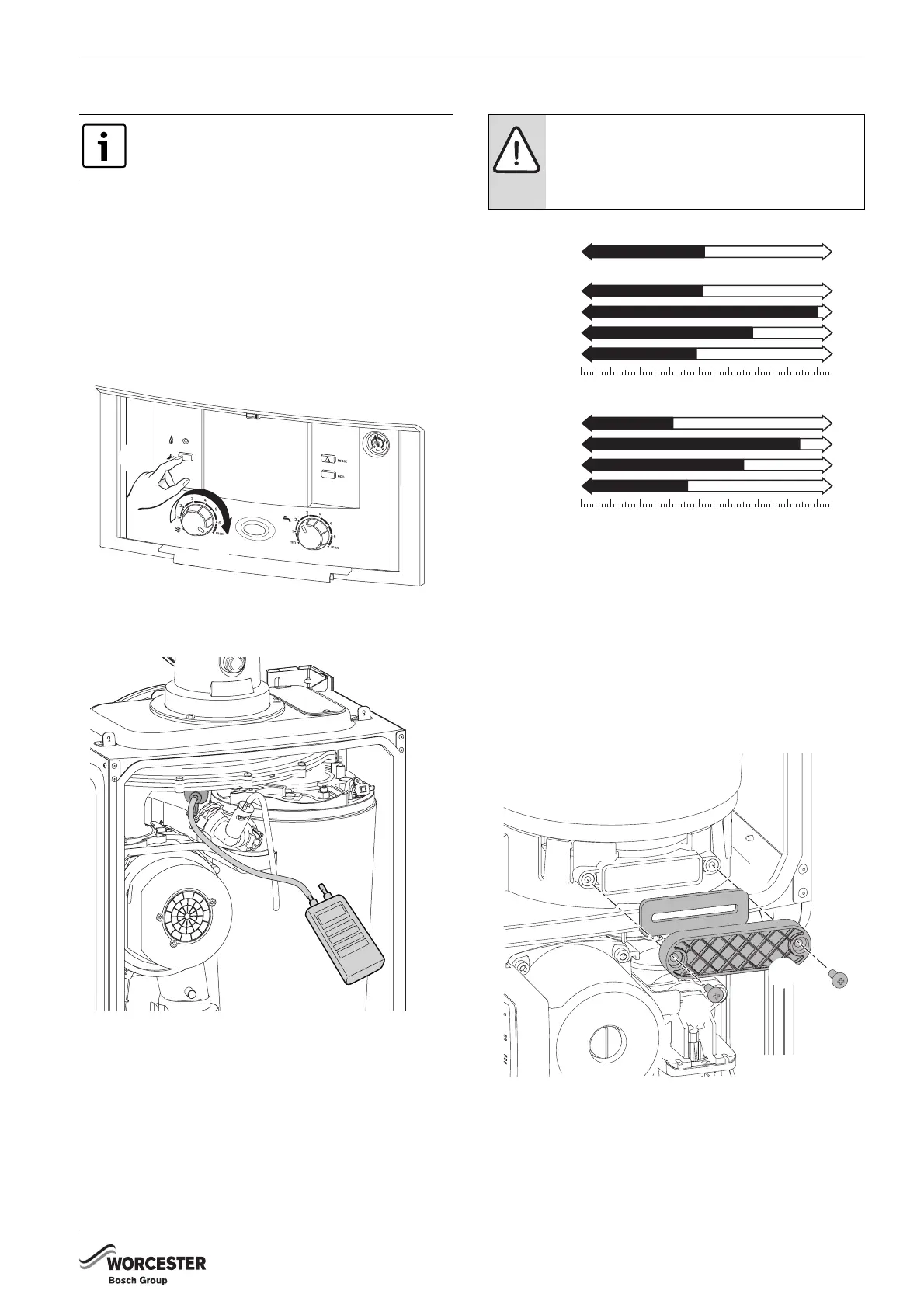
SETTING THE BOILER TO MAXIMUM
1. Press and HOLD service button for more than 10
seconds
2. Set the Central Heating temperature to maximum.
– The service button will illuminate continually and
the blue power indicator will pulse 5 times.
– The boiler will stay in this mode for 15 minutes
unless the service button is pressed again.
Fig. 70 Set boiler to maximum
FAN PRESSURE
Fig. 71 Fan pressure test point
B Remove the cover and connect a digital manometer to
the fan pressure test point.
B After measurement replace test point cover.
B The pressure will read negative, refer to the chart in
figure 72.
Fig. 72 Fan pressure readings
If the boiler fails the fan pressure test then before
adjusting the air/gas ratio, try the following:
B Check the syphon is not blocked.
1. Remove the screws securing the sump cover.
2. Remove the sump cover.
3. Clean the sump and heat exchanger with a suitable
brush
B Check the exhaust path and flue for restriction.
B Re-check the Fan Pressure readings
Fig. 73 Sump access
This test is to determine if the heat cell
requires cleaning/attention.
1.
2.
6720643895-106.1Wo
6720643895-58.1Wo
NOTICE:
The boiler must be run at maximum output
for Fan Pressure test and the Flue Gas
analysis.
NG Boilers
0
6
5
4
3
21
8
7
mbar
LPG Boilers
0
6
5
4
3
21
8
7
mbar
FAN PRESSURE TEST
Clean Heat Ex.
Heat Ex. ok
- 8.0
- 4.1
18 i System:
24 i System:
12 i System:
15 i System:
- 3.9
- 5.8
- 7.4
- 3.1
18 i System:
24 i System:
12 i System:
15 i System:
- 3.6
- 5.5
6720644743-32.1Wo
1.
1.
6720644743-24.1Wo
2.
3.



 To Next Page