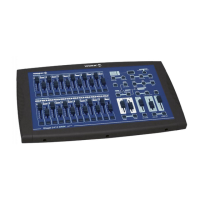
• FULL ON button:
Press this button to output all the PARs at full intensity.
• AUTO button:
Used to activate AUTO mode.
• ONE/MIX/SEQ button:
To select One mode, Mix mode or Sequence mode.
• SPEED slider:
Used to set or adjust relevant speed as user’s desire.
• FADE slider:
Used to adjust the FADE TIME level.
• AUDIO slider:
To adjust for best audio effect.
• MASTER slider:
Used to proportionally and totally change the overall console output.
5.2 Rear view
• POWER ON / OFF :
Used to switch on / off the power.
• DC INPUT :
DC 9 ~15V , 500mA min.
• AUDIO LINE INPUT :
0.1V~1Vp-p.
• DMX polarity select
Used to select DMX polarity (2-,3+ / 2+,3-).
• DMX OUT :
To send DMX data.
• MIDI IN :
Used to receive MIDI data.
• FOG MACHINE INPUT :
To connect with the fog machine.
• CF CARD socket:
It is for CF CARD operation.
• EXT STEP CONTROL INPUT :
To input the external Step Control signals.
6


 To Next Page