What to do if my Wouxun KG-Q10H Radio cannot power on?
- RRobert WhitneyJul 29, 2025
If your Wouxun Radio won't power on, first ensure the battery pack is correctly attached. If it is, then verify that the battery pack is fully charged.
What to do if my Wouxun KG-Q10H Radio cannot power on?
If your Wouxun Radio won't power on, first ensure the battery pack is correctly attached. If it is, then verify that the battery pack is fully charged.
How to stop unwanted interference on Wouxun Radio?
If you are receiving unwanted interference on your Wouxun Radio, try enabling CTCSS or DCS tone to filter out unwanted transmissions. Alternatively, try using a different channel.
Why is my Wouxun Radio receive indicator on but no sound?
If you are not hearing any sound from your Wouxun Radio even though the receive indicator is on, check the volume level. Also, disable CTCSS/DCS or ensure the setting matches the incoming transmission and check the squelch settings.
What to do if Wouxun Radio keypad is unresponsive?
If your Wouxun Radio keypad is unresponsive, first check if the keypad has been locked. Also, check if other keys are currently pressed.
Why is the battery life lower than expected on my Wouxun KG-Q10H Radio?
If the battery life of your Wouxun Radio is lower than expected, make sure the charger indicates the battery is fully charged. Keep in mind that the battery pack capacity will naturally diminish over a number of charge cycles, as is the case with all lithium batteries.
How to fix Wouxun Radio when it cannot transmit GPS location?
If your Wouxun Radio cannot transmit GPS location, verify that GPS is turned ON and SEND-LOC is enabled for the current channel.
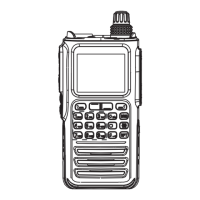
Description of buttons and controls on the radio's front panel.
Description of buttons and ports on the radio's sides.
Explanation of the icons and information shown on the radio's display.
Details on the radio's IP67 rating and protection against dust and water.
Instructions for safely installing and removing the battery pack.
Guidance on how to charge the radio's battery using different methods.
How to power the radio on/off and adjust the volume level.
Basic steps for selecting a channel and making your first transmission.
Explanation of the dual display feature and how to use Area A and Area B.
Understanding and switching between channel and frequency (VFO) modes.
Information on using channels, CTCSS tones, and DCS codes.
How to use the radio with repeaters for extended range.
How to activate and use the channel scanning function.
Using the priority channel scan to monitor specific channels.
Configuring the functions of the programmable Push-To-Talk (PTT) keys.
Assigning functions to programmable side and top keys.
Accessing and navigating the Area Menu for channel-specific settings.
Adjusting the squelch sensitivity to filter background noise.
Setting the radio's transmit power level.
Setting the CTCSS tone for receiving signals.
Setting the DCS code for receiving signals.
Setting the CTCSS tone for transmitting signals.
Setting the DCS code for transmitting signals.
Adding a new channel to the radio's memory list.
Removing a channel from the radio's memory list.
Changing the radio's working mode (Channel or Frequency).
Accessing and navigating the System Menu for global settings.
Enabling and configuring the priority channel scan feature.
Enabling voice-activated transmission without using the PTT button.
Enabling and configuring GPS location tracking and functions.
Detailed explanation of GPS location tracking and data transmission.
Configuring the radio as a cross-band repeater.
Using PC software to remotely control radio settings.
Technical specifications of the KG-Q10H radio.
| Operating Voltage | 7.4V |
|---|---|
| Operating Temperature | -20°C to +60°C |
| IP Rating | IP54 |
| Mode | FM |
| Display | LCD |
| Frequency Range | 400-480 MHz |
| Channel Spacing | 12.5kHz/25kHz |