QUICK START
3
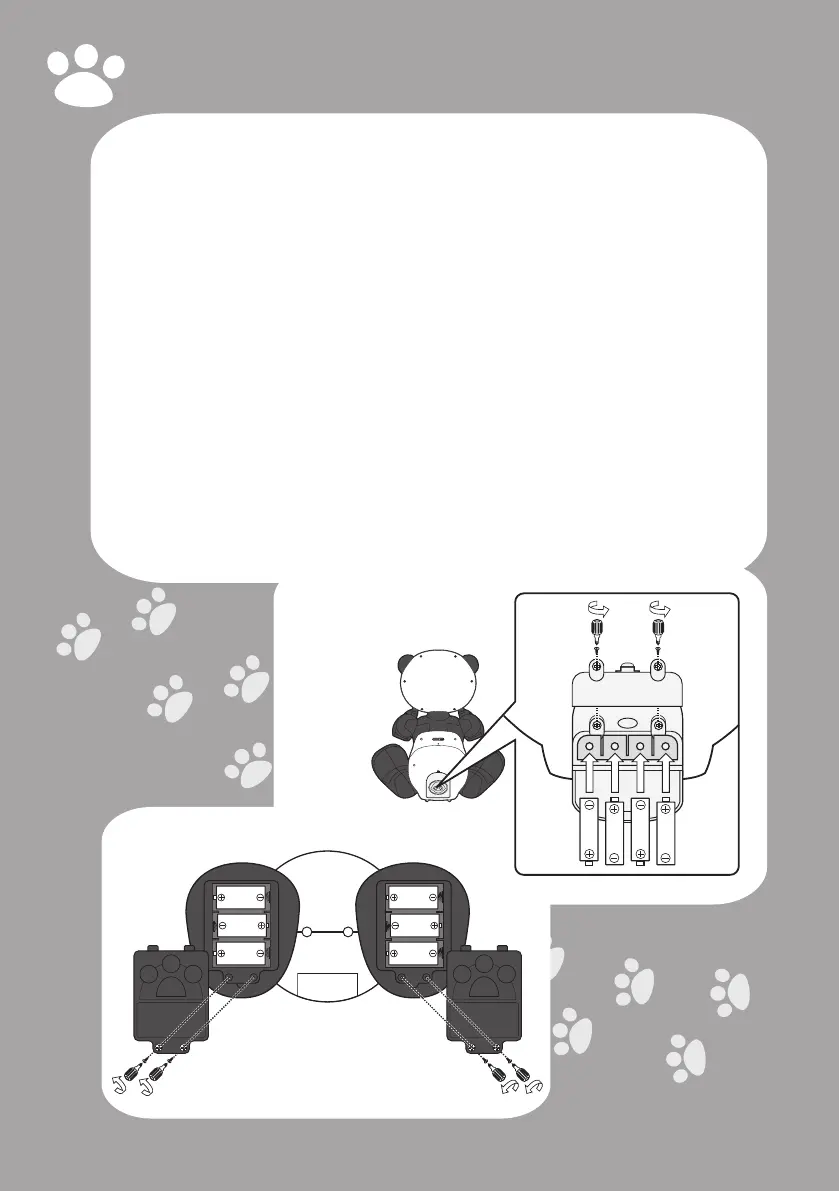
TochangeRobopanda’sbatteries:
NOTE: Before installing or changing
batteries, make sure that Robopanda
is turned off (switch is set to the OFF
position).
1 On the back side of Robopanda,
open the battery and cartridge
compartment door.
2 Using a Phillips screwdriver (not
included), remove the two screws on
the battery compartment cover,
then remove the battery
compartment cover.
3 Remove the 4x “AA” batteries from
the back side battery compartment,
and replace with fresh batteries.
IMPORTANT: Make sure you align the
positive and negative polarities of the
batteries with corresponding markings
inside the battery compartment.
Bottom View of Robopanda
4 Replace the battery compartment
cover and replace the 2 screws that
hold it in place.
5 Close the battery and cartridge
compartment door.
6 Under each of Robopanda’s feet,
there is a battery compartment
(total of two compartments).
Remove each battery compartment
by removing the two screws on the
battery compartment doors.
7 From each battery compartment,
remove the 3 x “C” batteries, and
replace with fresh batteries.
IMPORTANT: Make sure you align the
positive and negative polarities of the
batteries with corresponding markings
inside the battery compartment.
8 Replace each battery compartment
cover and replace the 2 screws that
hold them in place.
Back View of
Robopanda
1.5V “AA”
LR6/UM3
1.5V “AA”
LR6/UM3
1.5V “AA”
LR6/UM3
1.5V “AA”
LR6/UM3
Battery Compartment
1.5V “C”
LR14/UM2
1.5V “C”
LR14/UM2
1.5V “C”
LR14/UM2
1.5V “C”
LR14/UM2
1.5V “C”
LR14/UM2
1.5V “C”
LR14/UM2



 To Next Page