5
INTERACTING WITH ROBOPANDA™
This section describes how you can interact with Robopanda.
Robopanda’ssensors
There are several types of sensors on Robopanda:
• Touch sensors
• Tilt sensor
• Safety touch sensors
• Sonic sensors
Touchsensors
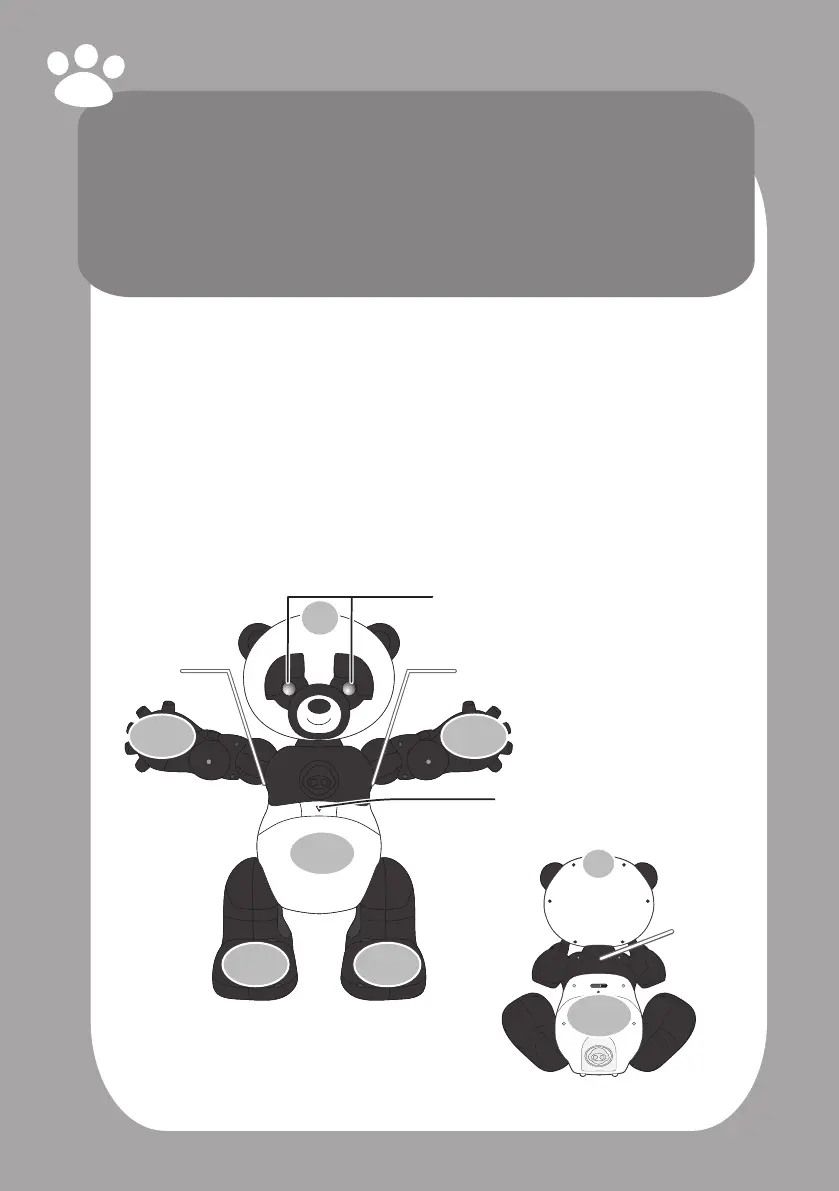
Robopanda has numerous touch sensors on his body that are used to interact and
play with him in each mode. He has eight touch sensors:
• Belly (1)
• Hand (2)
• Leg/Foot (2)
• Back (1)
• Head (2)
NOTE: When you remove Robopanda from his packaging, there are stickers placed
on his body indicating the location of his various touch sensors. You can remove
these stickers once you are familiar with him.
Robopanda will ask you to interact with him by touching his hand, belly or another
body part to continue the interaction.
Light Up Eyes
Safety
Pinch
Sensor
Safety
Pinch
Sensor
Sensors LED
Front
Head
Sensor
Belly
Sensor
Hand
Sensor
Hand
Sensor
Leg/Foot
Sensor
Leg/Foot
Sensor
Back
Head
Sensor
Back
Sensor
Safety
Pinch
Sensor



 To Next Page