INTERACTING WITH ROBOPANDA™
6
Tiltsensor
The tilt sensor built into Robopanda allows him to sense when he is being carried,
shook or tipped over, for instance. When he is tipped over, he might ask you to help
him up and likely tell you that he does not like being tilted. If he is continually
being tilted, or shaken, he will automatically go into sleep mode.
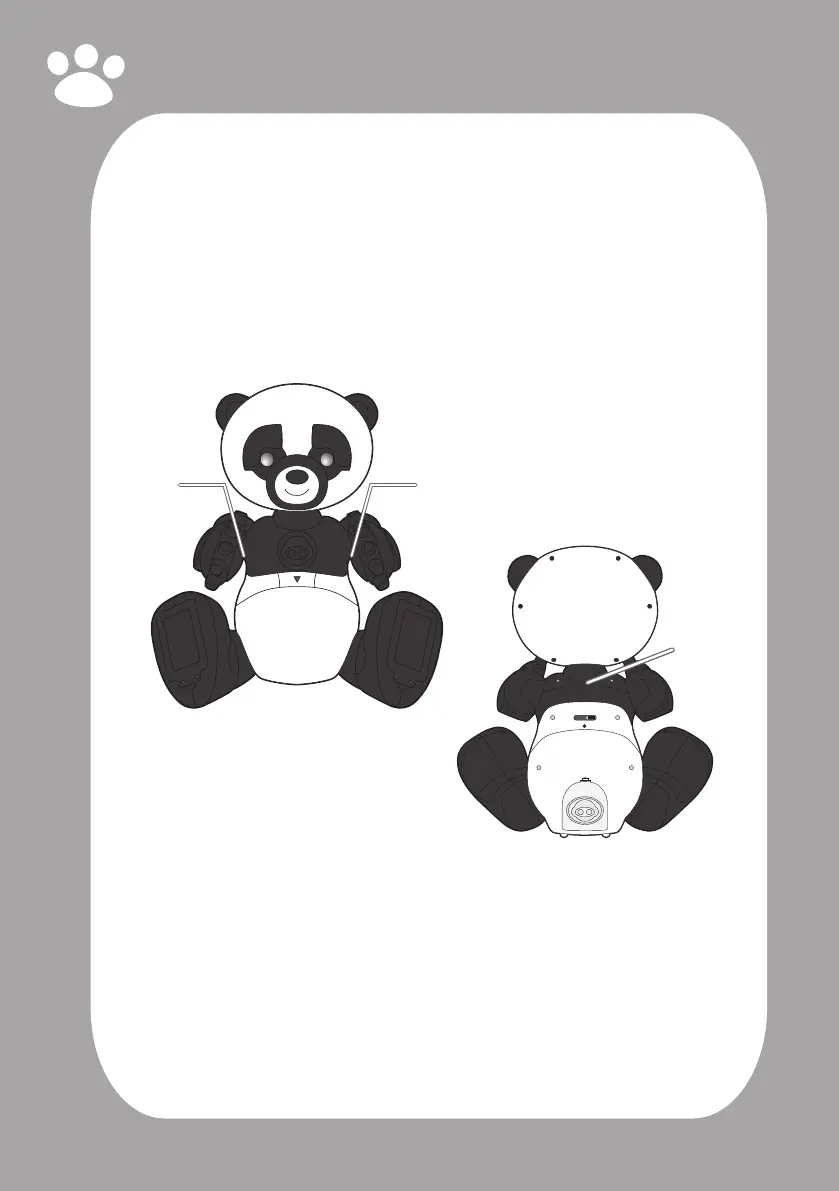
Safetytouchsensors
Robopanda has three built in safety touch sensors to prevent mishaps, such as
catching a nger in the Robopanda’s moveable joints:
• Back of the neck (1)
• Armpits (2)
If Robopanda detects a touch on one of his safety touch sensors, he will not move
his head or arms until you stop touching him.
NOTE: Do not touch his safety sensors while he is being powered on until he begins
to talk.
Sonicsensor
Robopanda has a sonic sensor to hear sounds while you interact with him, such
as when playing a game, or while he tells a story. He might ask you to clap your
hands, or ask to pretend you are a bear and roar with him! If he cannot hear you,
he will ask you to try again.
Safety
Pinch
Sensor
Safety
Pinch
Sensor
Safety
Pinch
Sensor



 To Next Page