B
B
E
E
C
C
C
C
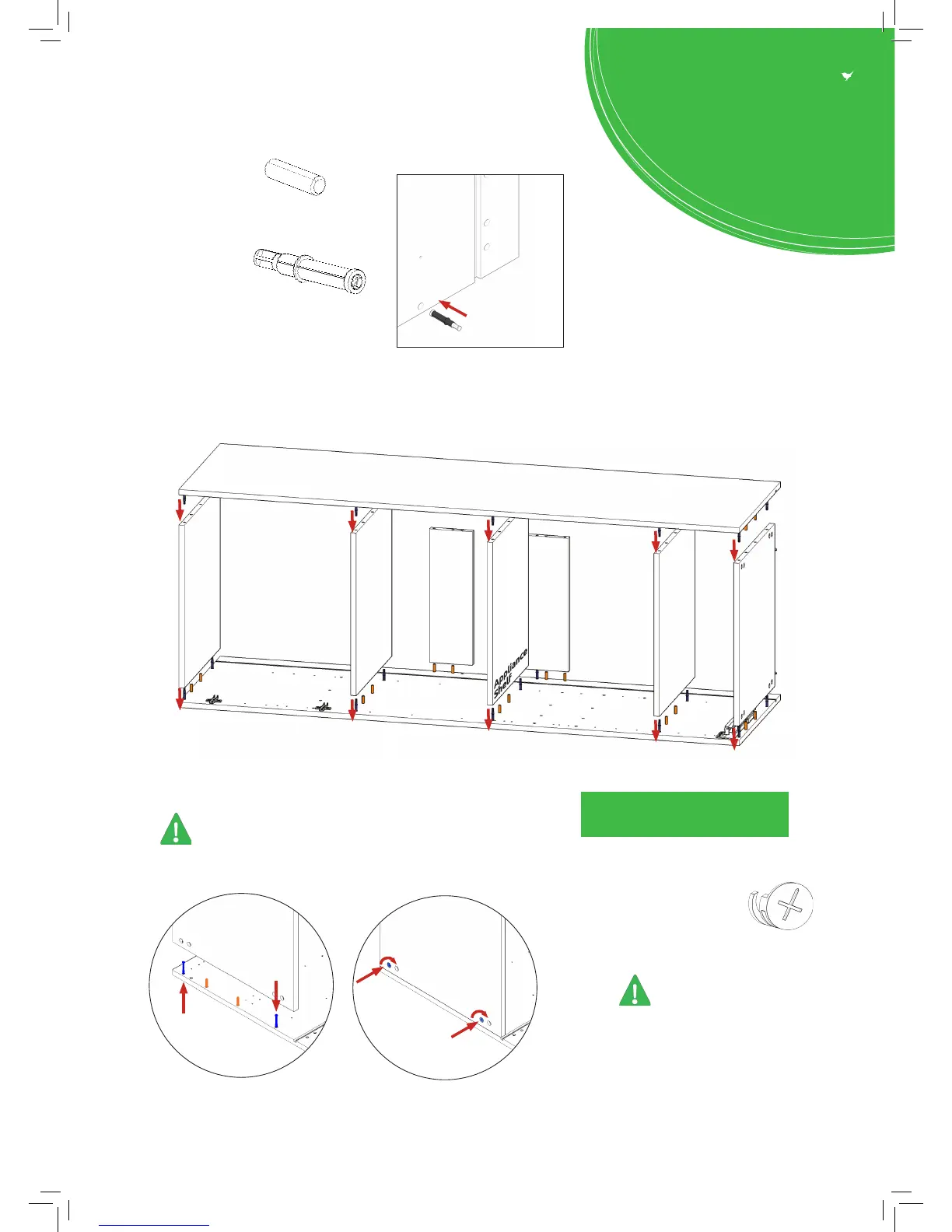
Step 5.
Carcass Construction
Attach Panels (C) & (E) to panels (B),
using cam dowel (G) & cam lock (H) (in blue),
and also using dowels (F) (in orange)
in positions as shown.
Step 6.
Cam Lock (H)
Join panels (C) & (E) to (B).
Insert cam lock (H).
Do NOT tighten until Step 9.
NB. All Cam Locks (H) are to be positioned facing the
outside of the unit carcass, for ease of tightening.
Do not use power tools with
cam dowel (G) or cam lock (H)
Seat (G)
cam dowel
into hole
as shown
Step 3.
Seat dowel (F) into holes in
both end panels (B) as shown.
Step 4.
Seat cam dowel (G) into
holes in both end panels (B)
as shown.
B
B
C
C
View from underside
View from underside
H
G
G
H



 To Next Page