Wren V5AP User Manual
10
Using an iDevice (iPhone, iPad, iPod)
Connect to your network — Option A
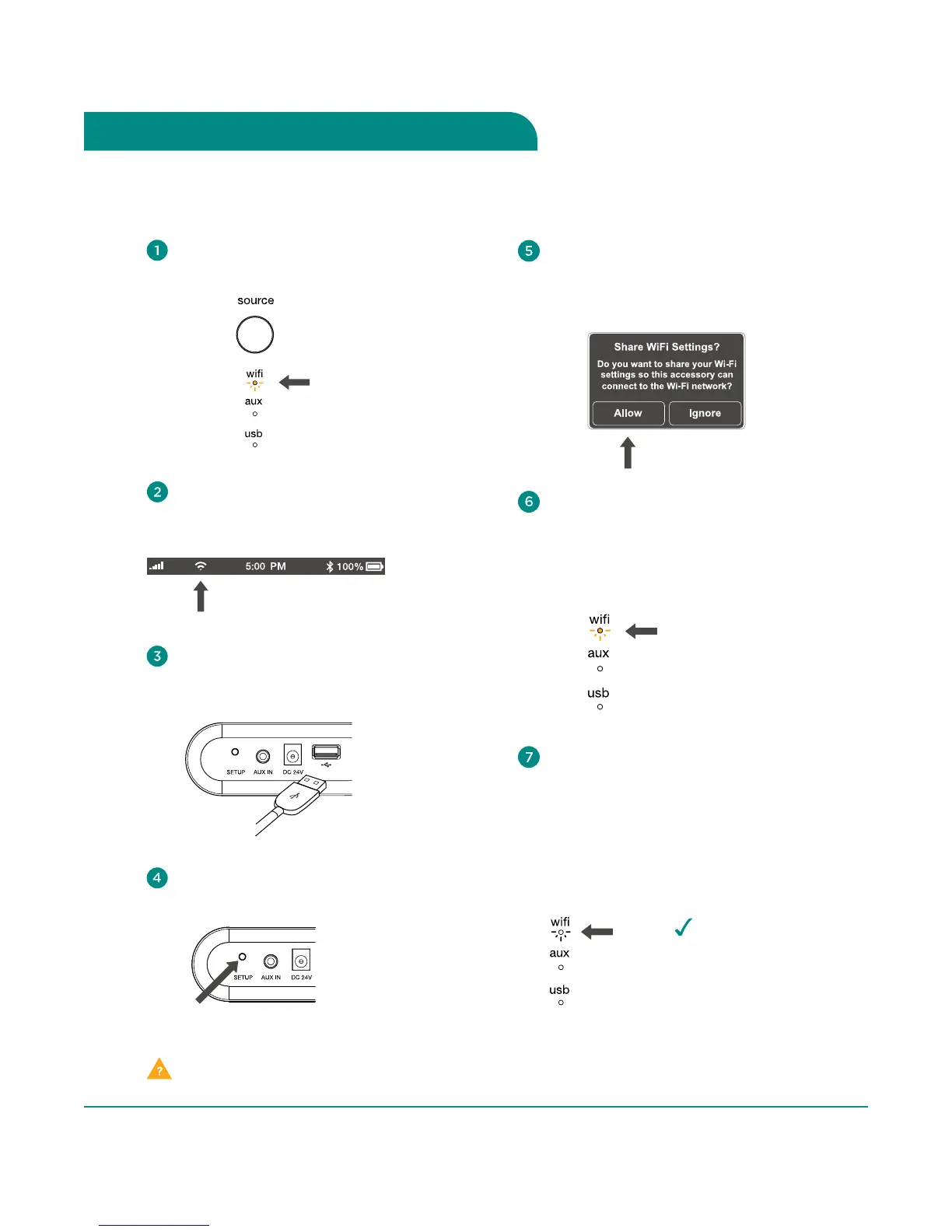
The WiFi indicator on the speaker
will blink amber as your settings
are transferred to the product.
The indicator will then turn solid amber
as the system logs on to your network.
blinking amber
A window will open on your iDevice
asking you to allow sharing of your
WiFi settings. Select “Allow” in the
popup box.
When connection is complete,
the WiFi indicator on your Wren V5AP
will change to solid white indicating
AirPlay is connected to your network
and ready to use.
Note: It may take up to 120 seconds
for the network connection to
be completed.
Congratulations!
Your Wren V5AP is
now ready to use as
an AirPlay device!
solid
white
Problem connecting? Visit wrensound.com/support for additional help.
Select WiFi as your source: Press
Source button until WiFi indicator is lit.
amber
Press and release the Setup button
located on the back of the speaker.
Connect your iDevice to the
Wren V5AP using the included USB
dock connector cable.
Make sure your iDevice is on,
unlocked and connected to your
WiFi network.



 To Next Page