Wren V5AP User Manual
11
Using a Mac or Windows Computer
Connect to your network — Option B
If you do not have an iDevice but you want to use AirPlay with iTunes on a Mac or PC, you will
need to use the Web Server method to set up a network connection for your Wren V5AP.
Make sure you have saved open work on your computer and have closed all programs first.
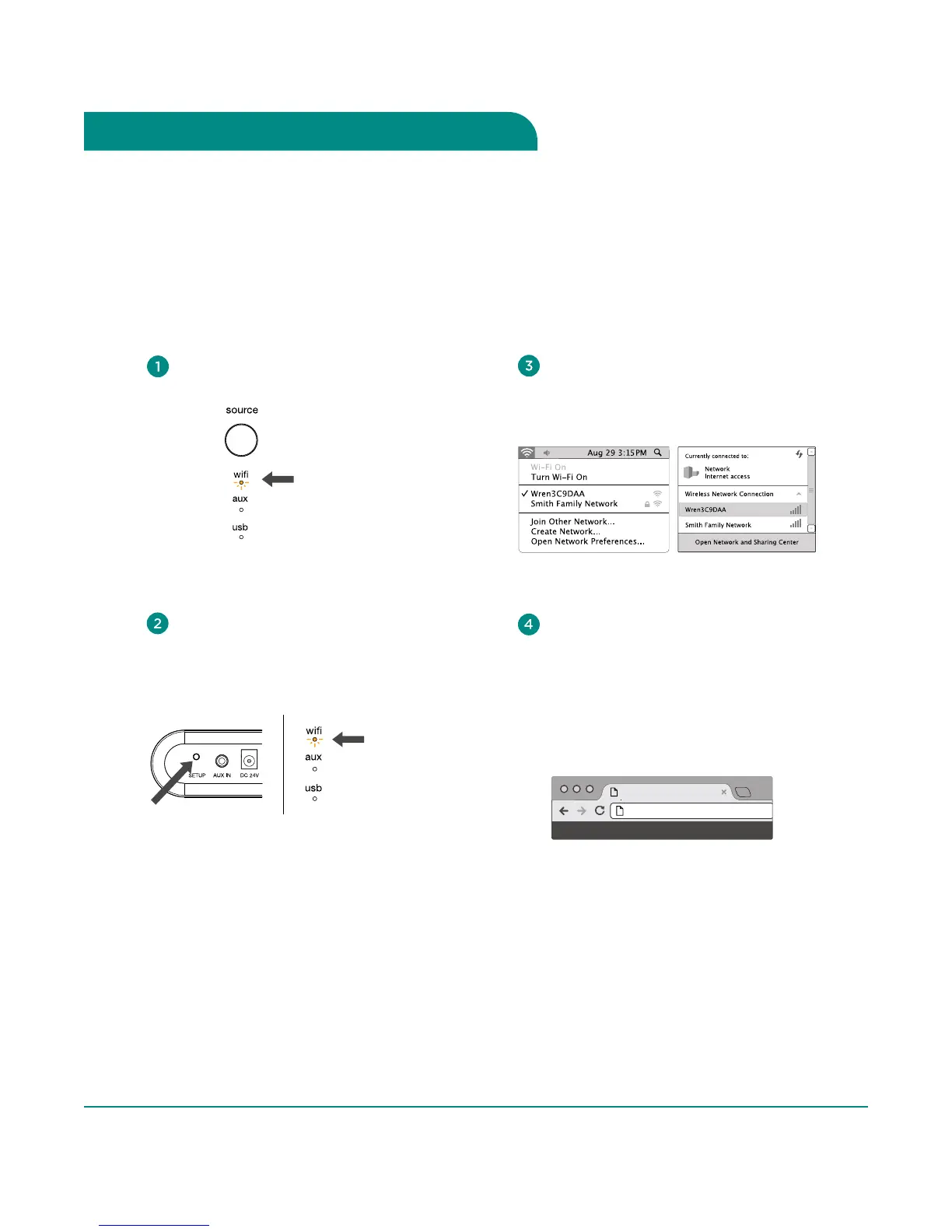
Using your computer, navigate to your
WiFi network selection window and
select the Network beginning with “Wren.”
Mac OSX
®
Windows 7
®
Launch your web browser (e.g., Safari
®
,
Internet Explorer
®
, Chrome
®
or Firefox
®
)
and type 169.254.1.1 in the address bar.
Then press <enter>. This will take you to
the Wren Status Information page.
Note: If the web page is not initially available
or becomes unresponsive, reload the
browser page.
DMP - User Interface
169.254.1.1
Select WiFi as your source: Press
Source button until WiFi indicator is lit.
amber
Press and hold the Setup button on the back
of the Wren V5AP for about five seconds.
When the amber WiFi indicator begins to
blink, release the Setup button. Your Wren
V5AP has entered Web Server setup mode.
blinking
amber
Steps 5-8, Next Page



 To Next Page