Troubleshooting
Xerox
®
VersaLink
®
C405 Color Multifunction Printer 191
User Guide
Clearing Paper Jams
This section includes:
• Clearing Document Feeder Jams ............................................................................................................................. 191
• Clearing Paper Jams from the Bypass Tray ......................................................................................................... 192
• Clearing Paper Jams from the Tray 1 Area .......................................................................................................... 195
• Clearing Paper Jams from the Tray 2 Area .......................................................................................................... 198
• Clearing Paper Jams from the Fuser Area ............................................................................................................ 199
Clearing Document Feeder Jams
To resolve the error that appears on the control panel, clear all paper from the Single-Pass Duplex
Automatic Document Feeder areas.
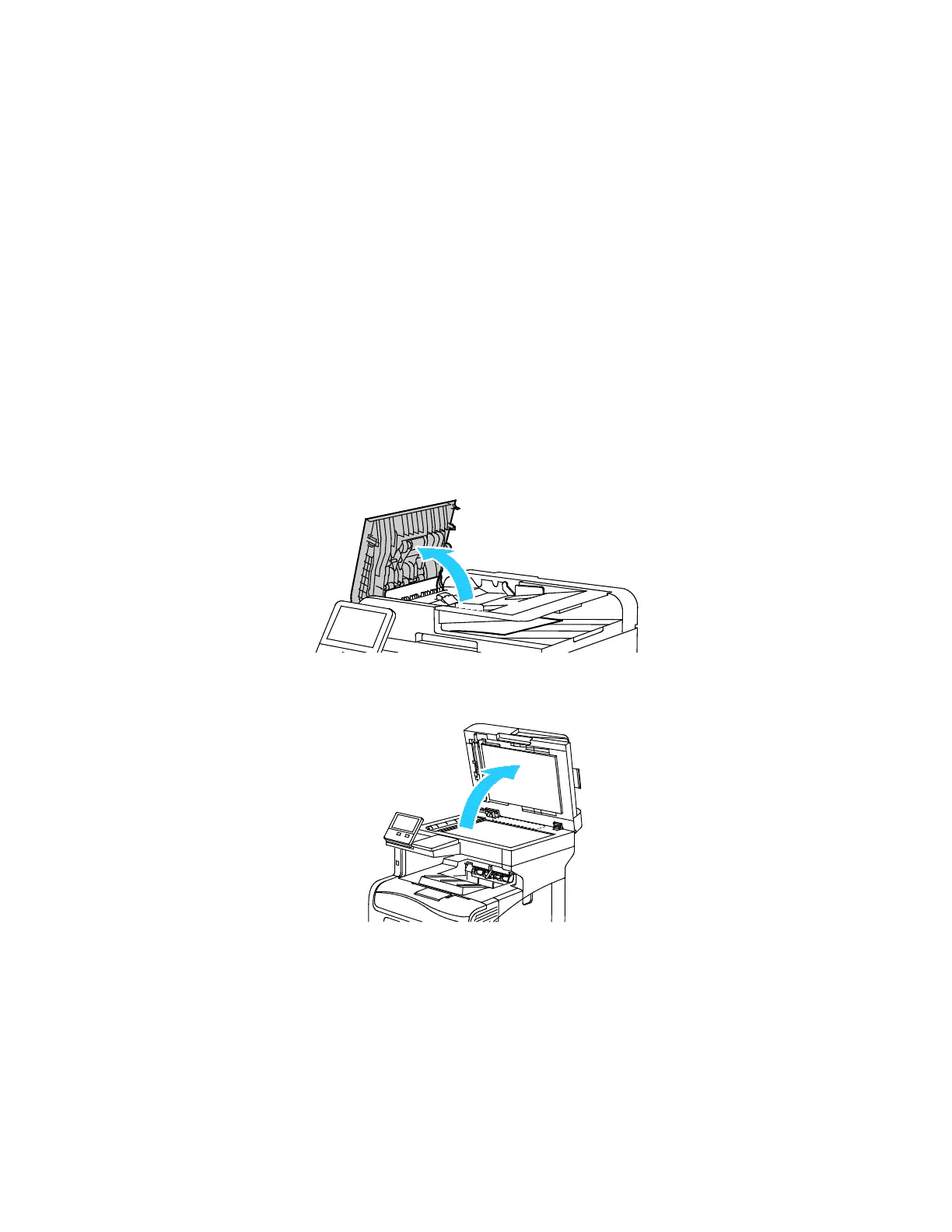
1. Open the Top Cover, then remove any paper.
2. If paper is jammed in the Single-Pass Duplex Automatic Document Feeder, open the Document
Cover, then remove any jammed paper.


 To Next Page
 Loading...