Status of Indicators
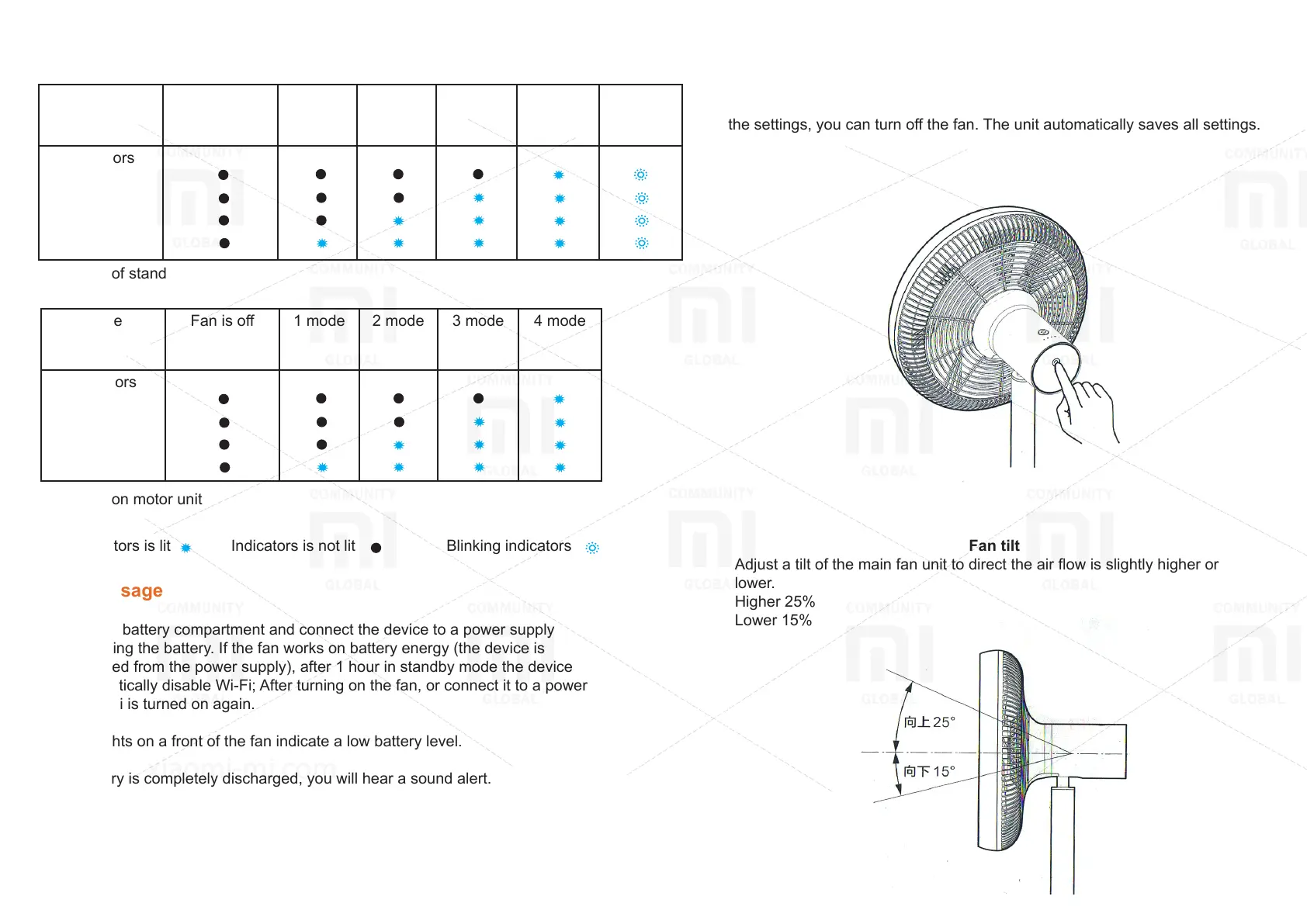
Mode Fan is o 1 mode 2 mode 3 mode 4 mode
Low
battery
Indicators
Mode Fan is o 1 mode 2 mode 3 mode 4 mode
Indicators
Indicators of stand
Indicators on motor unit
Indicators is lit Indicators is not lit Blinking indicators
Battery usage
Insert it into battery compartment and connect the device to a power supply
for recharging the battery. If the fan works on battery energy (the device is
disconnected from the power supply), after 1 hour in standby mode the device
can automatically disable Wi-Fi; After turning on the fan, or connect it to a power
supply Wi-Fi is turned on again.
Blinking lights on a front of the fan indicate a low battery level.
If the battery is completely discharged, you will hear a sound alert.
Usage
Fan tilt ajusting
Click on the button to adjust a degree of inclination of the fan. After completing all
the settings, you can turn o the fan. The unit automatically saves all settings.
Fan tilt
Adjust a tilt of the main fan unit to direct the air ow is slightly higher or
lower.
Higher 25%
Lower 15%


 To Next Page
 Loading...