http://xim.tech
XIM NEXUS
Trigger Mapping
Setting Trigger Mappings
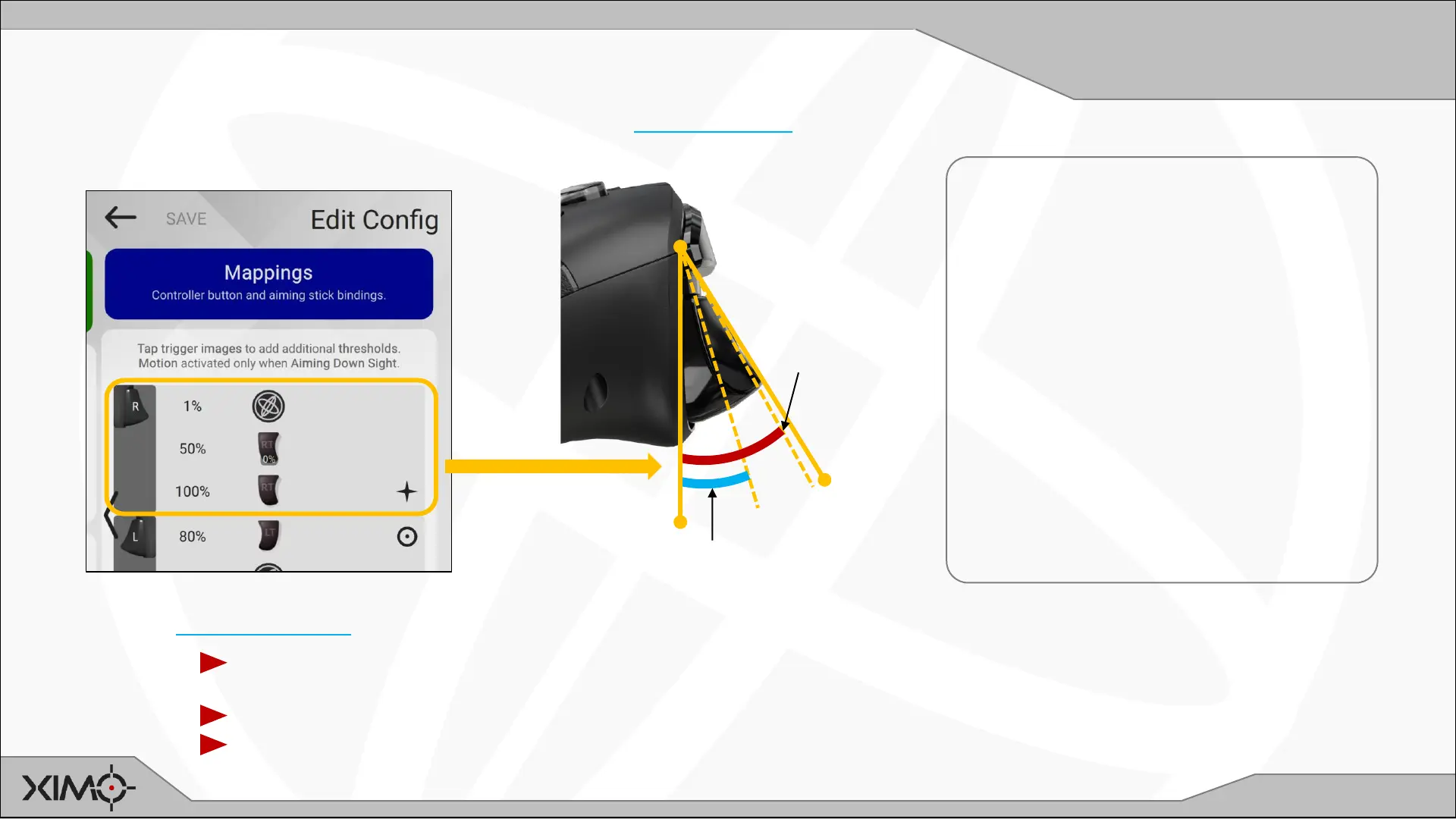
Trigger mapping is a powerful feature in that it’s exactly like button mapping but provides the ability to map actions to 4 different “stops”
(% of pull) per trigger. (Press the picture of the trigger to add additional stops.)
In this example, a partial (light) press
of the trigger can be used to enable
motion before firing occurs. In this
case, 50% XIM NEXUS trigger pull
maps to 0% console controller trigger
(use the slider to set to 0).
Other possible scenarios:
• Making a hair trigger by mapping
1% XIM NEXUS trigger to the
console controller trigger.
• Combining ADS and holding breath
steadying (available in some
shooters).
0%
100%
50%
1%
Game Trigger
Range
(0-100%)
Motion
Activates
The Motion Activation setting will determine which motion engage and toggle actions are currently active in mappings:
Aim Down Sight: Motion will only be engaged when Aim Down Sight is active (even if you place a motion
engage action at a trigger stop before ADS). Only motion engage actions are used.
Aim and Fire: All motion engage actions are used (even non-trigger) as they are defined.
Engage toggle: All motion toggle actions are used as they are defined.


 To Next Page