http://xim.tech
XIM NEXUS
Quick Pull
Advanced Triggers: Quick Pull
In addition to the flexibility provided by Trigger Mapping, you can also increase your trigger speed using Quick Pull.
Quick Pull makes it so that you don’t have to fully release your trigger in order to start and complete the next pull. Combine this with hair
triggers to greatly increase your firing speed. Another added benefit of Quick Pull is that it provides additional stability to your aim. The
physical force of fully pressing and releasing your trigger can at times cause your controller to move (thus affecting motion aim). Quick Pull
enables you to fire rapidly just by lightly “wiggling” (oscillating) the trigger mid-pull without aim disruption.
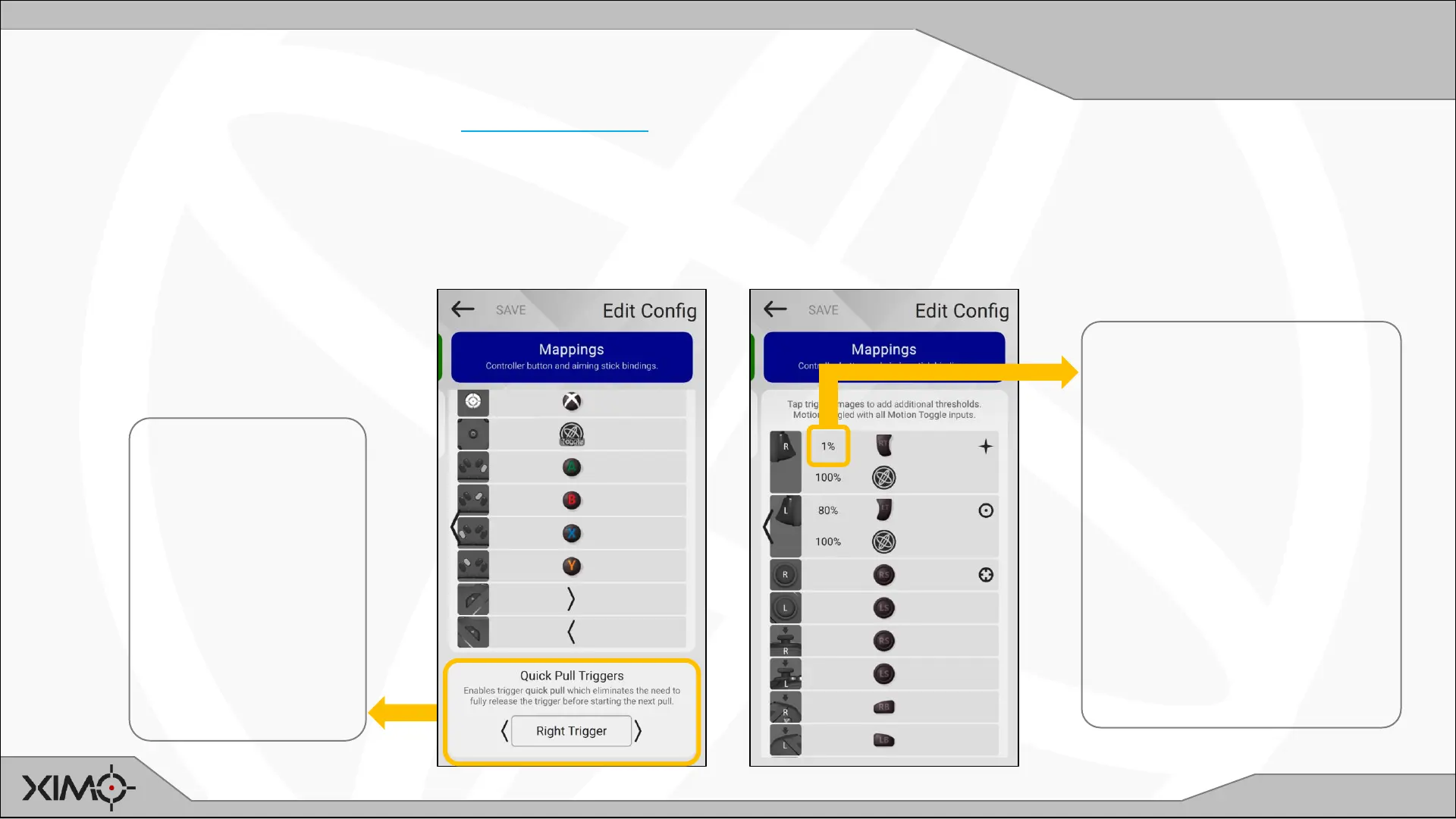
Enable Quick Pull
by choosing the
triggers you
would like to apply
it to.
In this example,
Right Trigger is
chosen since it is
used for firing.
Set Right Trigger
threshold to 1% to
make it a hair trigger.
After this step, along with
Quick Pull enabled, you can
now fire by barely pulling the
trigger at any point along
the trigger pull path.
Try firing quickly by lightly
oscillating the trigger
around mid-pull.


 To Next Page