http://xim.tech
XIM NEXUS
ADS Sync
Advanced Triggers: ADS Synchronization
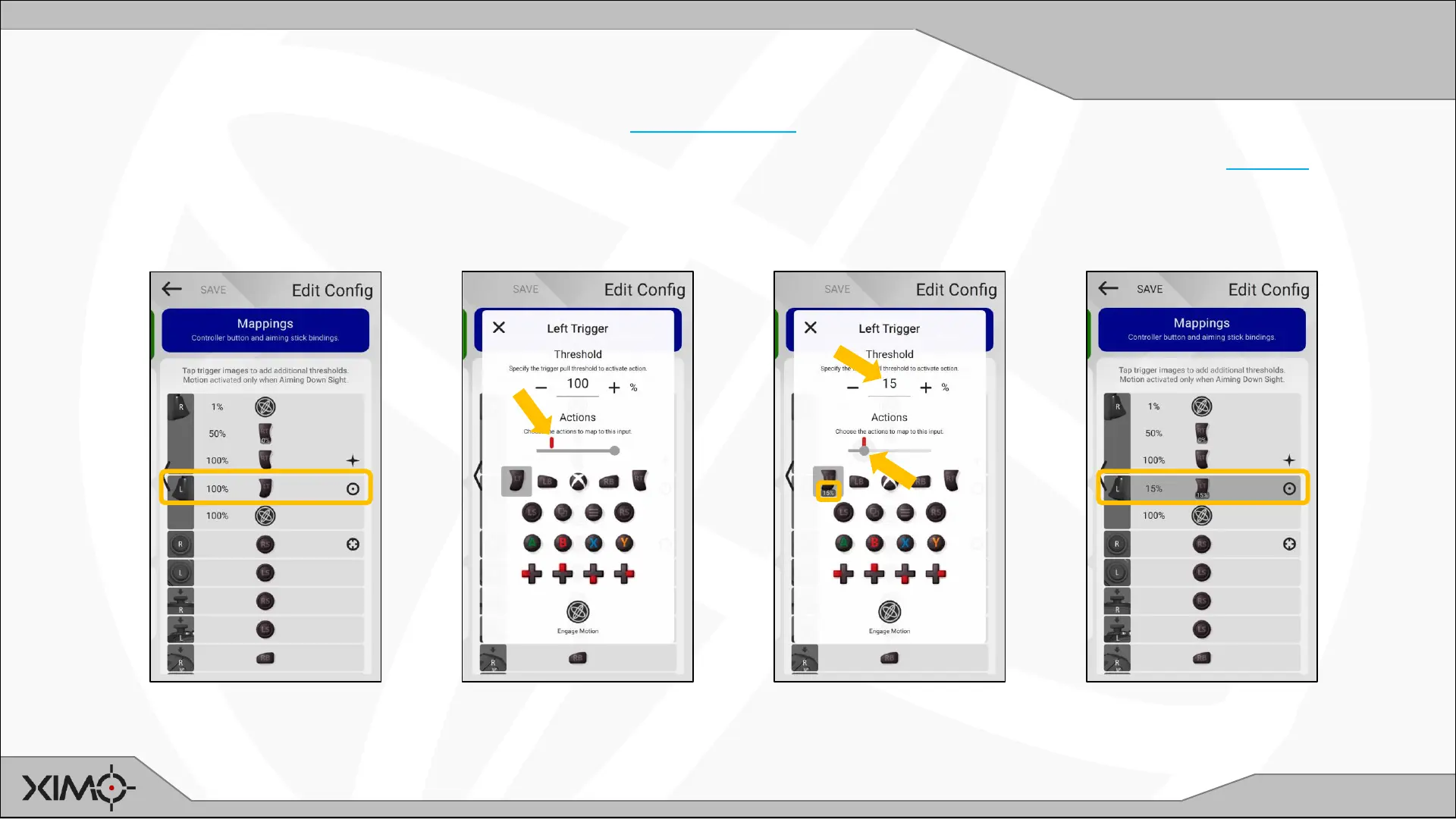
More advanced scenarios are available with the flexibility of Trigger Mapping, such as ADS trigger synchronization.
XIM NEXUS needs to know when your game switches to ADS aiming so it can match its aiming translation. This is done by declaring the ADS Role in one of
your mapped trigger positions. This will typically be mapped to 100% trigger pull of the console controller. However, most games switch to ADS before 100%
so there will be a small period of time through your trigger pull where your game is in ADS before your XIM NEXUS. Generally, most users won’t notice this, but
here is how you would better synchronize your ADS trigger with the game.
Start with 100% pull mapped to
100% in-game.
Slowly pull your trigger until you
see ADS occur in-game and note
the position of the red line.
Set the slider at or just before the
red line and copy the value
displayed under the console
trigger to the threshold.
Your XIM NEXUS will now
transition to ADS aiming more
closely with your game.


 To Next Page