EasyManua.ls Logo

XM XMP3 - Page 17

XM XMP3
97 pages
Print Icon
To Next Page IconTo Next Page
To Previous Page IconTo Previous Page
Loading...
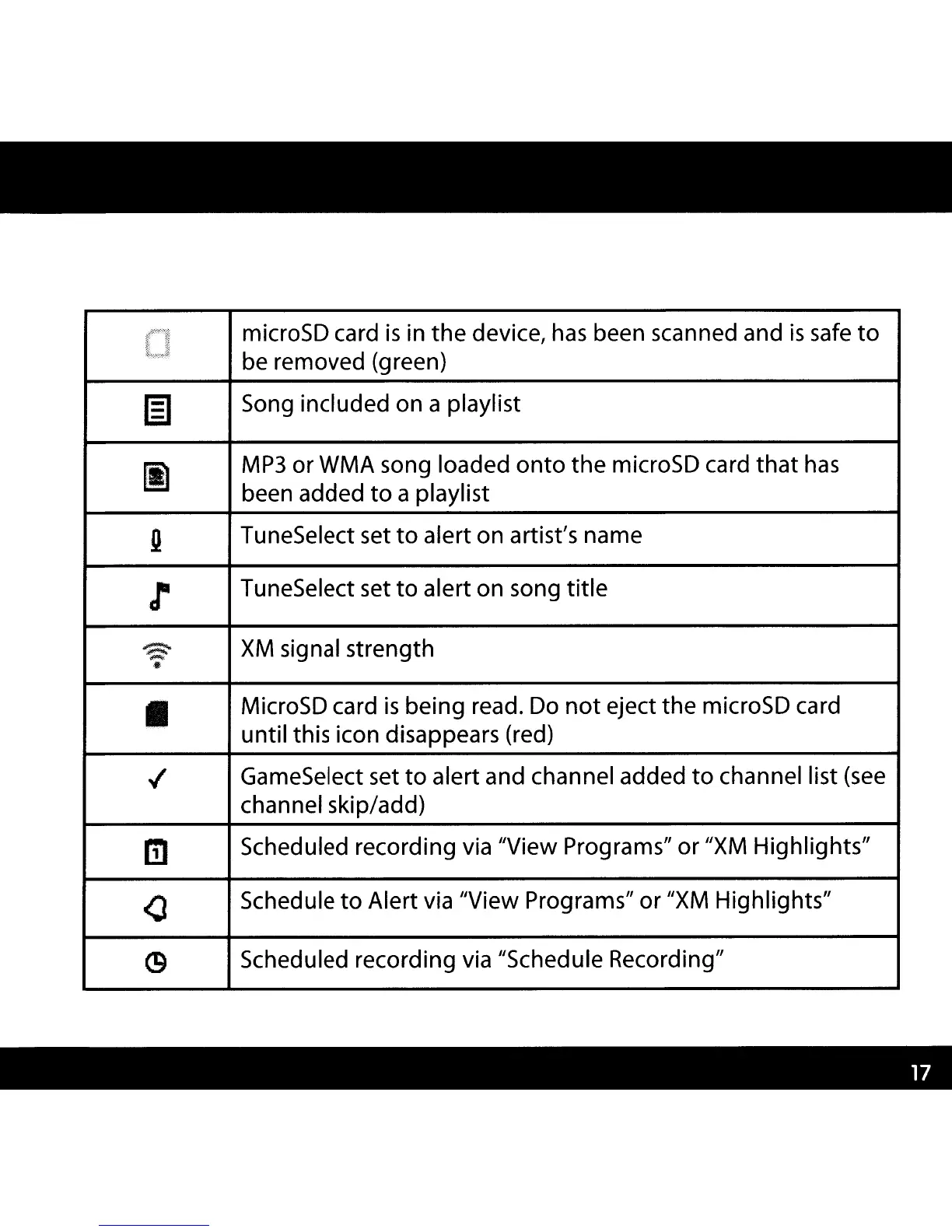
microSD card
is
in
the
device,
has
been scanned and
is
safe
to
be removed (green)
IE]
Song included on a playlist
rI1
MP3
or WMA song loaded
onto
the
microSD card
that
has
been added
to
a playlist
Q
TuneSelect set
to
alert on artist's name
r
TuneSelect set
to
alert on song
title
~
XM
signal strength
.pLIiij;.
II
MicroSD card
is
being read. Do
not
eject
the
microSD card
until this icon disappears (red)
..f
GameSelect set
to
alert and channel added
to
channel list (see
channel skip/add)
m
Scheduled recording via IIView Programs" or "XM Highlights"
<l
Schedule
to
Alert via IIView Programs" or
IIXM
Highlights"
C9
Scheduled recording via IISchedule Recording"

Other manuals for XM XMP3

Related product manuals