Troubleshooting
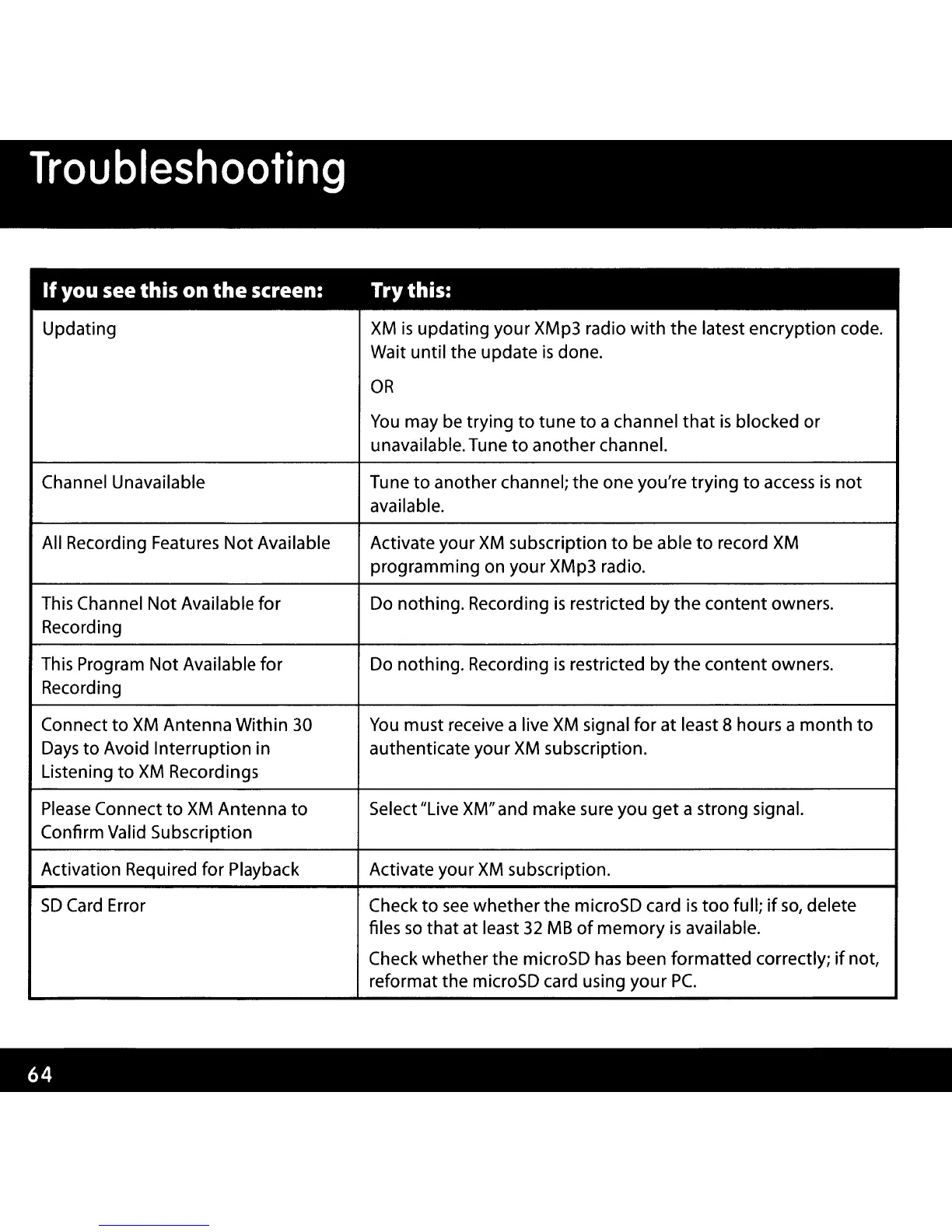
If
you see this on
the
screen: Try this:
Updating
XM
is
updating your XMp3 radio
with
the
latest encryption code.
Wait until the update
is
done.
OR
You
may
be
trying
to
tune
to
a channel
that
is
blocked or
unavailable. Tune
to
another channel.
Channel Unavailable Tune
to
another channel; the one you're trying
to
access
is
not
available.
All Recording Features
Not
Available
Activate your
XM
subscription
to
be able
to
record
XM
programming on your XMp3 radio.
This Channel
Not
Available
for
Do nothing. Recording
is
restricted
by
the
content owners.
Recording
This Program Not Available for
Do nothing. Recording
is
restricted by
the
content owners.
Recording
Connect
to
XM
Antenna
Within
30
You
must receive a live
XM
signal for
at
least 8 hours a
month
to
Days
to
Avoid Interruption in authenticate your
XM
subscription.
Listening to
XM
Recordings
Please
Connect
to
XM
Antenna
to
Select "Live XM" and make sure you
get
a strong signal.
Confirm Valid Subscription
Activation Required for Playback Activate your
XM
subscription.
SD
Card
Error
Check
to
see
whether the microSD card
is
too
full;
if
so,
delete
files
so
that at least
32
MB
of
memory
is
available.
Check whether the microSD
has
been formatted correctly;
if
not,
reformat the microSD card using
your
Pc.



 To Next Page