Playlists
You
can
create one or more custom lists, called playlists. A playlist
is
simply a collection
of
recorded tracks that play in a certain order. Create a"morning commute" playlist, a
"workout"
playlist, a"best
of"
playlist, and more. And
yes,
the same song
can
appear on more than one
playlist.
1 While listening
to
recorded
XM
or
MP3IWMA files, select options ---+ Add
to
Playlist.
2 Choose
to
add the song
to
an
existing playlist or
to
a new playlist.
To
create a
new playlist, select
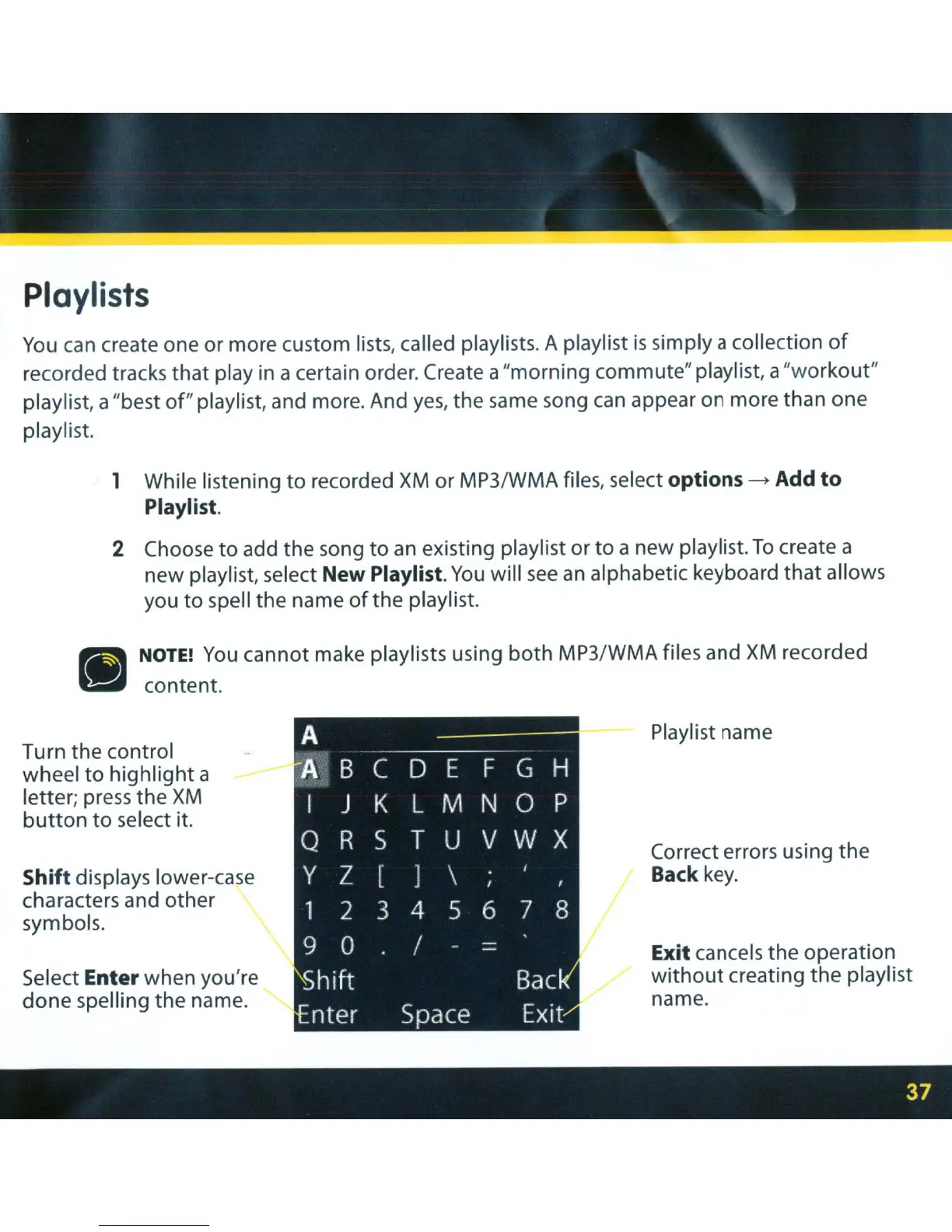
New Playlist.
You
will
see
an
alphabetic keyboard
that
allows
you
to
spell the name
ofthe
playlist.
•
NOTE!
You
cannot make playlists using
both
MP3/WMA files and
XM
recorded
content.
Turn the control
wheel
to
highlight
a
letter; press the
XM
button
to
select it.
Shift displays lower-case
characters and other
symbols.
Select
Enter when you're
done
spelling the name.
A
A
B C
o E F G
H
I
J
K L M
N 0 P
Q
R S
T U
V W X
Y Z
[
J
\
1 2 3
4
5 6
7 8
9 0
/
-
-
Shift
Sac
nter Space
Exit
Playlist name
Correct errors using the
Back
key.
Exit cancels the operation
without
creating the playlist
name.



 To Next Page