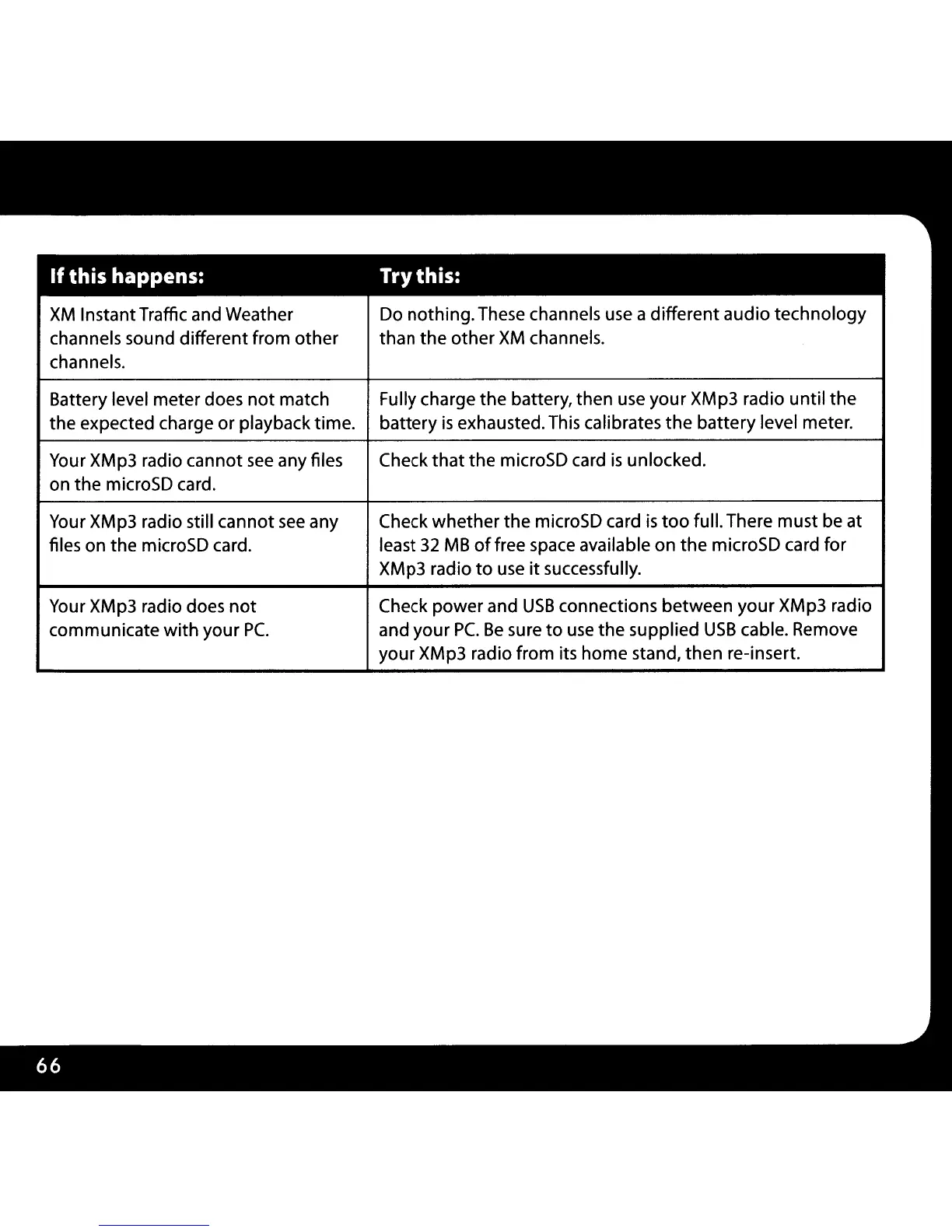
If
this happens:
Try this:
XM
InstantTraffic and Weather
Do nothing. These channels use a different audio
technology
channels sound different
from
other
than
the
other
XM
channels.
channels.
Battery level meter does
not
match
Fully charge
the
battery, then use
your
XMp3 radio
until
the
the expected charge or playback time.
battery
is
exhausted. This calibrates
the
battery
level meter.
Your XMp3 radio cannot
see
any files
Check
that
the
microSD card
is
unlocked.
on the microSD card.
Your XMp3 radio still cannot
see
any
Check
whether
the microSD card
is
too
full. There must be at
files on the microSD card.
least
32
MB
offree
space available
on
the
microSD card for
XMp3 radio
to
use
it
successfully.
Your XMp3 radio does
not
Check
power
and
USB
connections between
your
XMp3 radio
communicate
with
your
Pc.
and
your
Pc.
Be
sure
to
use
the
supplied
USB
cable. Remove
your XMp3 radio from its home stand,
then
re-insert.



 To Next Page