VESDAVLSProduct Guide VESDA by Xtralis
20 www.xtralis.com
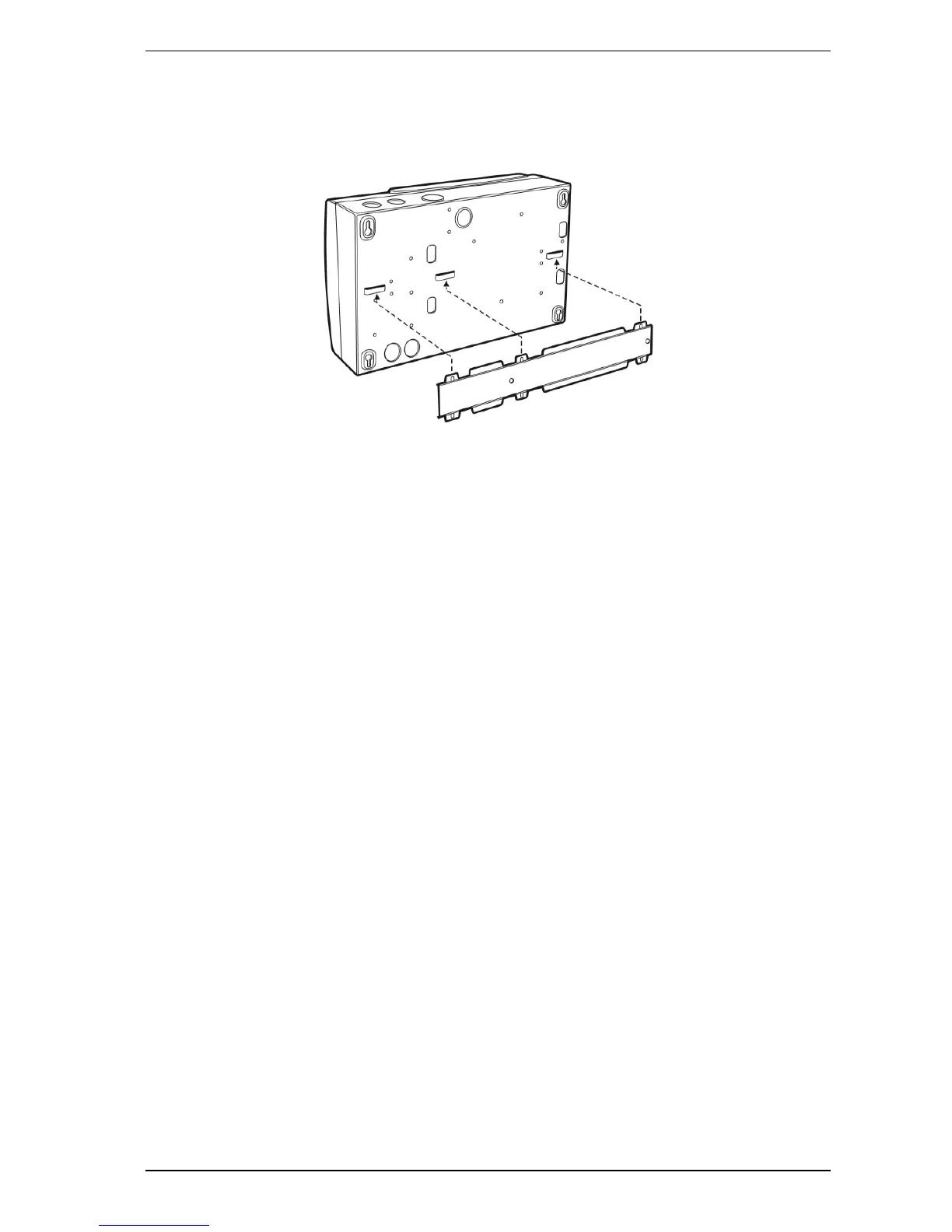
4.3 Mounting the Detector in the Inverted Orientation
If the detector is fitted with a LCD Programmer and/or a Display Module, reorient these to the inverted
position. Mount the detector in inverted orientation onto the mounting bracket.
Figure 4-3: Mounting the Detector in inverted orientation onto the mounting bracket
4.4 Mounting the Detector without mounting bracket
In the event the detector has to be mounted directly onto the mounting surface, remove the chassis from the
mounting box. Refer to Section 11.1 on page 38 for further information.
Use the four keyhole slots to secure the mounting box to a flat surface, ensuring that it is horizontally straight.
Re-install the chassis into the mounting box. Carefully re-connect the looms and complete the cabling prior to
closing the front cover. Refer to Section 11.2 on page 40 for further information.
Note: The detection chamber, head processor card and flow sensors are factory calibrated as a matched
set. Separating the set and replacing it with components from another set may cause the detector
to malfunction, requiring re-calibration at the factory.



 To Next Page
 Loading...













