EasyManua.ls Logo

Yaesu FT-101EE - Transmitter Mixer, Driver, and Receiver Alignment

Yaesu FT-101EE
43 pages
Print Icon
To Next Page IconTo Next Page
To Previous Page IconTo Previous Page
Loading...
13.
ALIGNMENT
OF
TRANSMITTER
MIXER/DRIVER
AND
RECEIVER
FRONT
END
STAGES
The
final
amplifier
bias
adjustment
must
be
set
to
60
mA
before
extensive
operation
of
the
transmitter
is
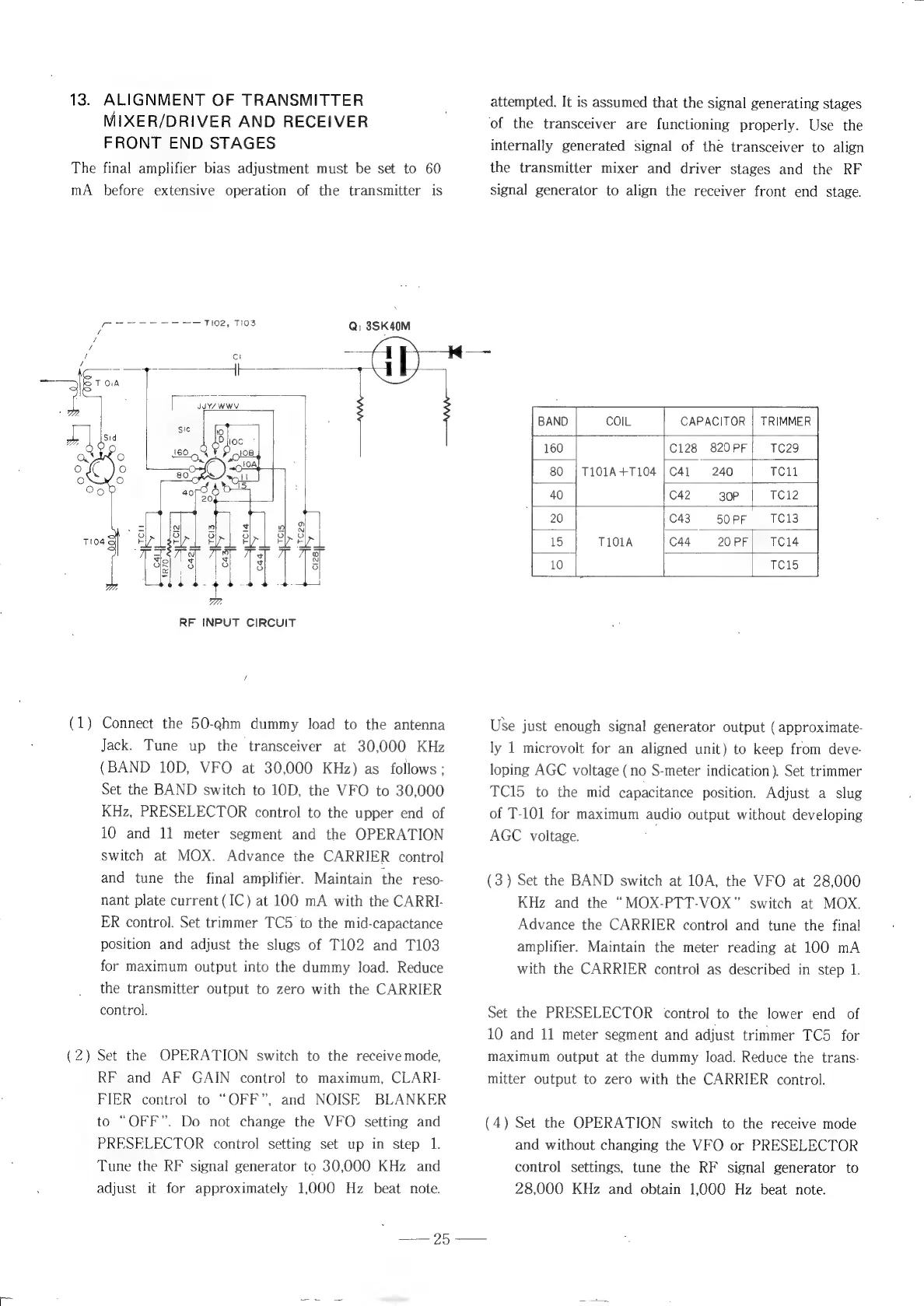
Qi
3SK40M
pow
TH02,
TI03
RF
INPUT
CIRCUIT
(1)
Connect
the
50-eahm
dummy
load
to
the
antenna
Jack.
Tune
up
the
transceiver
at
30,000
KHz
(BAND
10D,
VFO
at
30,000
KHz)
as
follows;
Set
the
BAND
switch
to
10D,
the
VFO
to
30,000
KHz,
PRESELECTOR
control
to
the
upper
end
of
10
and
11
meter
segment
and
the
OPERATION
switch
at
MOX.
Advance
the
CARRIER
control
and
tune
the
final
amplifier.
Maintain
the
reso-
nant
plate
current
(IC)
at
100
mA
with
the
CARRI-
ER
control.
Set
trimmer
TC5
to
the
mid-capactance
position
and
adjust
the
slugs
of
T102
and
T103
for
maximum
output
into
the
dummy
load.
Reduce
the
transmitter
output
to
zero
with
the
CARRIER
control.
Set
the
OPERATION
switch
to
the
receive
mode,
RF
and
AF
GAIN
control
to
maximum,
CLARI-
FIER
control
to
“OFF”,
and
NOISE
BLANKER
to
“OFF”.
Do
not
change
the
VFO
setting
and
PRESELECTOR.
control
setting
set
up
in
step
1.
Tune
the
RF
signal
generator
to
30,000
KHz
and
adjust
it
for
approximately
1,000
Hz
beat
note.
DS
attempted.
It
is
assumed
that
the
signal
generating
stages
_
of
the
transceiver
are
functioning
properly.
Use
the
internally
generated
signal
of
the
transceiver
to
align
the
transmitter
mixer
and
driver
stages
and
the
RF
signal
generator
to
align
the
receiver
front
end
stage.
CAPACITOR
|
TRIMMER
C128
820PF}
TC29
T101A
+1104
240
TC1l
30P
TC12
TC13
TC14
TC15
Use
just
enough
signal
generator
output
(approximate-
ly
1
microvolt
for
an
aligned
unit)
to
keep
from
deve-
loping
AGC
voltage
(no
S-meter
indication).
Set
trimmer
TC15
to
the
mid
capacitance
position.
Adjust
a
slug
of
T-101
for
maximum
audio
output
without
developing
AGC
voltage.
(3)
Set
the
BAND
switch
at
10A,
the
VFO
at
28,000
KHz
and
the
“MOX-PTT-VOX”
switch
at
MOX.
Advance
the
CARRIER
control
and
tune
the
final
amplifier.
Maintain
the
meter
reading
at
100
mA
with
the
CARRIER
control
as
described
in
step
1.
Set
the
PRESELECTOR
control
to
the
lower
end
of
10
and
11
meter
segment
and
adjust
trimmer
TC5
for
maximum
output
at
the
dummy
load.
Reduce
the
trans-
mitter
output
to
zero
with
the
CARRIER
control.
(4)
Set
the
OPERATION
switch
to
the
receive
mode
and
without
changing
the
VFO
or
PRESELECTOR
control
settings,
tune
the
RF
signal
generator
to
28,000
KHz
and
obtain
1,000
Hz
beat
note.

Other manuals for Yaesu FT-101EE

Related product manuals