EasyManua.ls Logo

Yaesu VX-2R - Control and Connections; Physical Controls Overview

Yaesu VX-2R
80 pages
Print Icon
To Next Page IconTo Next Page
To Previous Page IconTo Previous Page
Loading...
VX-2R OPERATING MANUAL2
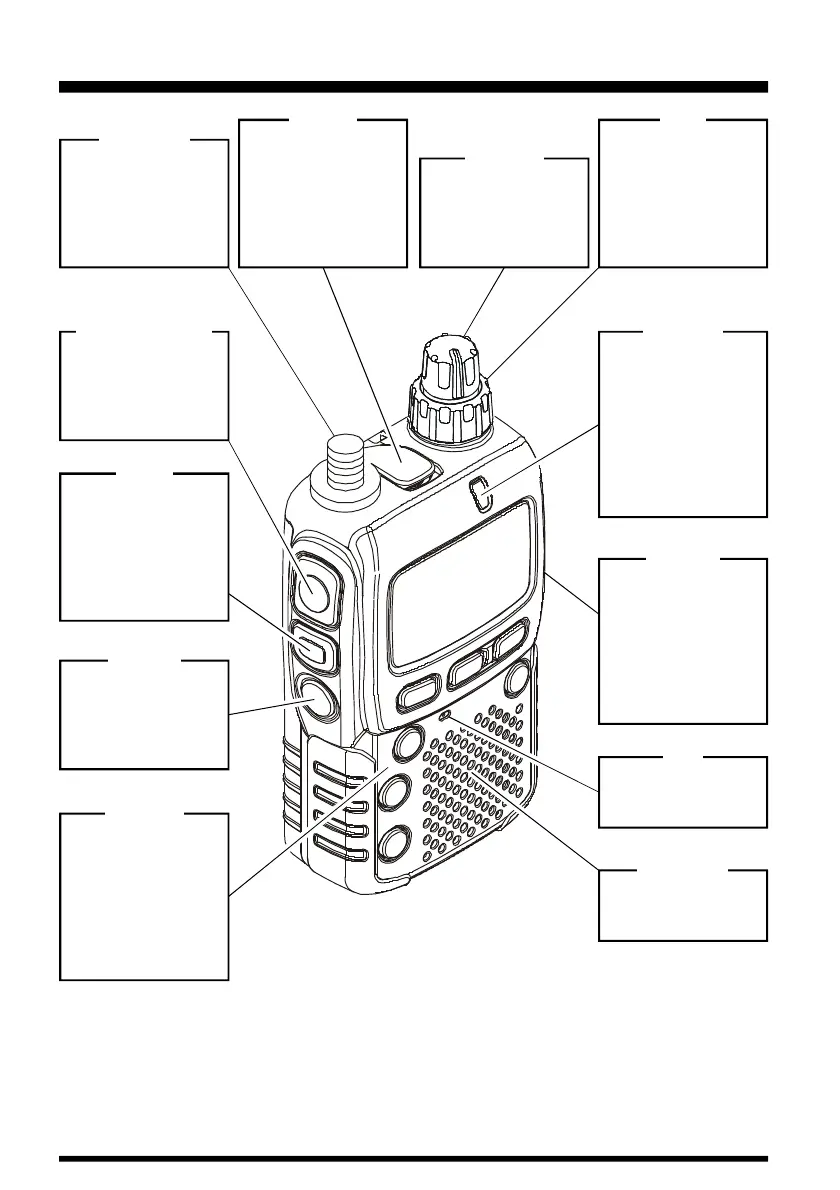
CONTROL & CONNECTIONS
DIAL
The main tuning Dial
is used for setting
the operating fre-
quency, and also is
used for menu se-
lections and other
adjustments.
VOLUME
This control adjusts
the audio volume
level. Clockwise ro-
tation increases the
volume level.
MIC/SP
This four-conductor
miniature jack pro-
vides connection
points for micro-
phone audio, ear-
phone audio, PTT,
and ground.
ANTENNA
Connect the sup-
plied rubber flex an-
tenna (or another
antenna presenting
a 50-Ohm imped-
ance) here.
PTT
(
Push To Talk
)
Press this switch to
transmit, and re-
lease it (to receive)
after your transmis-
sion is completed.
MONI
Pressing this key
disables the noise
squelching action,
allowing you to hear
very weak signals
near the back-
ground noise level.
POWER
Press and hold in
this switch for one
second to toggle the
transceiver’s power
on and off.
EXT DC
This coaxial DC jack
allows connection to
an external DC
power source (3.2-
7.0V DC). The cen-
ter pin of this jack is
the Positive
(
+
)
con-
nection.
SPEAKER
The internal
speaker is located
here.
MIC
The internal micro-
phone is located
here.
KEYPAD
These seven keys
select many of most
important operating
features on the VX-
2R. The functions of
the keys are de-
scribed in detail on
the pages to follow.
BUSY/TX
This indicator glows
green when the
squelch opens, and
turns red during
transmit. During
“Emergency” opera-
tion See page 31,
this indicator will
glow (or flash) white.

Table of Contents

Other manuals for Yaesu VX-2R

Related product manuals