VX-2R OPERATING MANUAL 61
The VX-2R includes a convenient “Clone” feature, which allows the memory and configu-
ration data from one transceiver to be transferred to another VX-2R. This can be particu-
larly useful when configuring a number of transceivers for a public service operation. Here
is the procedure for Cloning one radio’s data to another:
1. Turn both radios off.
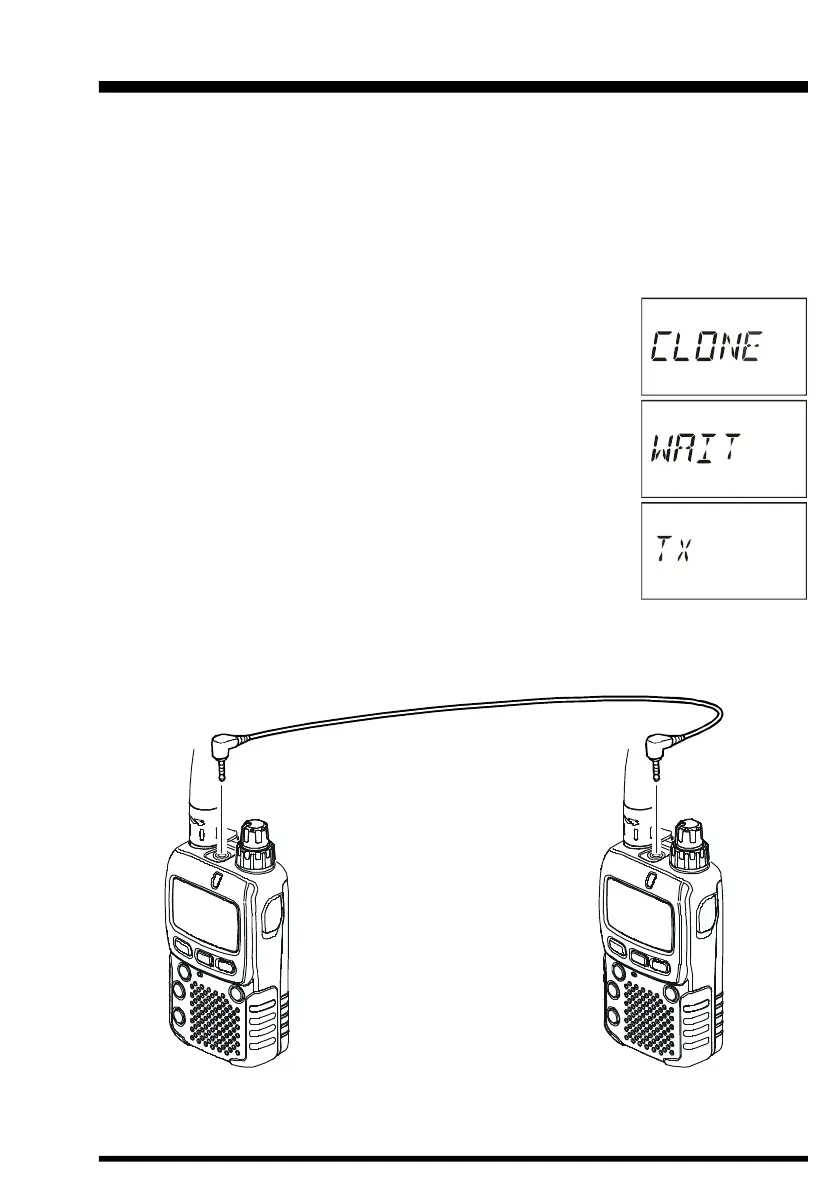
2. Connect the optional CT-27 Clone Cable between the MIC/SP jacks of the two ra-
dios.
3. Press and hold in the
[
F/W
]
key while turning the radios on. Do
this for both radios (the order of switch-on does not matter).
“CLONE” will appear on the displays of both radios when the
Clone mode is successfully activated in this step.
4. On the Destination radio, press the
[
V/M
]
key (“WAIT” will
appear on the LCD).
5. Press the
[
BAND
]
key on the Source radio; “TX” will appear
on the Source radio, and the data from this radio will be trans-
ferred to the other radio.
6. If there is a problem during the cloning process, “ERROR” will
be displayed. Check your cable connections and battery volt-
age, and try again.
7. If the data transfer is successful, “CLONE” will reappear on both displays. Turn both
radios off and disconnect the clone cable. You can then turn the radios back on, and
begin normal operation.
CLONING
CT-27 CLONING CABLE


 To Next Page