EasyManua.ls Logo

Yamaha ca-410 - Front Panel Overview; Power Switch and Indicator; Volume, Tone, and Balance Controls

Yamaha ca-410
13 pages
Print Icon
To Next Page IconTo Next Page
To Previous Page IconTo Previous Page
Loading...
FRONT
PANEL
AND
CONTROLS
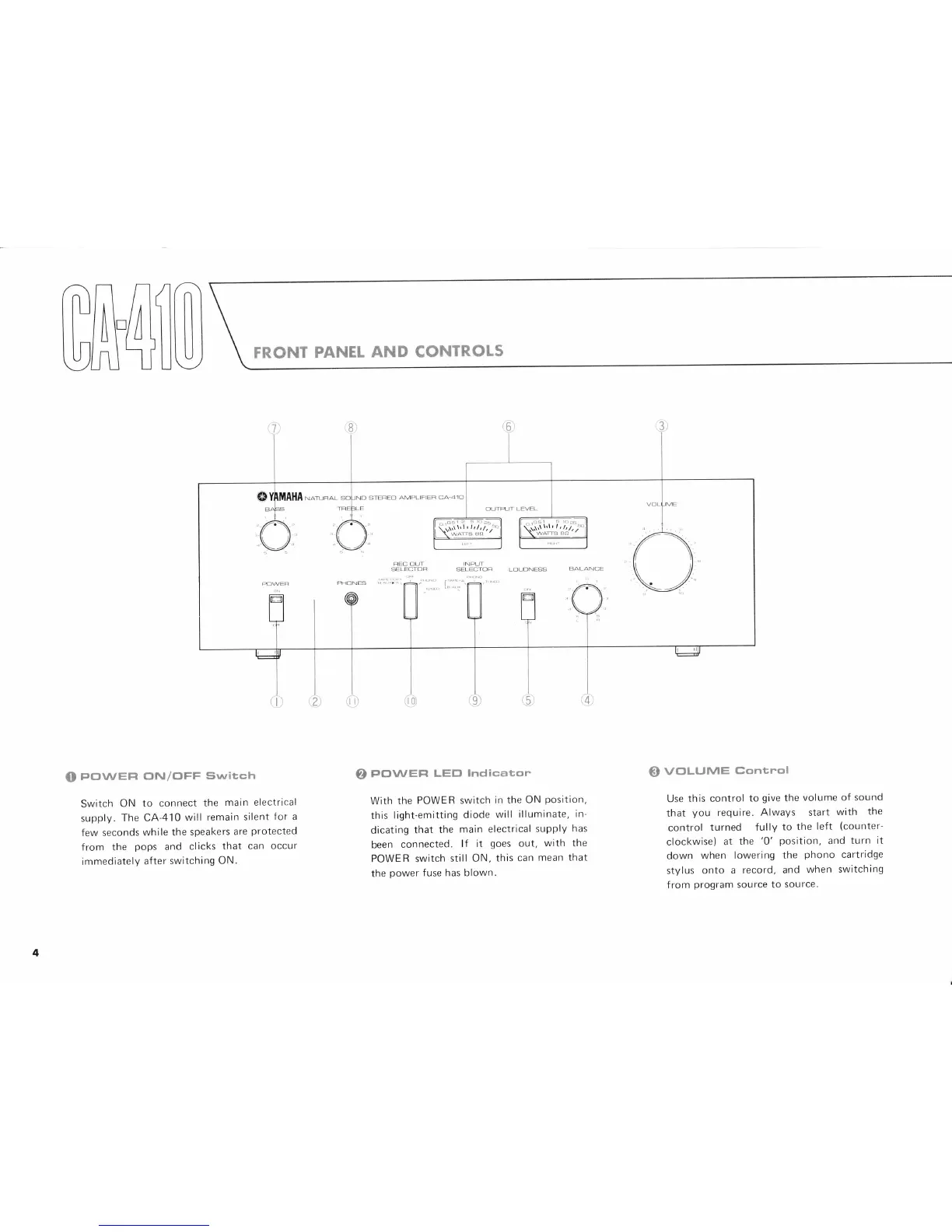
(O
PovvEFt
(]lv/oFF
svvitch
Switch
ON to
connect
the
main electrical
supply.
The CA-410
will
remain silent
Ior a
few seconds
while the
speakers
are
protected
from the
pops
and clicks
that
can occur
immediately
after switching
ON.
o
POWEFT
LEtrt
Indicator
With
the
POWER switch
in the
ON
position,
this
light-emitting
diode
will
illuminate,
in-
dicating
that
the
main electrical
supply
has
been
connected.
lf it
goes
out,
with the
POWER switch
still
ON, this
can
mean that
the
power
fuse
has
blown.
VC]LUIVIE
Gontrol
Use
this control
to
give
the
volume
of sound
that
you
require.
Always start
with
the
control
turned
fully
to
the
left
(counter-
clockwise)
at
the
'0'
position,
and
turn
it
down
when
lowering
the
phono
cartridge
stylus
onto a
record,
and
when
switching
from
program
source to
source.
@

Related product manuals