EasyManua.ls Logo

Yamaha CS-80 - Using the Programmable Panels to Duplicate the Preset Patches

Yamaha CS-80
56 pages
Print Icon
To Next Page IconTo Next Page
To Previous Page IconTo Previous Page
Loading...
HOW
TO
USE
PROGRAlVllVlfNG
.
TO GET
A SOUND
|
24
If
you've
read
the
previous
section
and
experimented
with
the
PANEL
controls,
you
probably
understand
what
they
do,
but
how
do you
go about
programnning
a
specific
sound you
want
to
hear?
There
are many
approaches
to
getting
a sound,
and
the
one we suggest
here
is
no
better
or worse than
others;
if
another
technique
works
for you,
use it.
Before
you
attempt
to program
a
given
sound, turn
off
all
effects
not
on
the Programmable panel . . . that
is,
begin with
the nominal
settings
pictured in
the
cover
illustration.
General
Approach
First,
think of
a
sound
...
get
it
in
your mind. Once
you
"hear"
it in
your
head,
you
can
begin to
analyze
what basic
musical
elements
make
up
that
sound,
and
therefore
how
to set up
the
same basics with
the
synthesizer.
Three
basic
elements
make
up
any musical
sound:
pitch,
timbre and
volume.
These
correspond
to
the
VCO,
VCF
and VGA
sections.
If
you
want
to get a
sound
resembling
an
acoustic
instrument,
consider
how
that
instrument
generates
sound.
What
is
the
basic
pitch,
the playing
range?
Use
the
FEET
selector
[5]
to set
the
keyboard
to
an
appro-
priate pitch
range.
What
is
the
basic waveform
or tone? You
set this
with the
VCO, If
the
sound
resembles
woodwinds
(reed
instruments),
use the
SQUARE
WAVE
[23]
and
try
different PULSE
WIDTH
[22]
settings.
For
strings,
add PULSE
WIDTH
MODULATION
[20
&
21]
or
use
SAWTOOTH
[24]
.
SAWTOOTH
is
also useful
for
brassy
sounds,
NOISE
[25]
alone
is
good for wind,
thunder,
sizzle and
other
special
effects.
It can
be
mixed
sparingly
with
other
VCO
sounds
to add
breath.
Use SINE
WAVE
[36]
for
colorless
or
"pure"
sounds.
What
is the
timbre,
the
tone
color? This
is
set with
the VCF.
An
"open"
sound
with
lots
of harmonics.
f
like
clarinet,
suggests
the HPF
[26]
is LOW and
the
LPF
[28]
is HIGH. A
sound
with
body but
less
brilliance,
like
piano,
suggests
the HPF
is still
LOW,
but LPF
is
closed
down
partially.
A very
rich,
but
muted
sound,
like
a string
bass,
suggests the
HPF
is
still
LOW, but LPF
is
closed
down
quite a ways
toward
LOW.
Step-by-Step
Examples
of
Programming
We
have
presented
a
handful
of patches for
you to
try, along
with
very
brief
explanations
of why
the con-
trols
are
set as they
are. Because
everyone
conceives
of
and
plays
sounds
differently,
and because
normal
component
tolerances
make
it
impossible
to give
"absolute"
control
settings,
you'll
want
to
vary
the
settings
to
"fine
tune"
the
sound
to
your
taste.
Become
aware of
what
each
control
does to the patch,
and
you will
soon find
that
you
don't need
to
write
down patches
. .
. you'll
instinctively
know
how
to set
all
the
controls.
Remember
that the
overall BRIL-
LIANCE
control
[7]
and
RESONANCE
control
[8]
may be used
to
further
change
a patch
once it
has
been
set.
NOTE: The
patches shown
for Strings, Harpsichord,
Flute,
and other sounds
which
also
appear as
Preset
Patches
are non-identical
to
the
presets.
There
are
many
different ways
to "get a
sound,"
and
the
pro-
gramming examples shown
here
were
chosen
because
they fail \n
a
logical
progression with
a minimum change
of control settings.
Orchestral
instruments
are
used
only
because
they
provide a
good
frame
of reference;
the
CS-80
can
be used to make
an
infinite
variety
of
unique
sounds
once the basic principles
are understood.
NOTE: AM
panel settings
remain
unchanged
from
one
patch
to
the
next,
unless otherwise
noted. Those
settings
which
do
change from
the previous
patch are marked
in
color on
the
patch
diagrams.
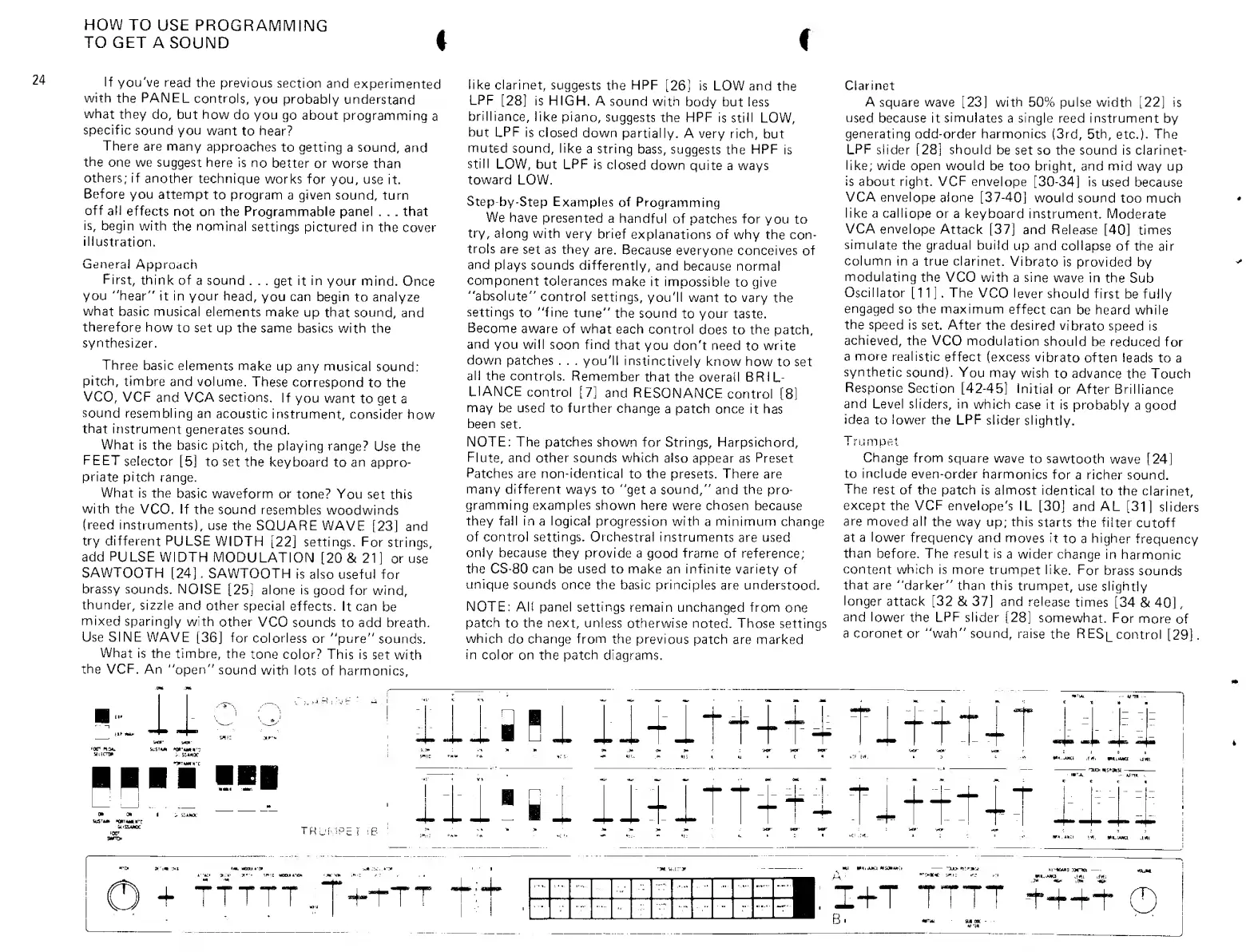
Clarinet
A
square
wave
[23]
with
50% pulse width
[22]
is
used
because it
simulates
a single reed instrument
by
generating
odd-order harmonics
(3rd, 5th,
etc.).
The
LPF
slider
[28]
should
be
set so
the
sound is clarinet-
like;
wide
open would
be too bright, and mid
way
up
is about right. VCF
envelope [30-34]
is
used
because
VCA envelope
aione
[37-40]
would
sound
too much
like
a
calliope
or a
keyboard
instrument.
Moderate
VCA
envelope
Attack
[37]
and
Release
[40]
times
simulate
the gradual build
up and
collapse
of
the
air
column in
a
true clarinet.
Vibrato
is provided by
modulating
the
VCO with
a
sine
wave in
the
Sub
Oscillator
[11].
The
VCO lever
should
first
be fully
engaged
so
the
maximum
effect can
be heard while
the
speed is
set. After
the
desired
vibrato
speed is
achieved,
the
VCO modulation
should
be
reduced
for
a
more
realistic
effect
(excess
vibrato
often leads
to a
synthetic
sound).
You
may wish
to advance
the
Touch
Response
Section
[42-45]
Initial
or
After Brilliance
and
Level sliders, in
which
case it
is
probably
a good
idea
to lower
the
LPF
slider
slightly.
Trumpet
Change from
square
wave
to
sawtooth
wave
[24]
to include
even-order
harmonics
for
a richer
sound.
The
rest
of the
patch is almost
identical
to the
clarinet,
except
the VCF
envelope's
IL
[30]
and AL
[31]
sliders
are moved
all
the
way up; this
starts the
filter
cutoff
at a
lower
frequency and
moves
it
to
a
higher
frequency
than
before. The result is
a wider
change
in
harmonic
content
which is
more
trumpet
like.
For
brass
sounds
that
are
"darker" than
this
trumpet,
use slightly
longer
attack
[32
8t
37]
and
release
times
[34
&
40]
,
and lower
the
LPF
slider
[28] somewhat.
For
more
of
a coronet
or
"wah" sound,
raise
the
R
ESi_
control
[29]
.
aiiHi
ll4it^=++lnf-ft-lT
ii-ll
TRUMPET iB
iti'si ilUTT+n
Ti.m+T
mi
.m, WILJOIQ
+ fTTTT.;,7"^rT'
V Wdiua *titmw:i
^iJr
:
I+T
TTTT
-tH-H-i-
©

Other manuals for Yamaha CS-80

Related product manuals