44
EAD10 Owner’s Manual
Recording Your Performance
Basic Guide
Overdub Recording Your Performance onto an Accompaniment
Song
You can overdub your performance onto a accompaniment song that you’ve imported onto a USB flash drive and save your
performance combined with the accompaniment song as a single audio file.
Preparing an Accompaniment Song (Audio File)
• Importing from a Computer
Save the audio file (.wav file) from the computer to the root directory on a USB flash drive.
• Importing from the [AUX IN] Jack
Connect a portable music player or other such device to the [AUX IN] jack on the rear panel, and have the song ready
for playback.
Recording the Accompaniment Song
1.
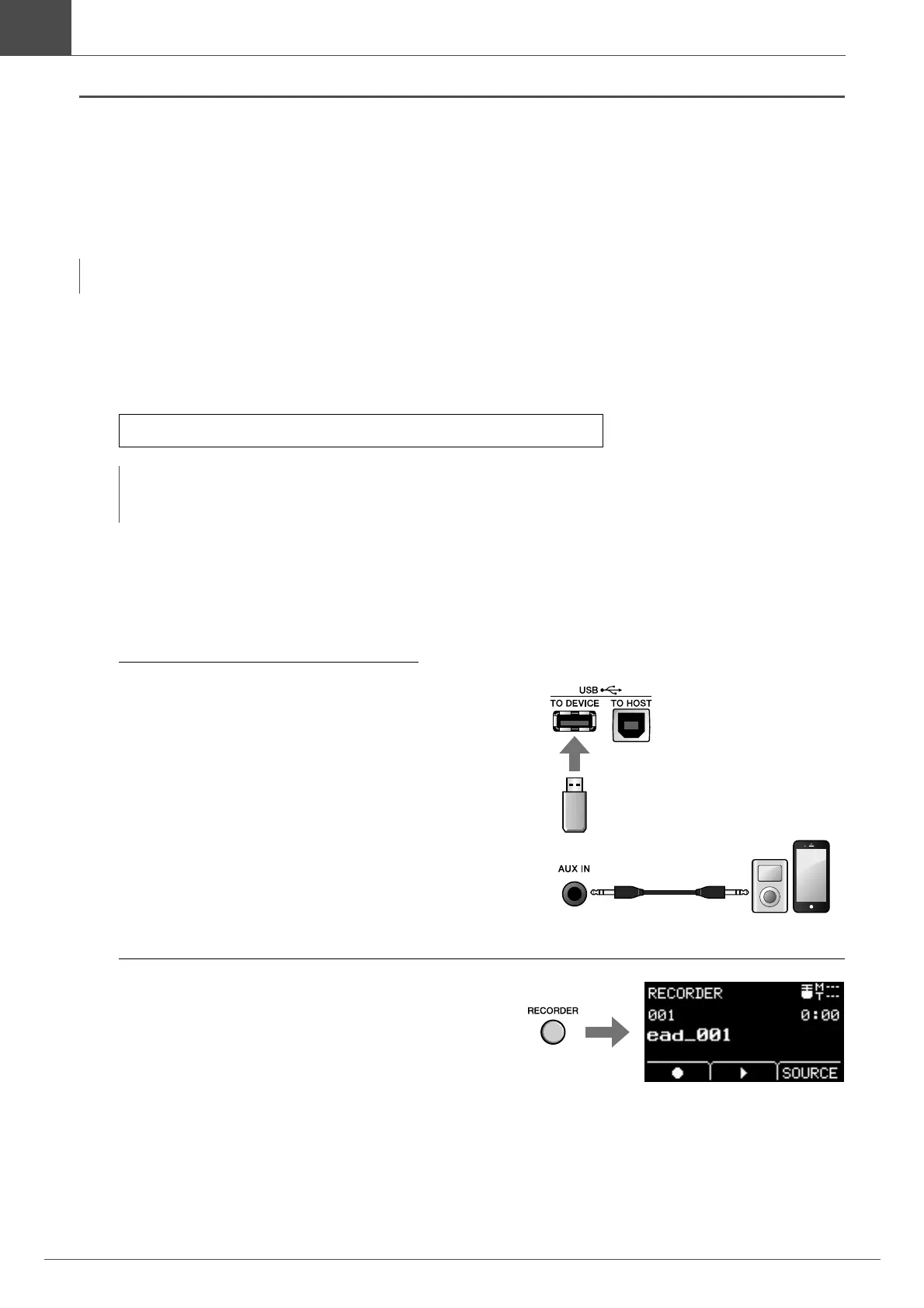
Connect the USB flash drive to the [USB TO
DEVICE] terminal on the rear panel, then
connect a portable music player to the
[AUX IN] jack.
2.
Press the [RECORDER] button.
The RECORDER (USB) screen opens.
NOTE
If you play along to a track coming into the Aux Input, only your performance will be recorded.
Audio file requirements: 16-bit, 44.1 kHz, stereo, wav format
NOTE
• Some of the audio files may not play back even when the above requirements are met.
• The EAD10 does not recognize the audio file if it is in a folder.



 To Next Page