45
EAD10 Owner’s Manual
Recording Your Performance
Basic Guide
3.
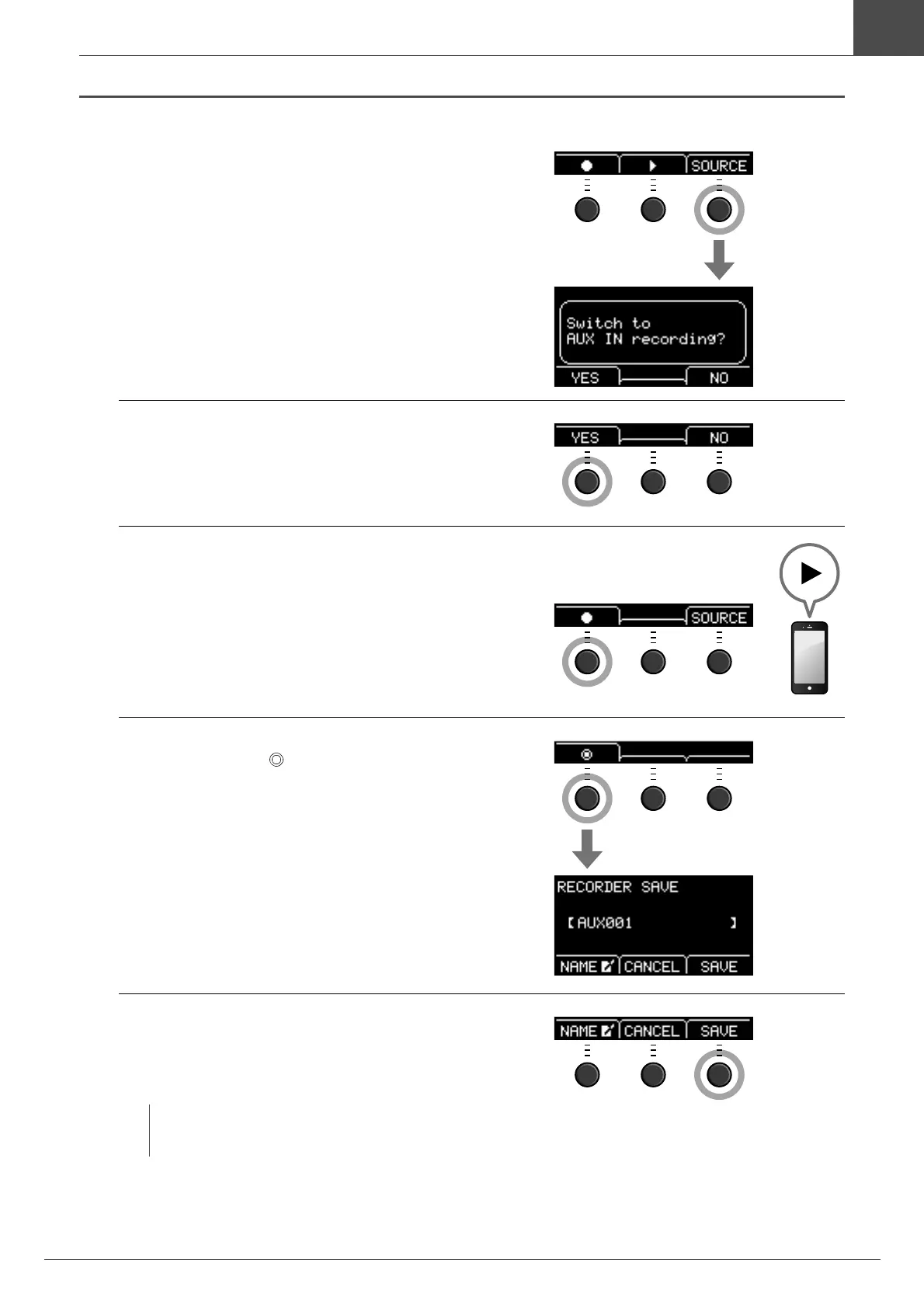
Press the button below “SOURCE” ([F3]).
The “Switch to AUX IN recording?” confirmation
screen appears.
4.
Press the button below “YES” ([F1]), to
switch to AUX IN Recording.
5.
Press the button below “” ([F1]) on the
EAD10 to start recording, and simultane-
ously press Playback on the portable music
player to start playback of the accompani-
ment song.
6.
After the song playback finishes, press the
button below “ ” ([F1]) to stop recording.
The RECORDER SAVE screen opens.
7.
Press the button below “SAVE” ([F3]), and
save the file.
Press the button below “CANCEL” ([F2]) if you do not
want to save the file.
By doing this, the external song you have just recorded is on the USB flash drive, ready for you to
use.
NOTE
If you want to change the file name, press the button below
“NAME” ([F1]) and enter a new name. (page 37)



 To Next Page