EasyManua.ls Logo

Yamaha MG102C - User Manual

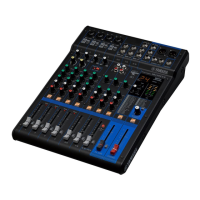
Yamaha MG102C
21 pages
Print Icon
To Next Page IconTo Next Page
Loading...
ES
FR
DE
EN
Owner’s Manual
Bedienungsanleitung
Mode d’emploi
Manual de instrucciones
Owner’s Manual
Bedienungsanleitung
Mode d’emploi
Manual de instrucciones
MIXING CONSOLE
MIXING CONSOLE
Features
Input Channels..............................................................page 10
With up to four mic/line inputs or up to three (four for MG102C)
stereo inputs, the MG mixer can simultaneously connect to a
wide range of devices: microphones, line-level devices, stereo
synthesizers, and more.
Compression...................................................................page 9
Compression increases the overall level without introducing
distortion by compressing excessive peaks in the signals from
microphones and guitars.
AUX Sends and Stereo AUX Return............................page 12
You can use the AUX SEND jack to feed the signal sent to an
external signal processor, and then return the processed stereo
signal through the RETURN jack.
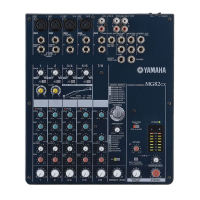
High-quality digital effects (MG82CX)...................page 13, 57
With digital effects built in, the MG82CX can deliver a wide range
of sound variations all by itself.
Caractéristiques
Canaux d’entrée..............................................................page 36
Avec quatre entrées micro/ligne ou trois entrées stéréo maximum
(quatre pour la console MG102C), la console de mixage MG peut
connecter simultanément une grande variété d’appareils :
micros, appareils de ligne, synthétiseurs stéréo, etc.
Compression...................................................................page 35
La compression augmente le niveau général sans engendrer de
distorsion en comprimant les pics excessifs des signaux des
micros et des guitares.
Envois AUX et retour AUX stéréo..................................page 38
Vous pouvez utiliser la prise jack AUX SEND pour envoyer le
signal vers une unité de traitement de signaux externes, puis
pour renvoyer le signal stéréo traité via la prise jack RETURN.
Effets numériques de qualité supérieure (MG82CX)
...
page 39, 57
Grâce aux effets numériques intégrés, la console MG82CX peut
proposer de nombreuses variations de sons.
Funktionen
Eingangskanäle.............................................................Seite 23
Mit bis zu vier Mikrofon-/Line-Eingängen oder bis zu drei (vier
beim MG102C) Stereoeingängen können viele Geräte
gleichzeitig am MG-Mischpult angeschlossen werden:
Mikrofone, Geräte mit Leitungspegel, Stereo-Synthesizer uvm.
Kompression..................................................................Seite 22
Kompression erhöht den Durchschnittspegel, ohne Verzerrung
hinzuzufügen, indem übermäßige Pegelspitzen der Signale von
Mikrofonen oder Gitarren komprimiert werden.
AUX Sends und Stereo AUX Return............................Seite 25
Von der AUX SEND-Buchse können Sie das Signal einzeln an
einen externen Signalprozessor führen, und das verarbeitete
Stereosignal über die RETURN-Buchse zurück in das Pult
führen.
Hochwertige Digitaleffekte (MG82CX)...................Seite 26, 57
Mit den eingebauten digitalen Effekten kann das MG82CX aus
sich heraus eine Reihe von Klangvariationen liefern.
Características
Canales de entrada......................................................página 49
Con un máximo de cuatro entradas de micrófono/línea o tres
entradas estereofónicas (cuatro en el modelo MG102C), la
mezcladora MG puede conectarse simultáneamente con una
gran variedad de dispositivos: micrófonos, dispositivos de nivel
de línea, sintetizadores estereofónicos, etc.
Compresión..................................................................página 48
La compresión aumenta el nivel general sin causar distorsión,
mediante la compresión del exceso de picos en las señales de
los micrófonos y guitarras.
Envíos AUX y retorno AUX estereofónico.................página 51
Puede utilizar la toma AUX SEND para introducir la señal
enviada en un procesador de señales externo y luego devolver la
señal estereofónica procesada a través de la toma RETURN
(retorno).
Efectos digitales de alta calidad (MG82CX)........página 52, 57
Gracias a sus efectos digitales incorporados, la mezcladora
MG82CX puede producir por sí misma una amplia gama de
variaciones de sonido.

Other manuals for Yamaha MG102C

Questions and Answers

  • M
    melissa76Jul 30, 2025
    How to fix no effect on my Yamaha MG82CX Music Mixer?
    • C
      cruzstacyJul 30, 2025
      If your Yamaha MG82CX Music Mixer isn't applying effects, check that the EFFECT control on each channel is correctly adjusted. Make sure the internal effect unit’s ON switch is turned ON. Also, ensure that the EFFECT PARAMETER control and EFFECT RTN control are correctly adjusted.
  • J
    Justin HuntAug 3, 2025
    What to do if my Yamaha MG102C Music Mixer has no sound?
    • D
      donovanannAug 3, 2025
      To troubleshoot no sound from your Yamaha Music Mixer, verify that microphones, external devices, and speakers are correctly connected. Also, ensure the channel GAIN controls, LEVEL controls, and STEREO Master control are set to appropriate levels. Check if the MONITOR switch is properly set and that your speaker cables are correctly connected and not shorted. If problems persist, it may require professional attention.
  • S
    Sheila OdonnellAug 9, 2025
    Why is the sound faint, distorted, or noisy on my Yamaha Music Mixer?
    • S
      Steven RollinsAug 9, 2025
      To address faint, distorted, or noisy sound on your Yamaha Music Mixer, first, make sure the channel GAIN controls, LEVEL controls, and STEREO Master control are set to appropriate levels. Ensure that you're not connecting two different instruments to both the XLR-type and phone jacks, or to the phone and RCA pin jacks on one channel—use only one jack per channel. Check that the input signal from the connected device is set to an appropriate level, and that you are applying effects at an appropriate level. Confirm that microphones are connected to the MIC input jacks on channels 1 to 5/6. Finally, if using condenser microphones, verify that the PHANTOM +48 V switch is turned ON.
  • D
    David GarrettAug 14, 2025
    How to troubleshoot power issues with Yamaha Music Mixer?
    • B
      barnettcalvinAug 14, 2025
      If your Yamaha Music Mixer doesn't power on, ensure the supplied power adapter is properly plugged into an appropriate AC wall outlet and also correctly plugged into the mixer.
  • P
    Peter PetersAug 19, 2025
    What to do if I want to output a monitor signal through speakers with my Yamaha MG102C Music Mixer?
    • K
      Kristina BenderAug 19, 2025
      To output a monitor signal through speakers on your Yamaha Music Mixer, connect a powered speaker to the EFFECT (AUX) jack. Then, adjust the output signal using the EFFECT (AUX) controls on each channel.
  • T
    turnermorganAug 25, 2025
    How to make spoken words clearer on Yamaha MG102C Music Mixer?
    • Q
      qcummingsAug 25, 2025
      To make spoken words heard more clearly on your Yamaha Music Mixer, be sure that the switches are ON and adjust the equalizers (HIGH, MID and LOW) on each channel.

Summary

Precautions

Warnings

Essential safety instructions to prevent serious injury or death from hazards.

Cautions

Basic precautions to avoid physical injury or damage to the device or property.

Introduction

Before Turning on the Mixer

Essential steps before powering on the mixing console.

Mixer Basics

Quick Guide

A brief overview of connecting and setting up the mixer.

Making the Most of Your Mixer

Tips for optimizing mixer performance and sound.

Reference

Front & Rear Panels

Detailed layout and identification of mixer controls and connectors.

Channel Control Section

Explanation of controls for individual input channels.

Master Control Section

Overview of overall mixer output and master controls.

DIGITAL EFFECT

Information about the MG82CX's built-in digital effects.

Rear Input;Output Section

Details about the mixer's rear panel connectors.

Setup

Jack List

Comprehensive list of all input and output jacks with specifications.

Troubleshooting

Mounting to a Microphone Stand

Instructions for attaching the mixer to a microphone stand.

Specifications

Electrical Specifications

Technical data and performance metrics of the mixer.

General Specifications

Overall technical details including power, dimensions, and weight.

Yamaha MG102C Specifications

General IconGeneral
Frequency range20 - 20000 Hz
Channels quantity10 channels
Digital sound processing- bit
Product colorBlack
Power consumption (typical)21 W
Total Harmonic Distortion (THD)0.1 %
Weight and Dimensions IconWeight and Dimensions
Depth302.5 mm
Width256.6 mm
Height62.2 mm
Weight1500 g

Related product manuals