EasyManua.ls Logo

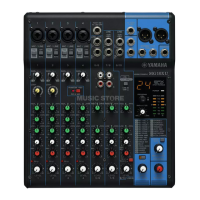
Yamaha MG10XUF - User Manual

Yamaha MG10XUF
28 pages
Print Icon
To Next Page IconTo Next Page
Loading...
EN
Owners Manual
PRECAUTIONS pages 4 to 6
Quick Start Guide pages 9 to 11
Troubleshooting pages 18 to 20

Questions and Answers

  • D
    Daniel JohnsonAug 17, 2025
    What to do if effects are not working on Yamaha MG10XUF Music Mixer?
    • N
      nvalenciaAug 17, 2025
      If effects aren't being applied on your Yamaha Music Mixer, try these steps: * Ensure the [FX] knobs for each channel are set to appropriate levels. * Confirm that the [ON] switch for [FX RTN] is turned on. * Adjust the [PARAMETER] knob and [FX RTN] fader to suitable levels.
  • V
    Victoria BrennanAug 20, 2025
    How to troubleshoot no sound output on Yamaha MG10XUF Music Mixer?
    • A
      anthonyduncanAug 20, 2025
      If no sound is coming from your Yamaha Music Mixer, there are several things to check: * Ensure that all external instruments, including microphones and speakers, are correctly connected. * Inspect your cables for any shorts. * Verify that the [GAIN] knobs for each channel, channel faders, and the [STEREO] master fader are adjusted to appropriate levels. * Confirm that the [LINE /USB] switch is set correctly.
  • A
    Amber HernandezAug 25, 2025
    Why are left and right levels different on Yamaha MG10XUF Music Mixer?
    • M
      Mrs. Pamela CampbellAug 25, 2025
      If the left and right levels are different for a stereo signal input on your Yamaha Music Mixer: * Make sure the [PAN] is set to the center. * Try reversing the left and right input connections. If the low volume switches sides after swapping, the issue may be with the signal source. * Ensure you are using the same type of cable for both the left and right input signals.
  • P
    phillipwaltonAug 28, 2025
    What to do if no sound from STEREO OUT jack on Yamaha MG10XUF?
    • J
      Jessica RodriguezAug 28, 2025
      If there is no sound output from the [STEREO OUT] jack on your Yamaha Music Mixer, check if the [STEREO] master [ON] switch is turned on.
  • C
    Christopher DominguezSep 1, 2025
    How to make speaking voices clearer on Yamaha Music Mixer?
    • O
      Olivia SotoSep 1, 2025
      To improve the clarity of speaking voices on your Yamaha Music Mixer: * Ensure the [HPF] switch is turned on. * Adjust the equalizer ([HIGH]/[MID]/[LOW]) appropriately.
  • T
    Tiffany RodriguezSep 5, 2025
    Why is the sound level unstable on Yamaha MG10XUF?
    • S
      stoneeugeneSep 5, 2025
      If the sound level is unstable and inconsistent on your Yamaha Music Mixer, use the [COMP] knob to lower the compressor level.
  • C
    Carlos HaleSep 8, 2025
    What to do if no sound from MONITOR OUT or PHONES jack on Yamaha Music Mixer?
    • P
      Paul ThompsonSep 8, 2025
      If no sound is coming from the [MONITOR OUT] jack or [PHONES] jack on your Yamaha Music Mixer, ensure that the [PFL] switches for the channels you are not using are turned off.
  • W
    William SchultzNov 12, 2025
    Why is the sound low, distorted, or noisy on my Yamaha MG10XUF?
    • A
      Anthony SmithNov 12, 2025
      If the sound from your Yamaha Music Mixer is low, distorted, or noisy, consider the following: * Ensure the microphone is connected to a [MIC/LINE] jack. * If using a condenser microphone, make sure the [PHANTOM +48V] switch is on. * Check if the [PAD] switch is enabled; turn it off for sources with low output levels. * Verify that the output signal level for the connected instrument is appropriate. * When connecting an instrument with a +4 dBu output level, adjust the [PAD] switch on a mono input channel or use a stereo input channel. * If an input channel has both XLR and phone input jacks (or phone and RCA pin jacks), use only one jack at a time. * Adjust the [GAIN] knobs, channel faders, and [STEREO] master fader to suitable levels. * Reduce the levels of effects or co...

Summary

Safety Instructions

Important Safety Instructions

Essential guidelines to prevent injury, electric shock, fire, and other hazards during operation.

Precautions

General Warnings

Covers critical warnings for preventing injury, death, or damage from electrical shock, fire, and misuse.

Getting Started

Quick Start Guide

Provides a step-by-step guide to connect devices and achieve initial sound output.

Connecting Devices

Instructions for connecting microphones, instruments, and speakers to the mixer.

Controls and Functions

Applying Effects

Troubleshooting

No Sound Output Issues

Diagnoses and resolves problems where no sound or very low volume is output from the mixer.

Other Common Problems

Addresses various other issues like distorted sound, incorrect levels, and effect problems.

Technical Specifications

Yamaha MG10XUF Specifications

General IconGeneral
Channels quantity10 channels
Digital sound processing- bit
DJ mixerYes
Rack mounting-
Monitor out1
Number of microphone inputs4
Phantom power48 V
AC input voltage120-240 V
AC input frequency50 - 60 Hz
Power consumption (typical)22.9 W
Weight and Dimensions IconWeight and Dimensions
Depth390 mm
Width275 mm
Height110 mm
Weight3300 g

Related product manuals