PERIODIC MAINTENANCE AND MINOR REPAIR
6-23
2
3
4
5
6
7
8
9
Cleaning the V-belt case air filter el-
ement
1. Remove cowling D. (See
page 6-8.)
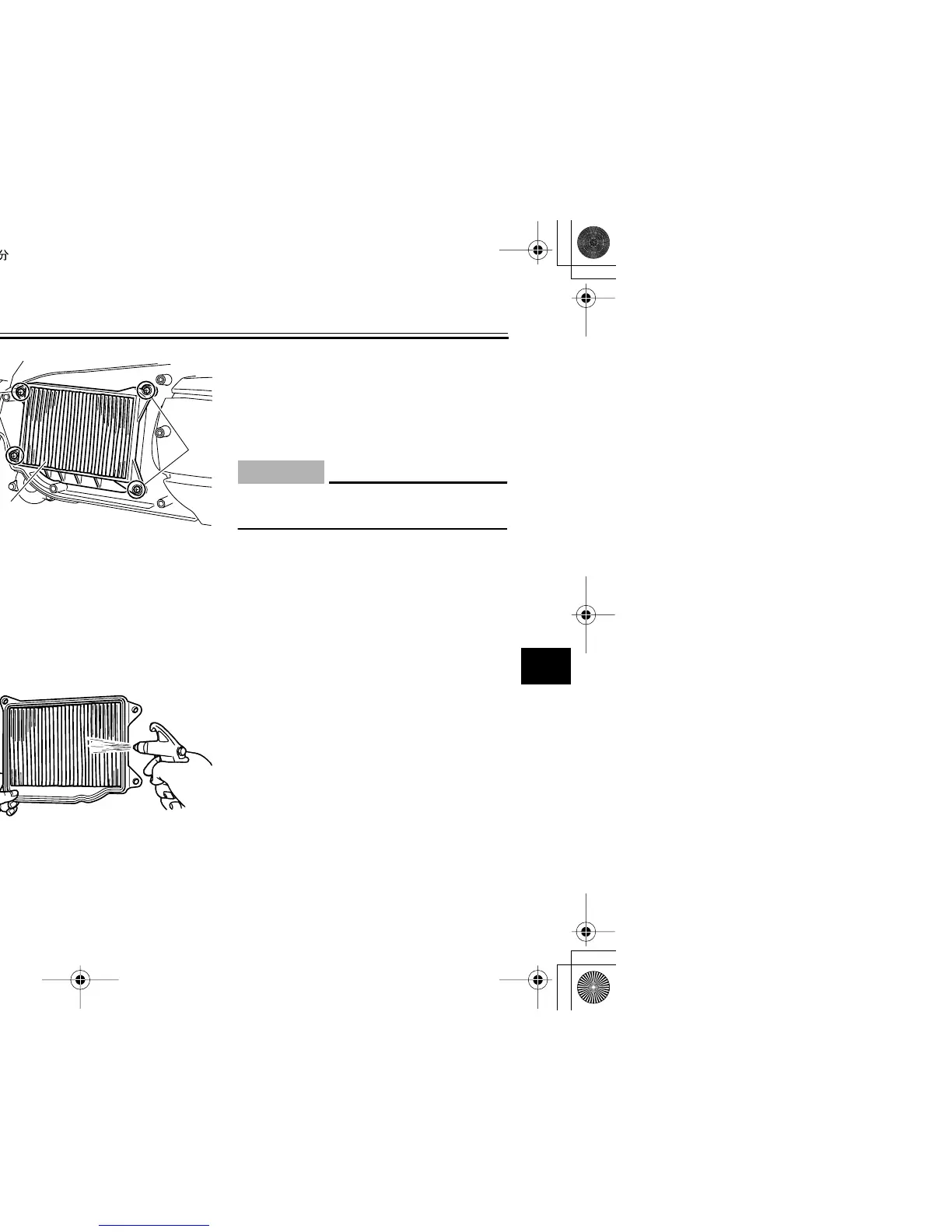
2. Remove the V-belt air filter case
cover by removing the screws.
3. Remove the V-belt case air filter
element by removing the screws.
4. Lightly tap the V-belt case air filter
element to remove most of the
dust and dirt, and then blow out the
dirt with compressed air as shown.
5. Check the V-belt case air filter ele-
ment for damage and replace it if
necessary.
6. Install the V-belt case air filter ele-
ment by installing the screws.
7. Install the V-belt air filter case cov-
er by installing the screws.
CAUTION:
ECA12940
Make sure that the V-belt filter ele-
ment is properly seated in its case.
8. Install the cowling.
1. Screw
2. V-belt air filter case cover
1
2
1. Screw
2. V-belt case air filter element
2
1
(×4)
1




 To Next Page