INSTRUMENT AND CONTROL FUNCTIONS
3-8
3
Select the brightness control mode as
follows.
1. Turn the key to “OFF”.
2. Push and hold the “SELECT” but-
ton.
3. Turn the key to “ON”, and then re-
lease the “SELECT” button after
five seconds.
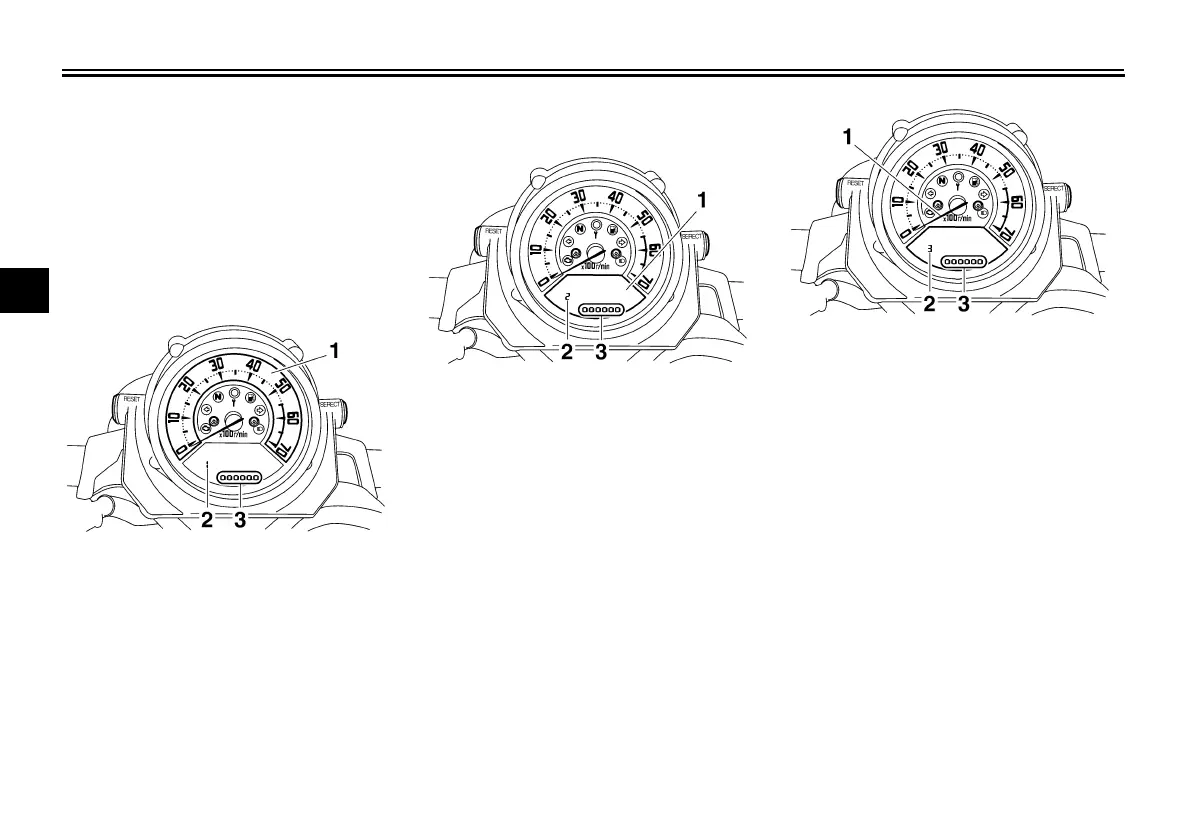
Item number “1” is displayed.
4. Adjust the tachometer panel
brightness level by pushing the
“RESET” button.
5. Push the “SELECT” button to se-
lect the LCD.
Item number “2” is displayed.
Adjust the LCD brightness level by
pushing the “RESET” button.
6. Push the “SELECT” button to se-
lect the tachometer needle.
Item number “3” is displayed.
Adjust the tachometer needle
brightness level by pushing the
“RESET” button.
7. Push the “SELECT” button and the
multi-function display will return to
the odometer or tripmeter mode.
1. Tachometer panel
2. Item number
3. Brightness level
1. LCD
2. Item number
3. Brightness level
1. Tachometer needle
2. Item number
3. Brightness level
U5YU23E0.book Page 8 Friday, November 23, 2007 8:49 AM



 To Next Page