Instrument and control functions
3-9
1
2
3
4
5
6
7
8
9
10
11
12
seconds by pushing the “SELECT” but-
ton.
To set the clock
1. Turn the key to “ON”.
2. Push the “SELECT” button and
“RESET” button together for two
seconds.
3. When the hour digits start flashing,
push the “RESET” button to set the
hours.
4. Push the “SELECT” button, and
the minute digits will start flashing.
5. Push the “RESET” button to set
the minutes.
6. Push the “SELECT” button and
then release it to start the clock.
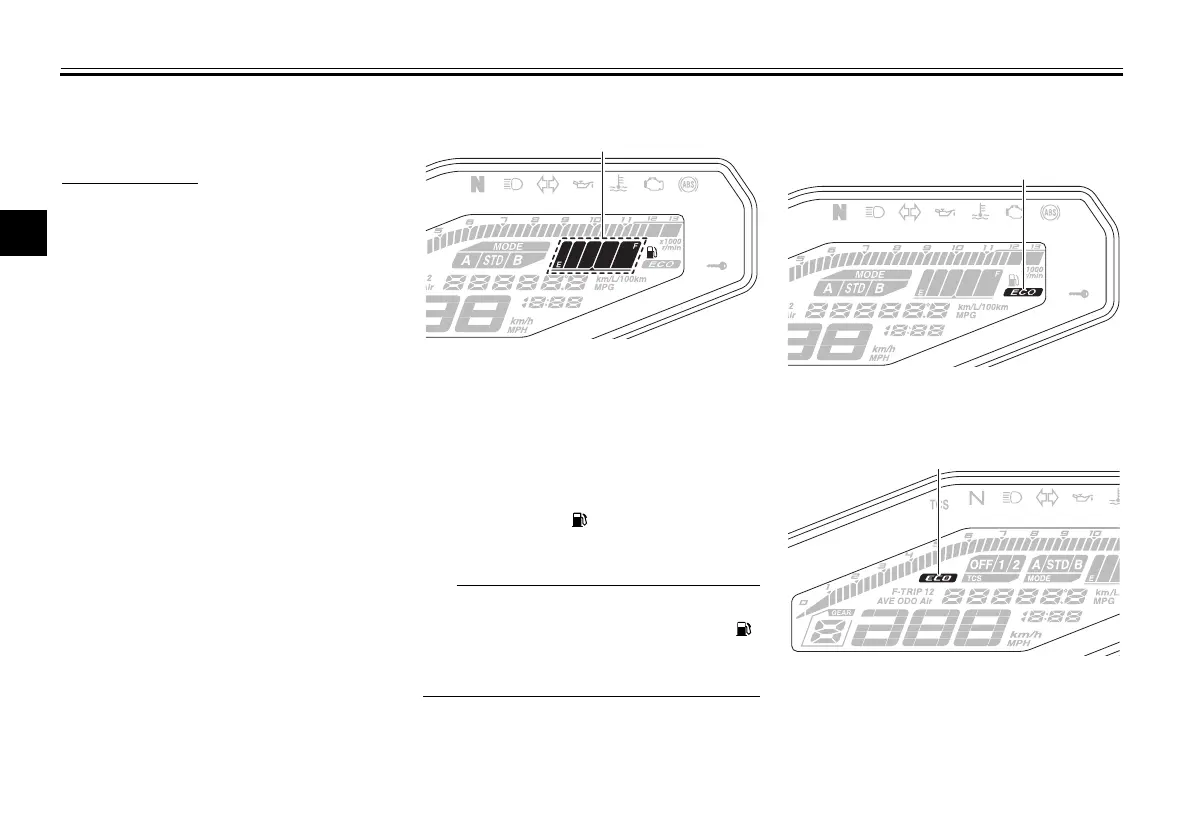
Fuel meter
The fuel meter indicates the amount of
fuel in the fuel tank. The display seg-
ments of the fuel meter disappear to-
wards “E” (empty) as the fuel level
decreases. When the last segment
starts flashing (“ ” will also flash for
MT09), refuel as soon as possible.
If a problem is detected in the electrical
ciruit, the fuel level segments and “ ”
will flash repeatedly. If this occurs, have
a Yamaha dealer check vehicle.
Eco indicator
MT09
MT09A
This indicator comes on when the vehi-
cle is being operated in an environmen-
tally friendly, fuel-efficient manner. The
1. Fuel meter
1. Eco indicator “ECO”
1. Eco indicator “ECO”
B87-9-E0_1.book 9 ページ 2015年12月16日 水曜日 午前10時21分





 To Next Page