Instrument and control functions
3-10
1
2
3
4
5
6
7
8
9
10
11
12
indicator goes off when the vehicle is
stopped.
Consider the following tips to reduce
fuel consumption:
Avoid high engine speeds during
acceleration.
Travel at a constant speed.
Select the transmission gear that
is appropriate for the vehicle
speed.
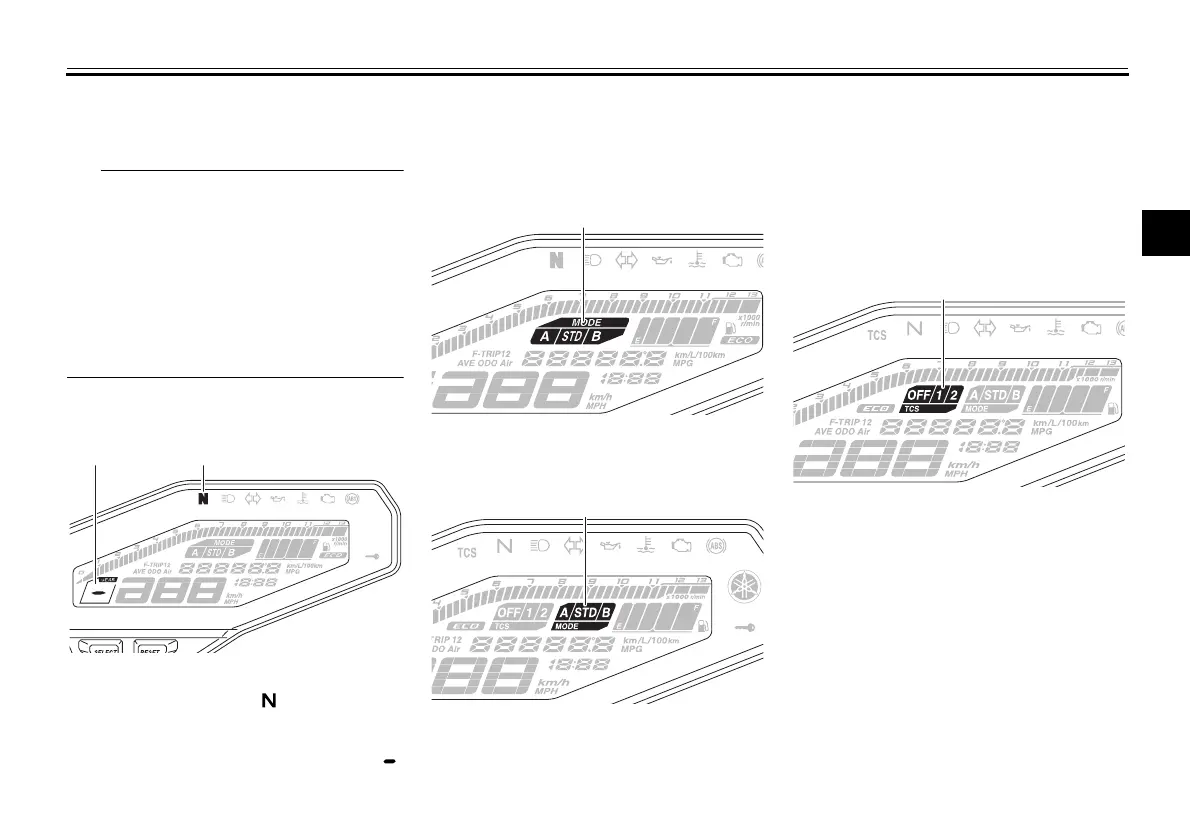
Transmission gear display
This display shows the selected gear.
The neutral position is indicated by “ ”
and by the neutral indicator light.
Drive mode display
MT09
MT09A
This display indicates which drive
mode has been selected: “STD”, “A” or
“B”. For more details on the modes and
on how to select them, see pages 3-15
and 3-17.
TCS display (for equipped models)
MT09A
This display indicates which traction
control system setting has been select-
ed: “1”, “2” or “OFF”. For more details
on the TCS settings and on how to se-
lect them, see page 3-21.
1. Transmission gear display
2. Neutral indicator light “ ”
1. Drive mode display
1. Drive mode display
1. TCS display
B87-9-E0_1.book 10 ページ 2015年12月16日 水曜日 午前10時21分






 To Next Page