Instrument and control functions
3-12
1
2
3
4
5
6
7
8
9
10
11
12
Air_ _ C ODO TRIP 1 TRIP
2 F-TRIP
For the UK:
F-TRIP km/L, L/100 km or MPG
AVE_ _._ km/L, AVE_ _._ L/100 km or
AVE_ _._ MPG C Air_ _ C
ODO TRIP 1 TRIP 2 F-TRIP
To reset a tripmeter, select it by
pushing the “SELECT” button, and
then push the “RESET” button for
one second.
If you do not reset the fuel reserve
tripmeter manually, it resets auto-
matically and disappears after re-
fueling and traveling 5 km (3 mi).
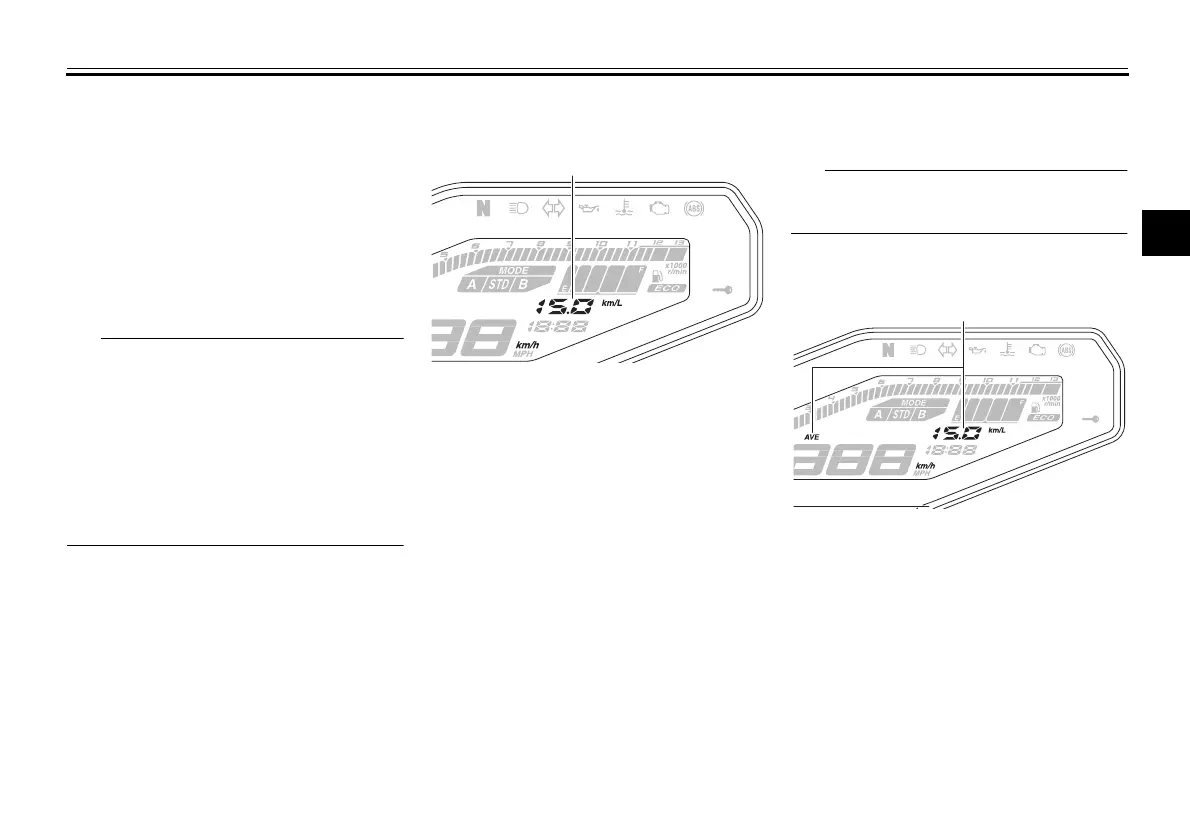
Instantaneous fuel consumption
mode
The instantaneous fuel consumption
display can be set to either “km/L”, “L/
100 km” or “MPG” (for the UK).
“km/L”: The distance that can be
traveled on 1.0 L of fuel under the
current riding conditions is shown.
“L/100 km”: The amount of fuel
necessary to travel 100 km under
the current riding conditions is
shown.
“MPG” (for the UK): The distance
that can be traveled on 1.0 Imp.gal
of fuel under the current riding con-
ditions is shown.
To switch between the instantaneous
fuel consumption display settings, push
the “SELECT” button for one second.
If traveling at speeds under 20 km/h (12
mi/h), “_ _._” is displayed.
Average fuel consumption mode
This display shows the average fuel
consumption since it was last reset.
The average fuel consumption display
can be set to either “AVE_ _._ km/L”,
“AVE_ _._ L/100 km” or “AVE_ _._
MPG” (for the UK).
“AVE_ _._ km/L”: The average dis-
tance that can be traveled on 1.0 L
of fuel is shown.
1. Instantaneous fuel consumption display
1. Average fuel consumption display
B87-9-E0_1.book 12 ページ 2015年12月16日 水曜日 午前10時21分




 To Next Page