Instrument and control functions
5-4
5
See page 4-4 for more information
on “TCS-MODE”.
See page 4-3 for more information
on “D-MODE”.
EAU91373
Wheel switch “ ”
When the wheel switch is operated, a
cursor will appear around the previous-
ly selected item on the display.
The wheel switch controls:
Vehicle information displays
Settings MENU
Grip warmer function (Option)
Operate the wheel switch as follows:
Rotate up - rotate the wheel upward to
scroll up or increase a setting value.
Rotate down - rotate the wheel down-
ward to scroll down or decrease a set-
ting value.
Push inward - press the wheel switch
in towards the handlebar to select
items indicated by the cursor and con-
firm settings changes. Press and hold
the switch inward to reset selected
items.
If the wheel switch is not operated
for a certain period of time, the
cursor will disappear.
For items that can be reset, leave
the cursor over the item, press
and hold the switch to reset.
See page 5-7 for more information
on the main screen and its func-
tions.
See page 5-12 for more informa-
tion on the MENU screen and how
to make settings changes.
EAU4939P
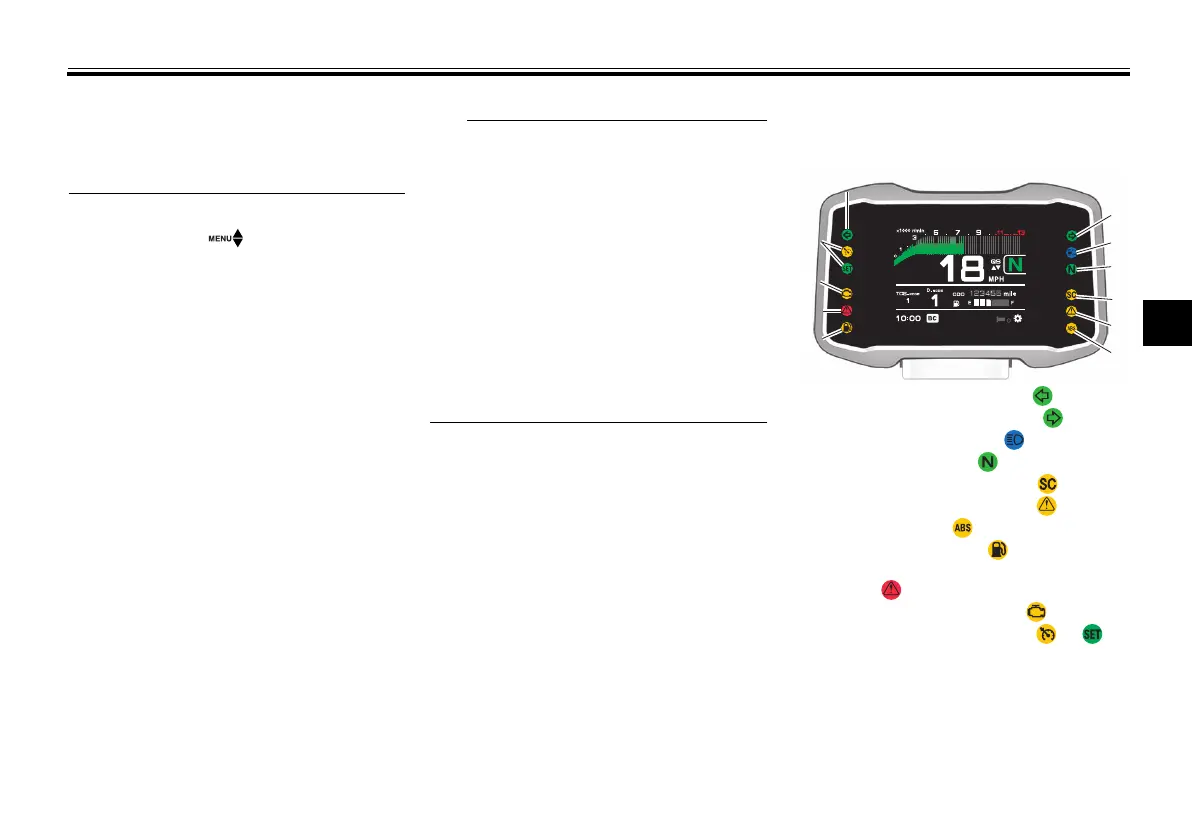
Indicator lights and warning
lights
1. Left turn signal indicator light “ ”
2. Right turn signal indicator light “ ”
3. High beam indicator light “ ”
4. Neutral indicator light “ ”
5. Stability control indicator light “ ”
6. Auxiliary system warning light “ ”
7. ABS warning light “ ”
8. Fuel level warning light “ ”
9. Oil pressure and Coolant temperature warn-
ing light “ ”
10.Engine trouble warning light “ ”
11.Cruise control indicator lights “ ” /“ ”
2
3
4
5
6
7
1010
9
8
10
11
9
111111
88
UBAM10E0.book Page 4 Wednesday, November 4, 2020 11:05 AM



 To Next Page