l If t
he vehicle coolant temperature
is above 116 °C (242 °F) the cool-
ant temperature display will read
“High Temp”.
Tripmeters “TRIP 1” / “TRIP 2”:
“T
RIP 1” and “TRIP 2” show the dis-
tance traveled since they were last re-
set.
“TRIP 1” a
nd “TRIP 2” will reset to 0.0
and begin counting again after 9999.9
has been reached.
Fuel reserve tripmeter “TRIP F”:
When the fuel tank reserve level has
been reached, “TRIP F” appears auto-
matically and begins recording dis-
tance traveled from that point.
After refueling and traveling some dis-
tance, “TRIP F” will disappear.
Current fuel consumption “INST
FUEL”:
The current fuel consumption display
can be set to “km/L”, “L/100km” or
“MPG” in the menu system. (See page
4-14.)
If traveling a
t speeds under 10 km/h,
“--.-” will be displayed.
Average fuel consumption “AVG
FUEL”:
Th
e average fuel consumption display
can be set to “km/L”, “L/100km” or
“MPG” in the menu system. (See page
4-14.)
After resetting t
he average fuel con-
sumption display, “--.-” will be shown
until the vehicle has traveled 1 km.
EAUM4795
Me
nu system
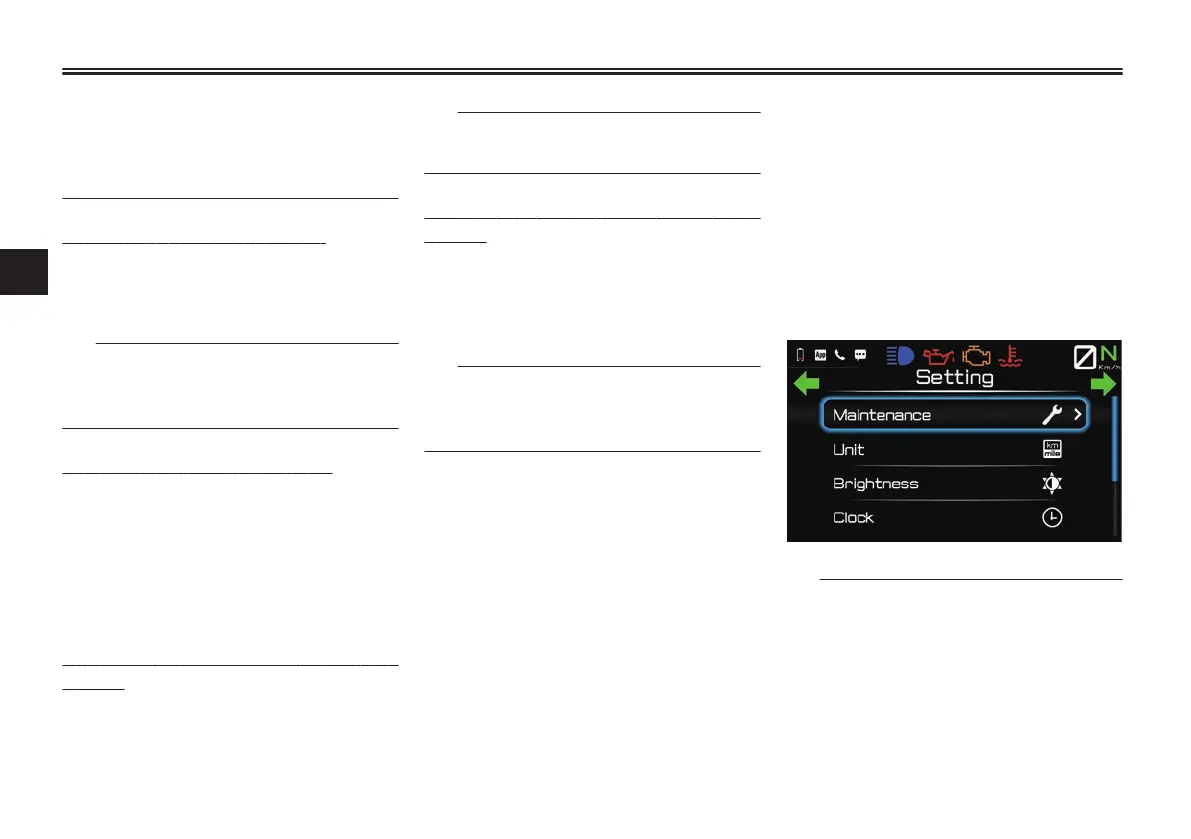
The first layer of the menu system is a
pop-out that appears on the right side
of the main display. (See page 4-7.) All
other menu screens replace the main
display screen with a full-screen view.
While the menu system is full-screen,
the main display items are relocated/
hidden as shown:
l The m
enu system cannot be ac-
cessed while the vehicle is in mo-
tion or if certain warning lights/
indicator icons are on. If this oc-
curs while the menu system is al-
ready open, then the display will
return to the main screen.
Instrument and control functions
4-12
4


 To Next Page