l If the wheel switch “ ” is not op-
er
ated for 10 seconds the menu
system will close and the display
will return to the main screen.
Menu system general operation:
Th
e menu system for this vehicle is
controlled with the wheel switch “
”
on
the right handlebar:
l While the main screen is dis-
played, long press the wheel
switch “
” to o
pen the menu
system top layer.
l Rotate the wheel switch “
” to
c
ycle/highlight different items or
adjust selected item values.
l Short press the wheel switch
“
” to o
pen a highlighted mod-
ule or select/de-select a blue-
highlighted item. When an item is
selected it will turn grey.
l If a menu item is selected, long
press of the wheel switch “
”
wi
ll confirm the setting and return
the menu to the previous module.
l If no menu item is selected, long
press the wheel switch “
” to
e
xit the menu system and return to
th
e main screen.
The menu system is divided into the fol-
lowing main modules:
“Setting”
Adjust settings related to
th
e multi-function meter’s
operation. (See page
4-14.)
“Themes”
Change between display
themes. (See page 4-13.)
“Telephone”
Incoming/missed call set-
ti
ngs. (See page 4-13.)
“Message”
Incoming/missed notifica-
tion settings. (See page
4-14.)
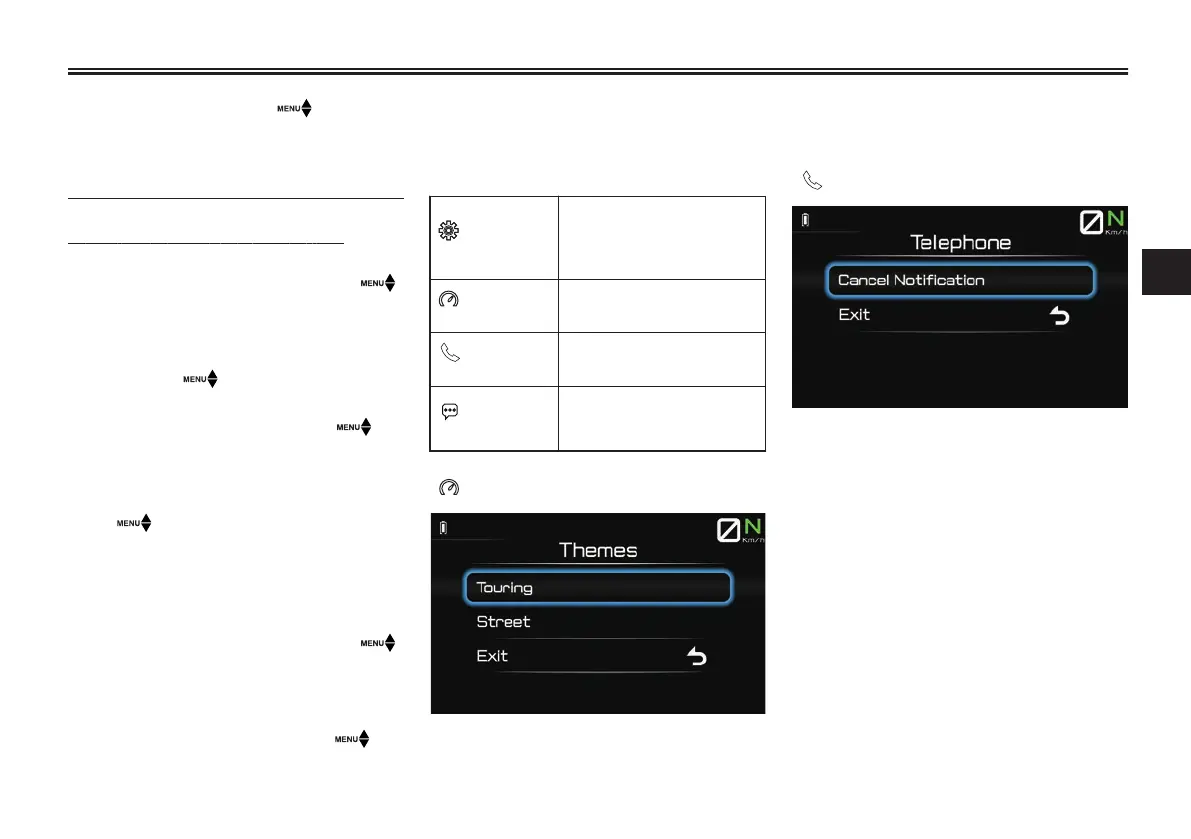
“ Themes”
This module a
llows you to switch be-
tween display themes. Select a theme
and the d
isplay will return to the main
screen in that theme.
“
Telephone”
This module allows you to clear all stor-
ed call notifications. When “Cancel No-
tification” is selected, the incoming/
missed call icon will disappear from the
main screen.
Instrument and control functions
4-13
4


 To Next Page