EasyManua.ls Logo

Yamaha MX-630 - Connections; Input Connections; Speaker Connections (MX-830); Speaker Cable Handling

Yamaha MX-630
12 pages
Print Icon
To Next Page IconTo Next Page
To Previous Page IconTo Previous Page
Loading...
(See
Fig.
P4.)
After
confirming
that
the
control
amplifier
is
also
switched
off,
connect
the
output
jacks
of
the
control
amplifier
to
the
corresponding
INPUT
jacks
on
the
rear
panel
of
this
unit.
Always
check
to
be
sure
that:
e
the
RCA
plugs
of
the
connecting
cord
are
clean,
the
left
and
right
channels
of
both
units
correspond,
connections
are
secure,
and
both
units
are
properly
grounded.
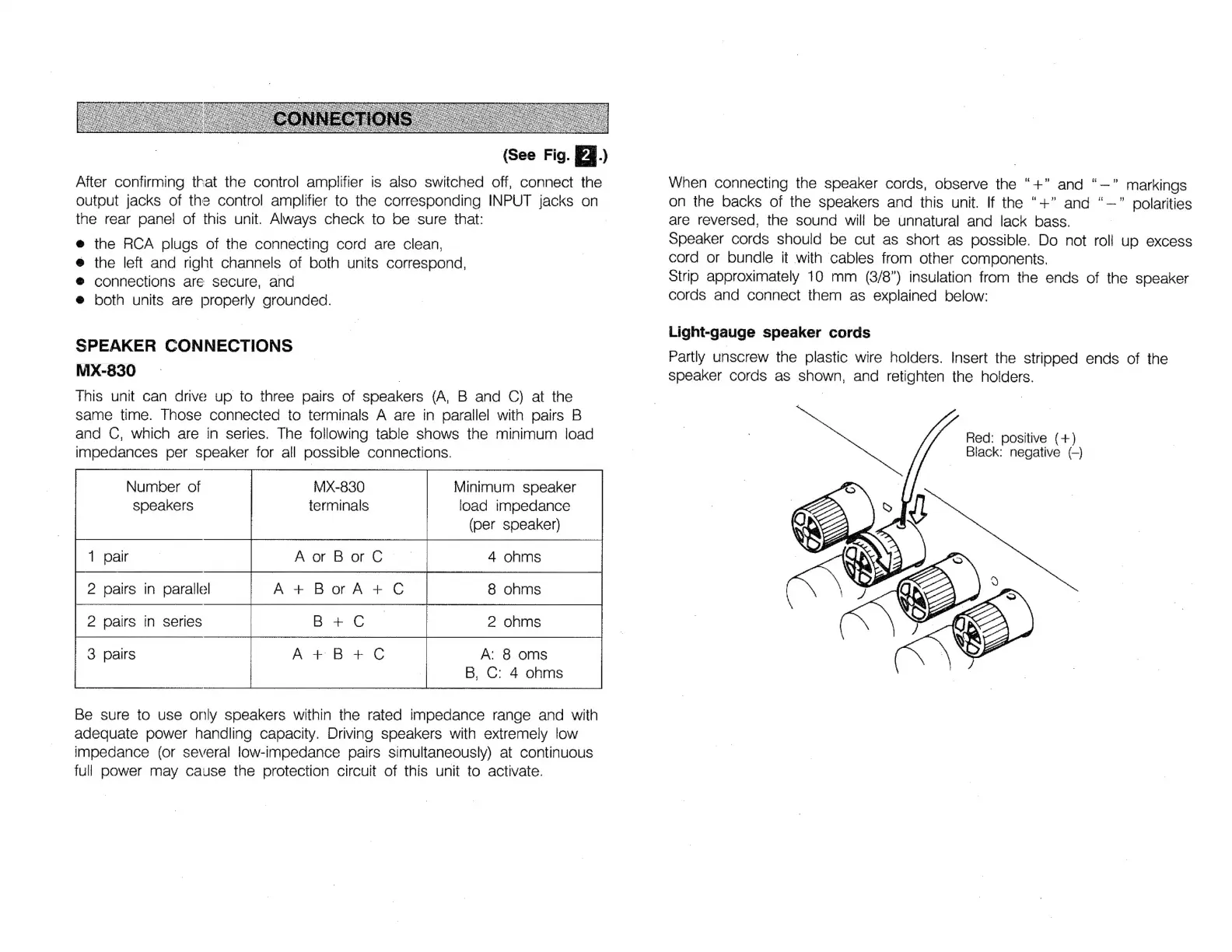
SPEAKER
CONNECTIONS
MX-830
This
unit
can
drive
up
to
three
pairs
of
speakers
(A,
B
and
C)
at
the
same
time.
Those
connected
to
terminals
A
are
in
parallel
with
pairs
B
and
C,
which
are
in
series.
The
following
table
shows
the
minimum
load
impedances
per
speaker
for
all
possible
connections.
Number
of
MX-830
Minimum
speaker
speakers
terminals
load
impedance
(per
speaker)
2
pairs
in
parallel
A+
BorA
+
Ç
2
pairs
in
series
A:
8
oms
B,
C:
4
ohms
Be
sure
to
use
only
speakers
within
the
rated
impedance
range
and
with
adequate
power
handling
capacity.
Driving
speakers
with
extremely
low
impedance
(or
several
low-impedance
pairs
simultaneously)
at
continuous
full
power
may
cause
the
protection
circuit
of
this
unit
to
activate.
When
connecting
the
speaker
cords,
observe
the
“+”
and
"—"
markings
on
the
backs
of
the
speakers
and
this
unit.
If
the
“+”
and
“—”
polarities
are
reversed,
the
sound
will
be
unnatural
and
lack
bass.
opeaker
cords
should
be
cut
as
short
as
possible.
Do
not
roll
up
excess
cord
or
bundle
it
with
cables
from
other
components.
Strip
approximately
10
mm
(3/8")
insulation
from
the
ends
of
the
speaker
cords
and
connect
them
as
explained
below:
Light-gauge
speaker
cords
Partly
unscrew
the
plastic
wire
holders.
Insert
the
stripped
ends
of
the
speaker
cords
as
shown,
and
retighten
the
holders.
Hed:
positive
(+)
Black:
negative
(-)

Related product manuals