13
Chapter 2 Song Playback
Operation during Playback
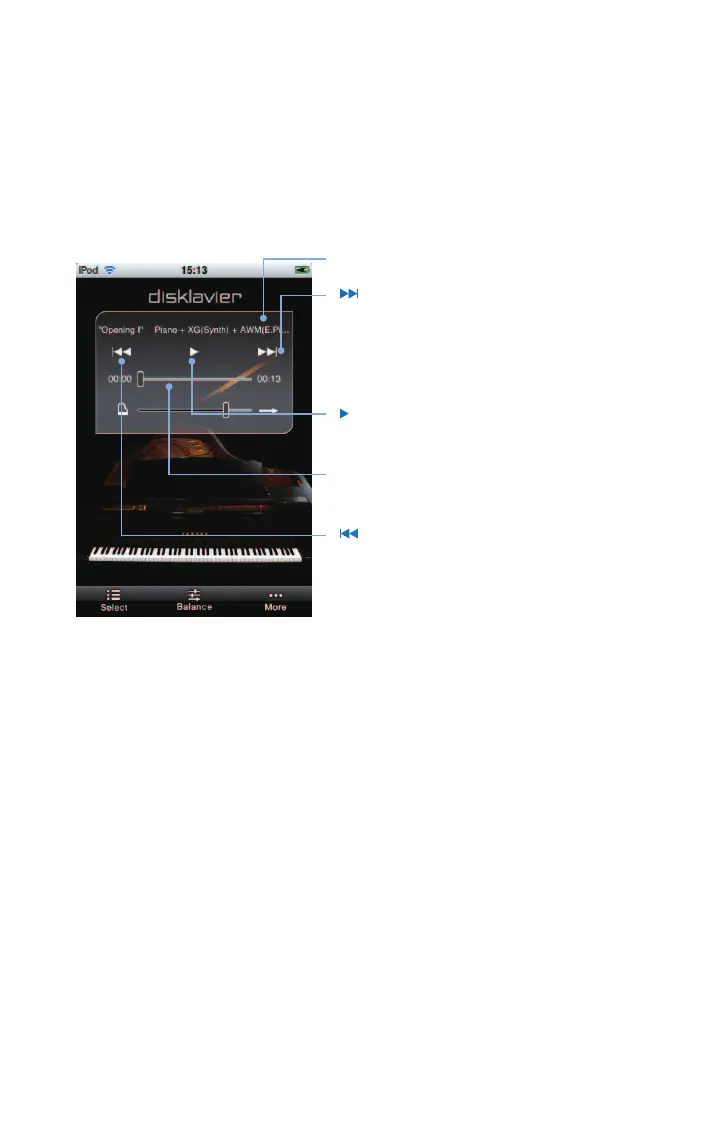
Tapping on the screen during song playback shows the song control panel for various
operations.* Display of the song control panel cycles on and off every time you tap on the
screen.
Tap on the screen during playback.
[ ] (skip / fast forward)
Skips to the next song when tapped briefly (less
than one second).
Fast-forwards through the current song when
tapped for a longer period (at least 1 second).
[
] (play / pause)
Starts or pauses playback.
Song position
Displays the playback position.
[
] (skip back / rewind)
Skips to the previous song when tapped briefly
(less than one second).
Rewinds through the current song when tapped
for a longer period (at least one second).
* Operations in this application may not always take effect on your
Disklavier immediately.
Song title












 To Next Page