14
Chapter 2 Song Playback
Operation during Playback (continued)
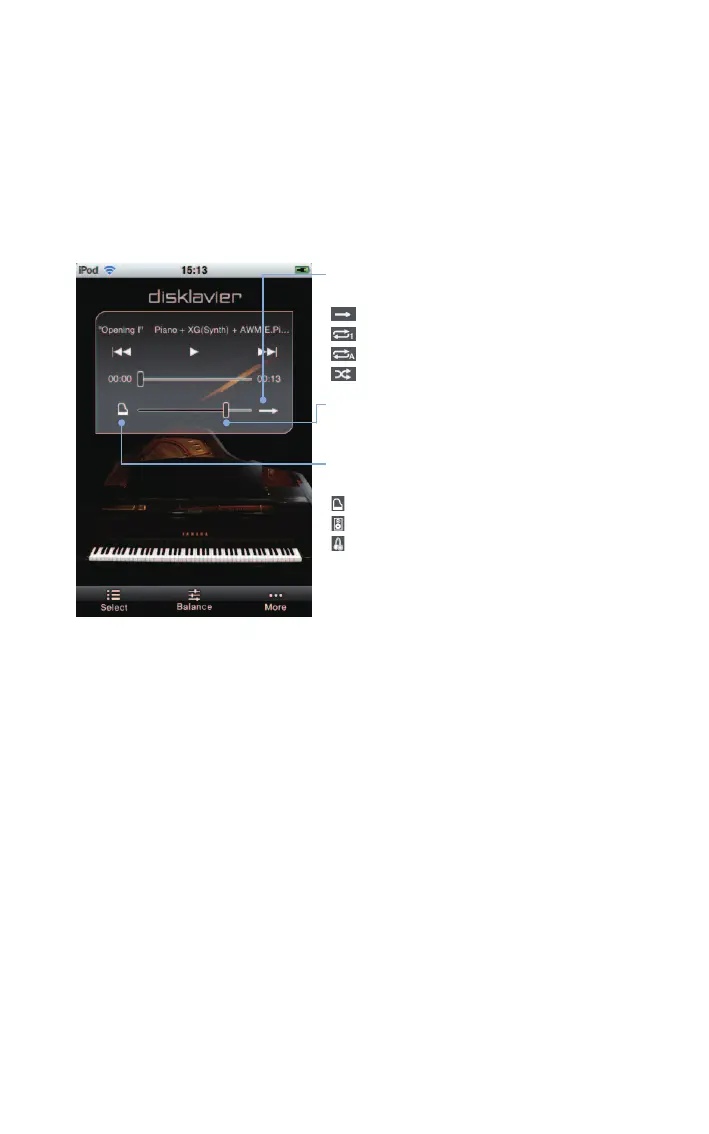
Tap on the screen during playback.
Repeat mode
Cycles through the repeat mode.
: Repeat off
: Single repeat mode
: All repeat mode
: Random repeat mode
Main volume
Adjusts the main volume.
Quiet status*
1
Cycles through the quiet status.
: Acoustic mode
: Quiet mode
: Headphone mode*
2
*
1
You cannot change quiet status when connected to some
models of the Disklavier E3 and Disklavier Control Unit DKC-850.
*
2
For Disklavier E3 upright pianos and Disklavier Control Unit
DKC-850, this does not appear. For Disklavier E3 grand pianos
and Disklavier Mark IV, the quiet status is locked to Headphone
mode when you connect headphones.












 To Next Page