18
Chapter 3 DisklavierRadio Playback
Operation during DisklavierRadio Playback
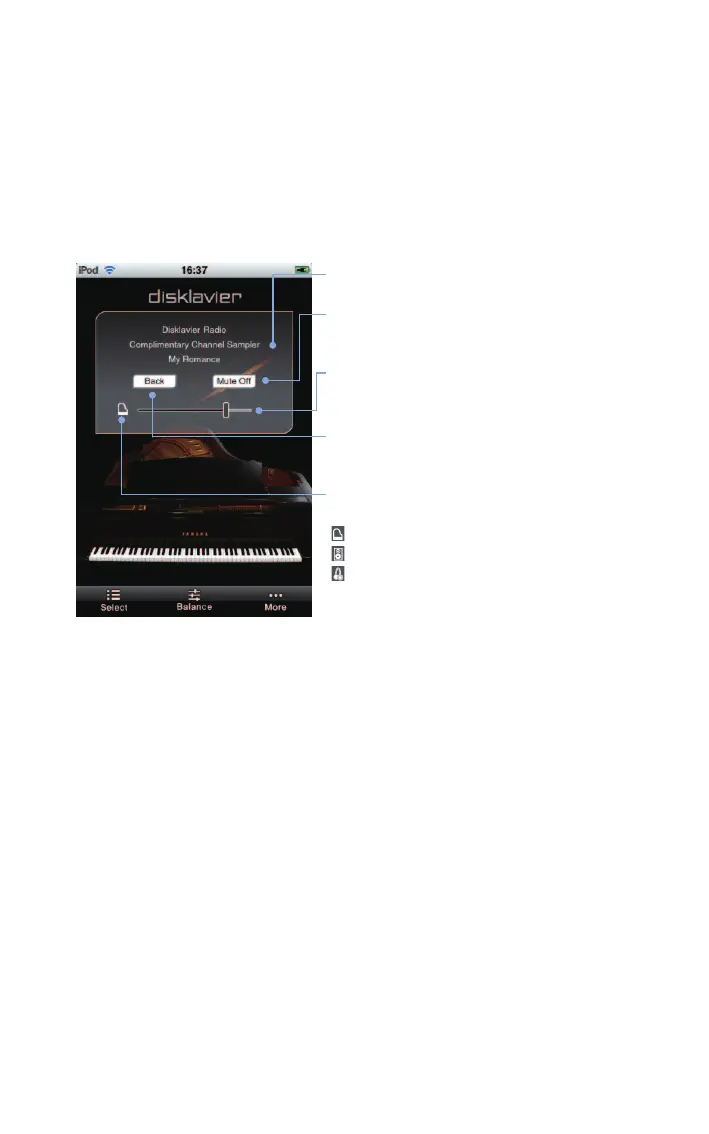
Tapping on the screen during DisklavierRadio playback shows the song control panel for
various operations.*
1
Display of the song control panel cycles on and off every time you tap
on the screen.
Tap on the screen during playback.
Channel title / song title
[Mute Off] / [Mute On]
Cycles the mute function on and off.
Main volume
Adjusts the main volume.
[Back]
Returns to channel selection.
Quiet status*
2
Cycles through the quiet status.
: Acoustic mode
: Quiet mode
: Headphone mode*
3
*
1
Operations in this application may not always take effect on your
Disklavier immediately.
*
2
You cannot change quiet status when connected to some
models of the Disklavier E3 and Disklavier Control Unit DKC-850.
*
3
For Disklavier E3 upright pianos and Disklavier Control Unit
DKC-850, this does not appear. For Disklavier E3 grand pianos
and Disklavier Mark IV, the quiet status is locked to Headphone
mode when you connect headphones.












 To Next Page