Instrument and control functions
3-5
3
one second when the multi-func-
tion meter is in odometer mode,
tripmeter 1, or tripmeter 2 mode .
Speedometer
The speedometer shows the vehicle’s
traveling speed.
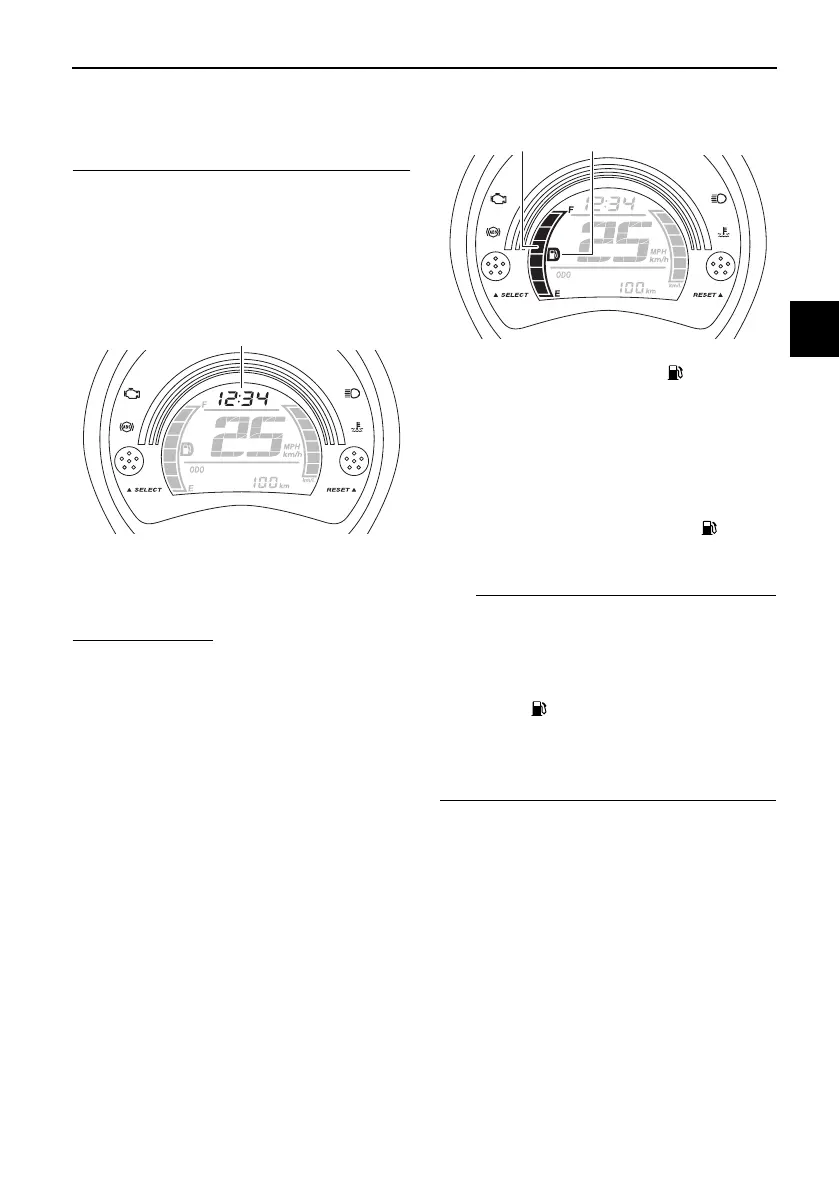
Clock
The clock uses a 12-hour time system.
To set the clock
1. Turn the key to “ON”.
2. Push the “SELECT” button and
“RESET” button together for at
least two seconds.
3. When the hour digits start flash-
ing, push the “RESET” button to
set the hours.
4. Push the “SELECT” button, and
the minute digits will start flashing.
5. Push the “RESET” button to set
the minutes.
6. Push the “SELECT” button and
then release it to start the clock.
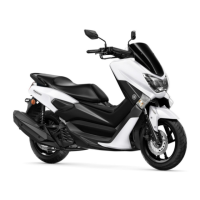
Fuel meter
The fuel meter indicates the amount of
fuel in the fuel tank. The display seg-
ments of the fuel meter disappear to-
wards “E” (Empty) as the fuel level
decreases. When the last segment and
fuel level warning indicator “ ” start
flashing, refuel as soon as possible.
If a problem is detected in the electrical
circuit, the following cycle is repeated
until the malfunction is corrected: fuel
level segments and fuel level warning
indicator “ ” flash eight times, then go
off for approximately 3 seconds. Have
a Yamaha dealer check the electrical
circuit.
1. Clock
1. Fuel meter
2. Fuel level warning indicator “ ”
UBV3E0E0.book Page 5 Monday, September 26, 2016 3:42 PM



 To Next Page