PSR-E233/YPT-230 Owner’s Manual
28
Function Settings
The [FUNCTION] button gives you access to a variety of operations related to adjusting
or enhancing the sound and making settings for connection to external devices.
For more about the available functions, see the following Function Setting List.
1
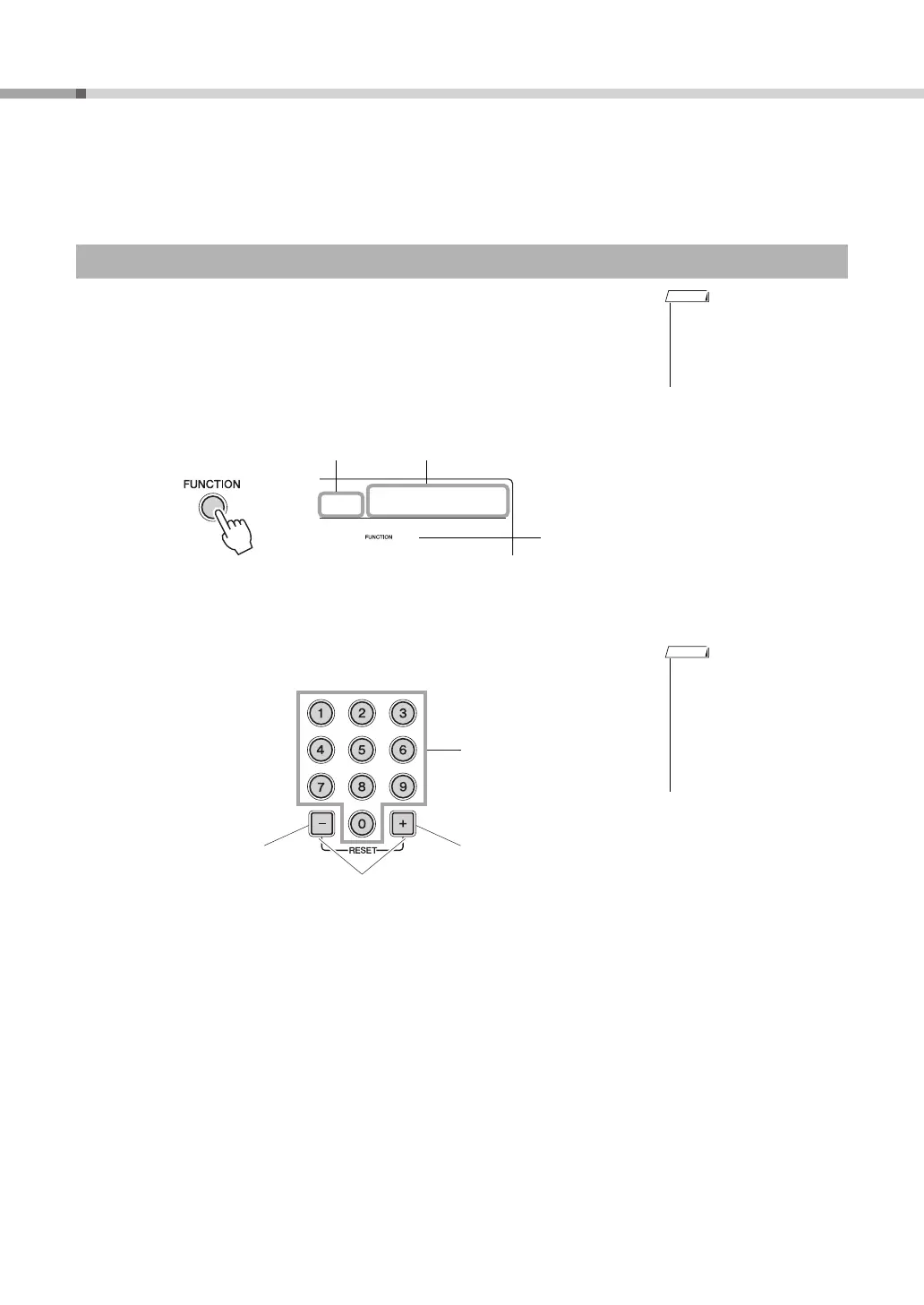
Press the [FUNCTION] button a number of times until the
desired item appears.
Each time the [FUNCTION] button is pressed, the Function number increases
one by one.
You can also decrease the Function number by one when you press the [-] but-
ton briefly while holding down the [FUNCTION] button.
If the Function includes sub-modes, the Function item appears in the display for
a few seconds, and the sub-modes will be displayed.
2
Set the value by using the number buttons [0]–[9], [+], [-].
Select the item and change the value
• The Function number will
not appear in the display
during Song, Style or metro-
nome playback. The mea-
sure will appear instead.
Value Function item
Function number
• Any settings will be restored
to the factory default settings
when the power is turned
off.
• To exit the Function settings,
press one of these buttons;
[SONG], [VOICE],[STYLE]
or [GRAND PIANO].
Direct numeric entry.
• Decrement value by 1.
• No
• Off
• Increment value by 1.
• Yes
• On
Press simultaneously to
recall the default setting.















 To Next Page