PSR-E283 YPT-280 Reference Manual
12
Playing a Song
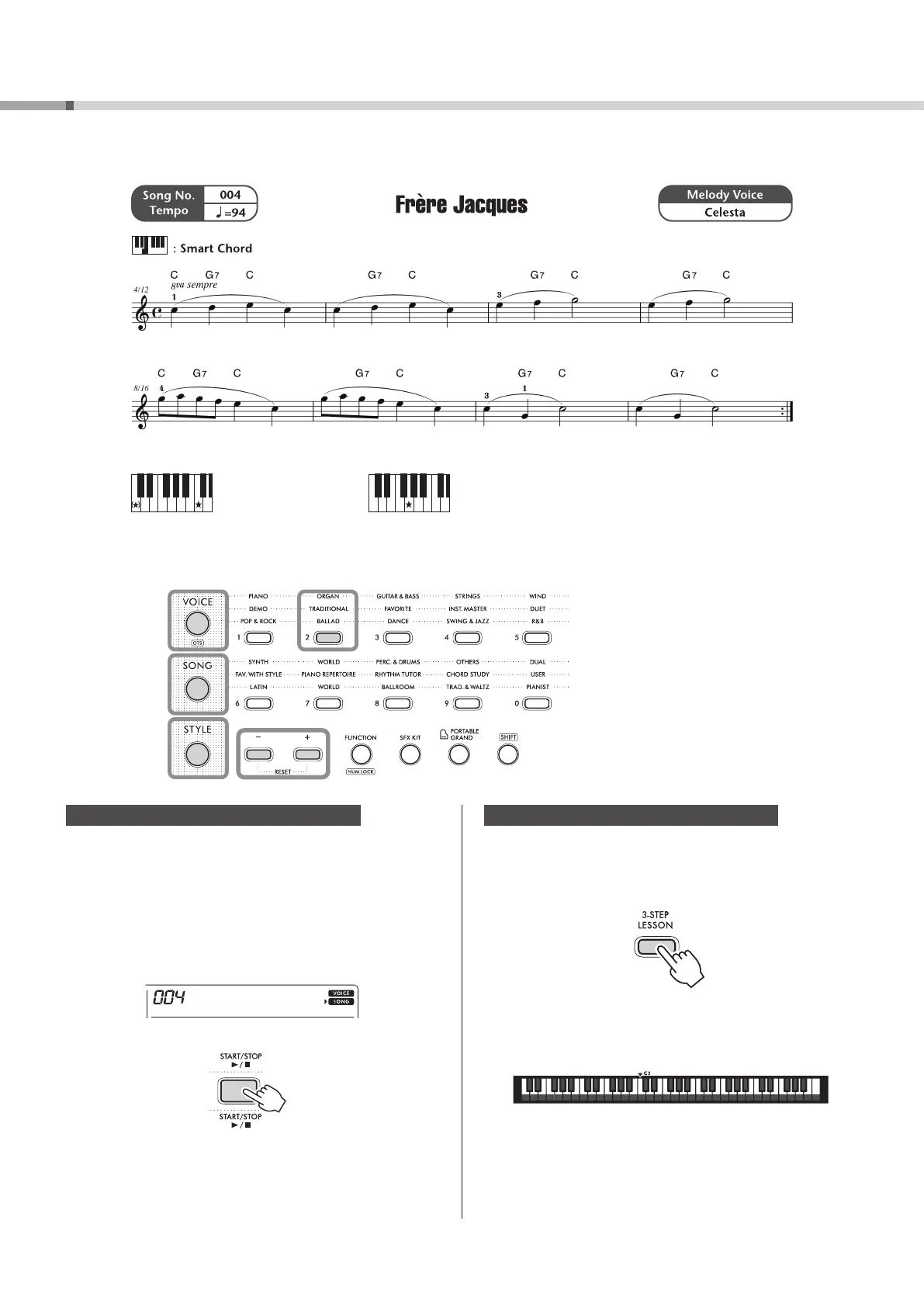
Try using the convenient functions of this instrument to play Song number 4, “Frère Jacques.”
C
The same chord will sound, no matter
which key you play.
G
7
-1)
-1)
-1)
Song Playback (page 18)
1 Listen to the sample lesson (Song).
1) Press [SONG] !3.
2) Press [TRADITIONAL] in the Category buttons !4 and
select “004 FrereJac” (Frère Jacques), which should be
displayed first.
If a different Song is displayed, press [TRADITIONAL]
in the Category buttons !4 repeatedly or use [+] or
[-] !5 to select “004 FrereJac.”
3) Press [START/STOP] !1 to listen to the Song.
4) Press [START/STOP] !1 again to stop Song playback.
3-Step Lesson (page 21)
2 Try playing with your right hand using the Lesson
function.
1) Press [3-STEP LESSON] i three times and select
“3 WAITING” (Lesson 3—Your own pace).
Song playback will wait until you play the correct key.
2) Play slowly at your own pace while looking at the
musical score and the keyboard on the display.
Press [START/STOP] !1 to end the Lesson.



 To Next Page