PSR-E283 YPT-280 Reference Manual
34
Function Settings
Function
Number
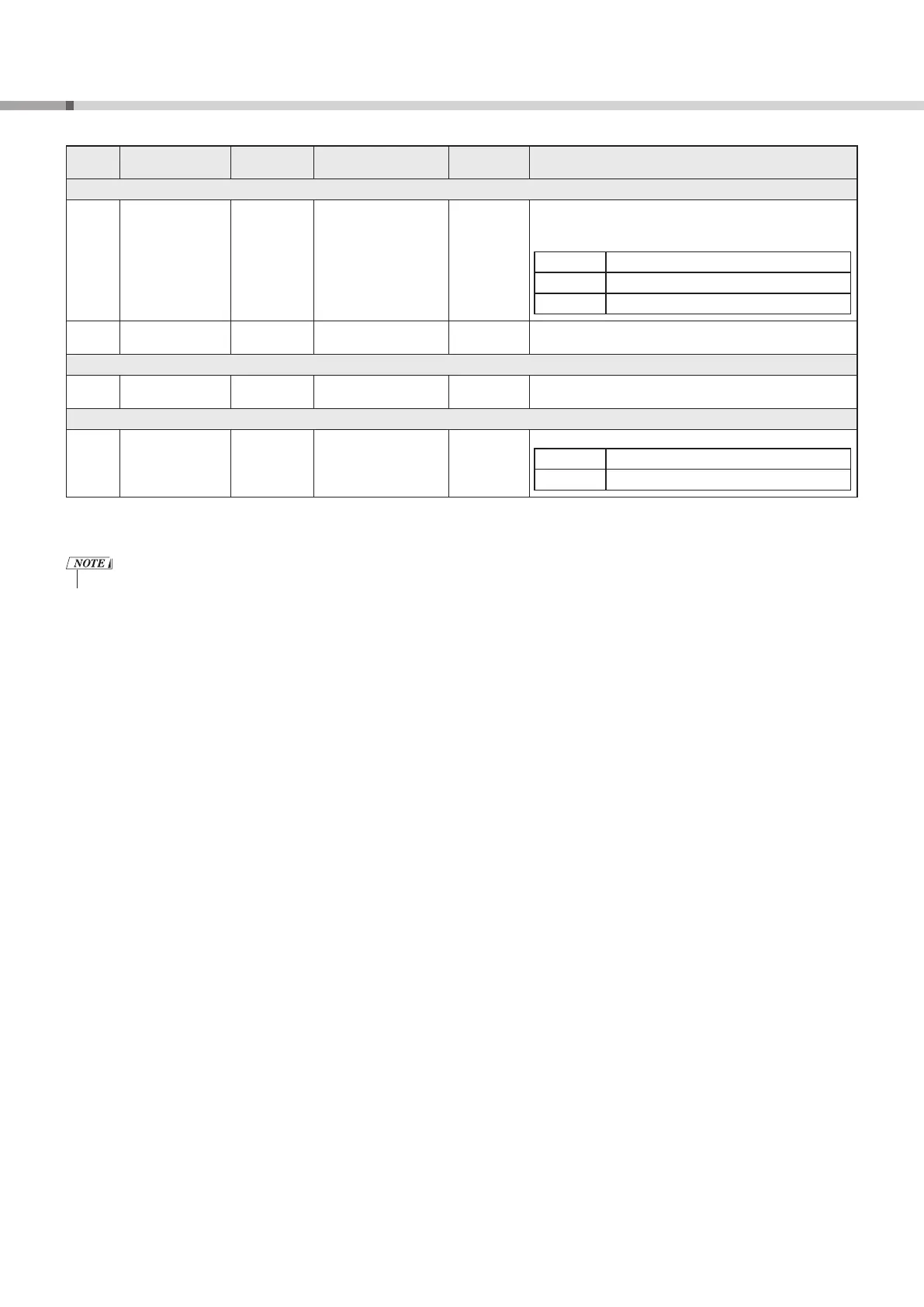
Function Name Display Range/Settings Default Value Description
Demo (page 18)
026 Demo Group
DemoGrp
1 (Demo)
2 (Preset)
3 (User)
1 (Demo)
Selects the playback group to repeat. After holding down
[DEMO] e for longer than a second to select a playback Demo
Group, press [DEMO] e again to start playback of all preset Songs
in each Demo Group.
Demo Preset Songs (Song Number: 001–003)
Preset All preset Songs (Song Number: 001–100)
User User Song (Song Number: 123)
027 Demo Play Mode
PlayMode
1 (Normal)
2 (Random)
1 (Normal) Selects the repeat playback mode.
Auto Power Off (page 6)
028 Auto Power Off
Time
AutoOff
oFF (off), 5/10/15/30/60/
120 (minutes)
30 (minutes) Sets the time that will elapse before the instrument’s power is
automatically turned off.
Battery (page 5)
029 Battery Type
Battery
1 (Alkaline)
2 (Ni-MH)
1 (Alkaline) Selects the type of batteries you have inserted into the instrument.
Alkaline Alkaline batteries or manganese batteries
Ni-MH Rechargeable nickel metal hydride batteries
* The appropriate value is automatically set for each Voice combination.
** The appropriate value is automatically set for the currently selected Song or Style.
• For details on settings that are retained even when the power is turned off, backup, and initialization, see page 35.



 To Next Page