PSR-E473, PSR-EW425 Owner’s Manual
24
Playing a Variety of Instrument Voices
This instrument features various instrumental Voices including piano. Not only can you
play just one single Voice (Main Voice), but you can also layer a different Voice (Dual Voice)
with the Main Voice, or play a different Voice (Split Voice) in the left-hand area of the key-
board from the right-hand area.
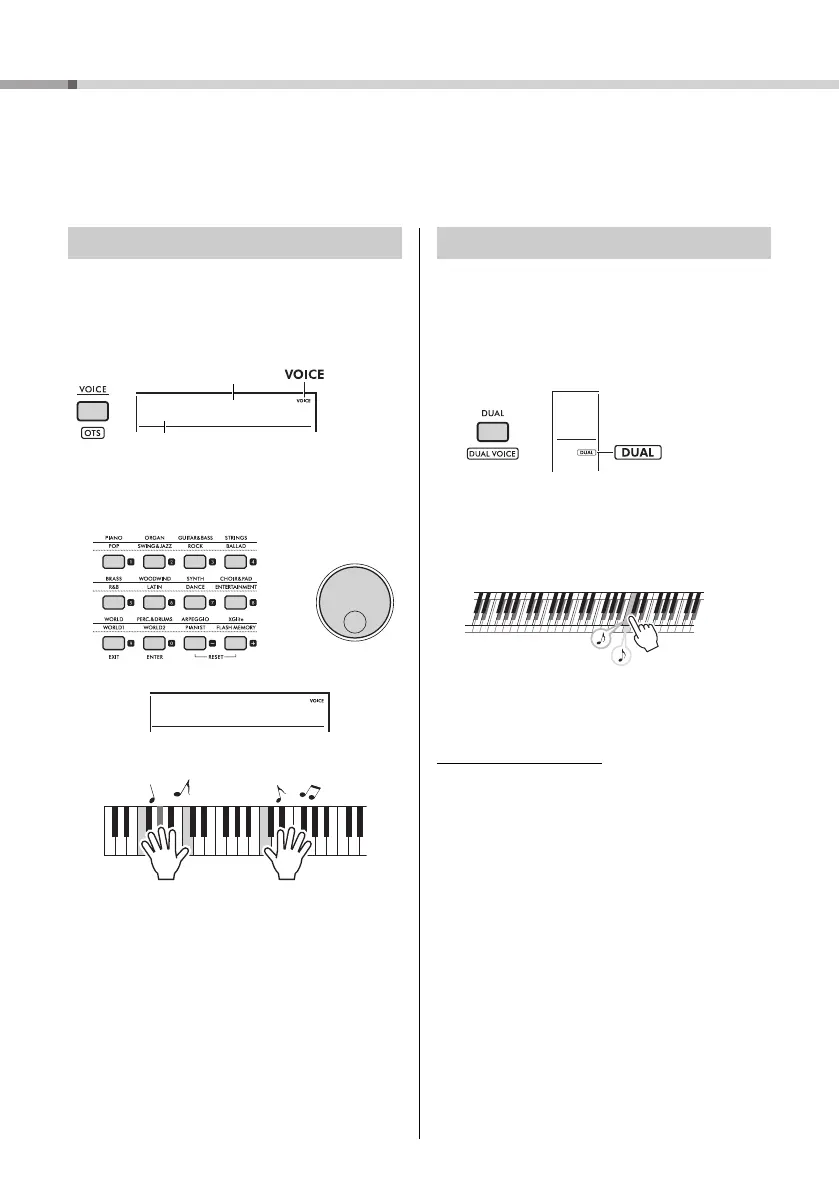
1
Press the [VOICE] button.
The Voice number and name will be shown.
For a list of available Voices, refer to the Data List
on the website (page 11).
2
Use the category buttons or the dial to
select the desired Voice. (Refer to page
21.)
3
Play the keyboard.
In addition to the Main Voice, you can layer a sec-
ond, different Voice over the entire keyboard as a
“Dual Voice.”
1
Press the [DUAL] button to turn on the
layer.
Although turning on Dual will select a Dual Voice
suitable for the current Main Voice, you can also
select a different Dual Voice.
2
Play the keyboard.
Press the [DUAL] button again to turn the layer
off.
Changing a Dual Voice
While holding down the [SHIFT] button, press the
[DUAL] button to call up the “D.Voice” setting (page
62, Function 015).
Selecting a Main Voice
Voice name
Voice number
Appears
when the
Voice selec-
tion display is
selected.
Flute
178
Adding a layer - Dual Voice
Appears when
the layer is on.
Two Voices will sound
at the same time.



 To Next Page