PSR-E473, PSR-EW425 Owner’s Manual
12
Front Panel
• The illustrations and displays as shown in this manual are based on the PSR-E473.
• Please note that the PSR-E473 and PSR-EW425 have different numbers of keys: the PSR-E473 has 61 keys, and
the PSR-EW425 has 76 keys.
Panel Controls and Terminals
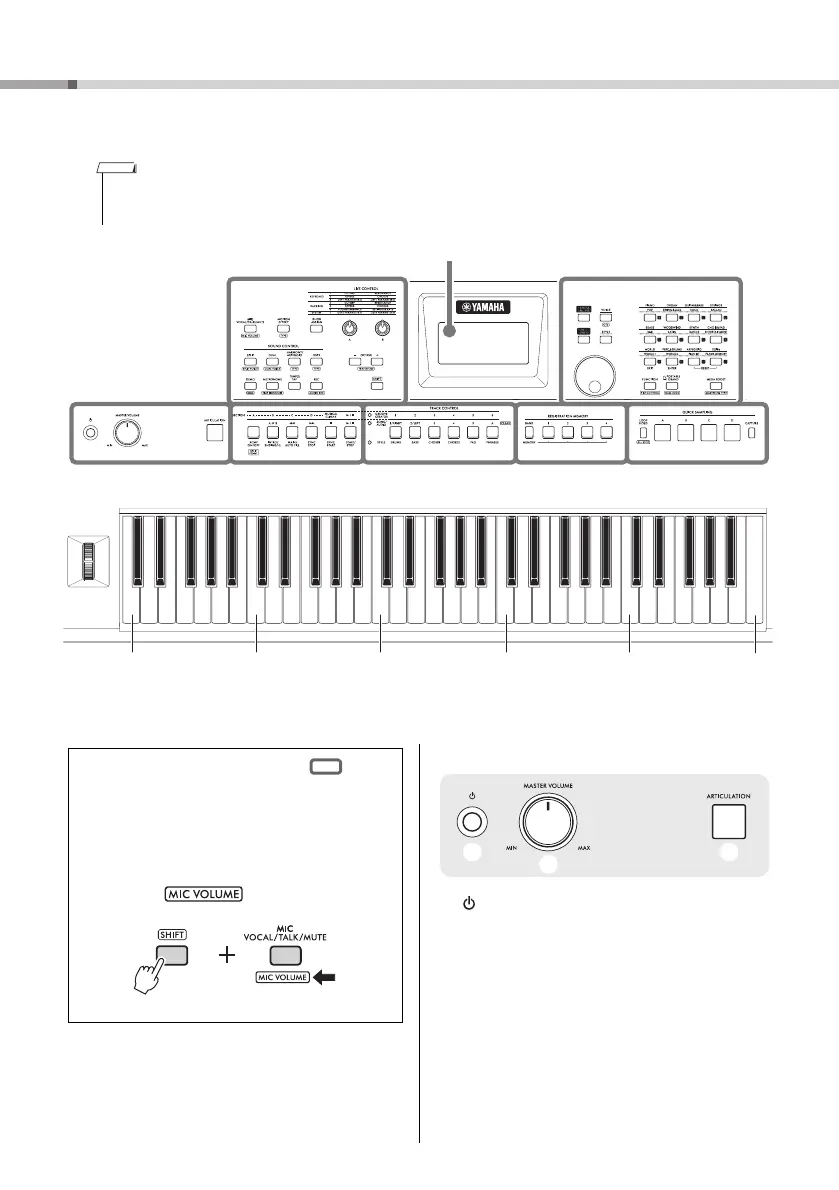
Display (page 22)
As illustrated, each note of the keyboard has a specific note number and name (e.g., 036/C1), which is used in making various
settings, such as Split Point (page 62).
A
q [ ] (Standby/On) switch .......................... page 18
Turns on the instrument’s power or sets to standby.
w [MASTER VOLUME] control ..................... page 18
Adjusts the overall volume.
e [ARTICULATION] button............................ page 27
Recreates the characteristic performance techniques
for specific instruments when you play the keyboard
while pressing this button.
About the button names in
(SHIFT function)
While holding down the [SHIFT] button, press the
button to call up the function name in the box.
For example, while holding down the [SHIFT] but-
ton, press the [MIC VOCAL/TALK/MUTE] button
to call up the display.
q
w
e
036
(C1)
048
(C2)
060
(C3)
072
(C4)
084
(C5)
096
(C6)
H



 To Next Page