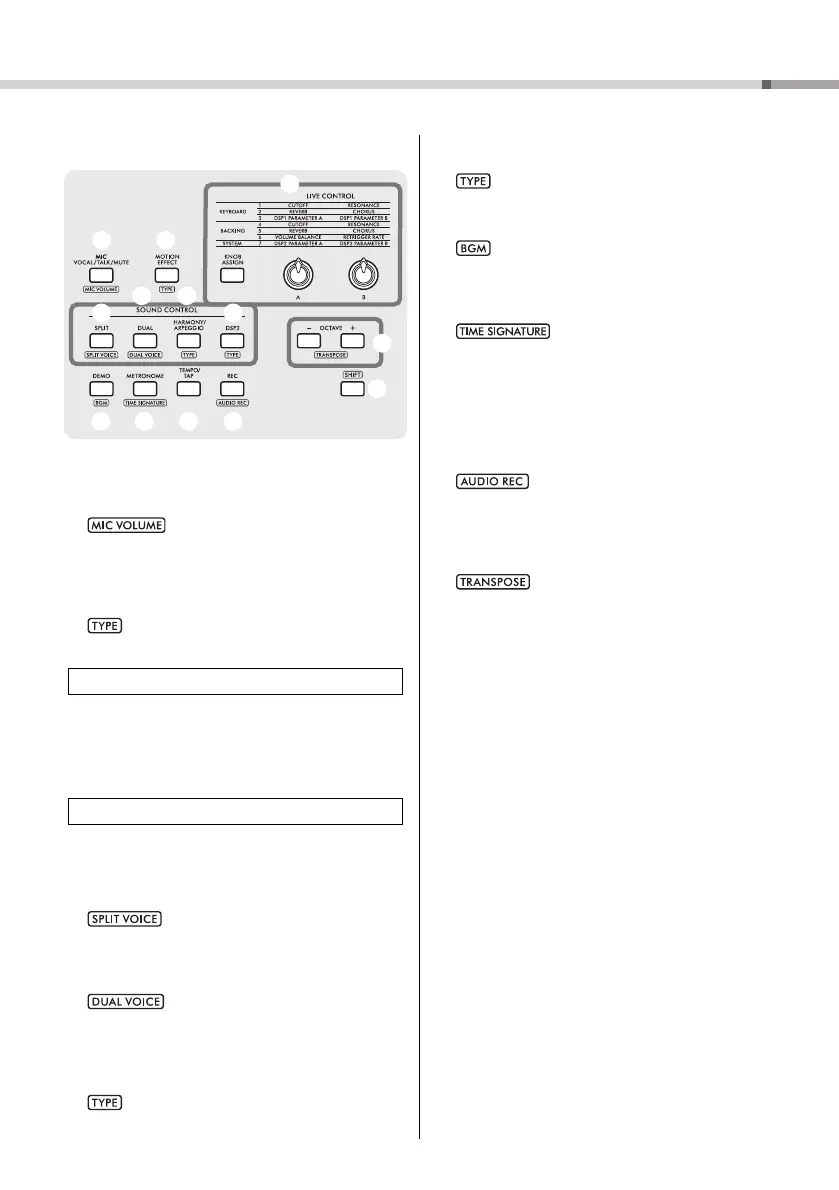
Panel Controls and Terminals
PSR-E473, PSR-EW425 Owner’s Manual
13
B
r [MIC VOCAL/TALK/MUTE] button............ page 38
Switches the microphone type (VOCAL/TALK/
MUTE).
: Calls up the Mic volume setting dis-
play.
t [MOTION EFFECT] button ......................... page 29
Holding down this button adds various dynamic
effects to the sound in real time.
: Calls up the Motion Effect type selection dis-
play.
y [KNOB ASSIGN] button, [A]/[B] knobs
......................................................................... page 30
Assigns a function to each knob for controlling the
sound in real time.
u [SPLIT] button .............................................. page 25
Divides the entire keyboard into two sections, and
lets you play in different Voices by your right and left
hands.
: Calls up the Voice selection display for
the left-hand part.
i [DUAL] button............................................... page 24
Layers two different Voices.
: Calls up the Voice selection display for
the layered part.
o [HARMONY/ARPEGGIO] button .............. page 26
Turns the Harmony effect or Arpeggio function on or
off.
: Calls up the Harmony type or Arpeggio type
selection display.
!0 [DSP2] button............................................... page 28
Turns the DSP2 effect on or off.
: Calls up the DSP2 type selection display.
!1 [DEMO] button ............................................. page 35
Plays back Demo Songs repeatedly.
: Calls up the Song group (Demo group) setting
display to play back the Songs repeatedly.
!2 [METRONOME] button ............................... page 23
Turns the metronome on or off.
: Calls up the time signature setting
display for metronome playback.
!3 [TEMPO/TAP] button .................................. page 23
Calls up the tempo setting display.
!4 [REC] button ................................................. page 46
Records your performance to the instrument in MIDI
format.
: Records your performance to the USB
flash drive in Audio format (page 49).
!5 OCTAVE [−][+] buttons
Shifts the pitch of the Main Voice and Dual Voice up
or down in octave units.
: Transposes the pitch of the entire
instrument in semitone steps.
!6 [SHIFT] button.............................................. page 12
Holding down this button lets you call up alternate
functions for panel buttons that have assigned alter-
nate functions.
LIVE CONTROL
SOUND CONTROL



 To Next Page