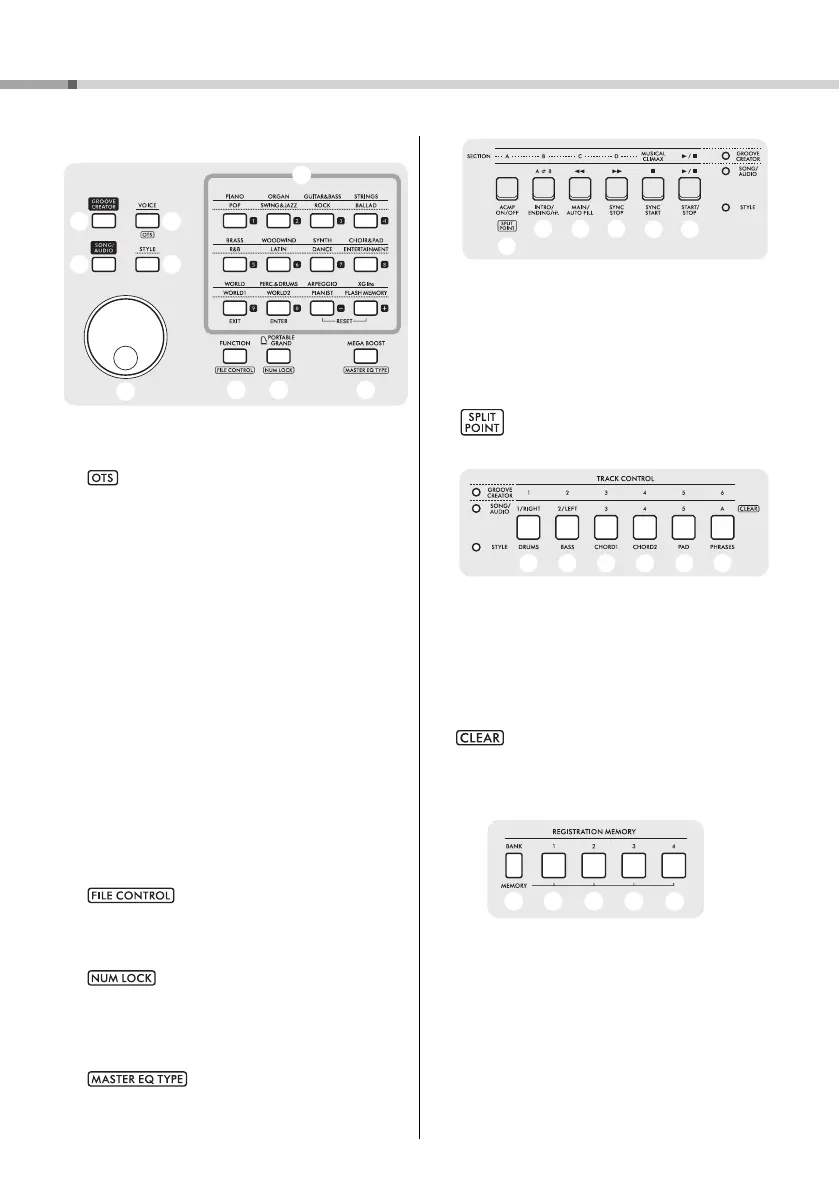
Panel Controls and Terminals
PSR-E473, PSR-EW425 Owner’s Manual
14
C
!7 [VOICE] button ............................................. page 24
Press this button to select Voices.
: Calls up the optimum panel settings for the cur-
rent Song, Style or Groove.
!8 [STYLE] buttons........................................... page 31
Press this button to select Styles.
!9 [SONG/AUDIO] buttons.............................. page 34
Press this button to use the Song or Audio function.
@0 [GROOVE CREATOR] buttons.................. page 40
Press this button to use the Groove Creator function.
@1 Dial .................................................................. page 21
For changing the item or value.
@2 Category/Number input buttons, [EXIT] button,
[ENTER] button ............................................ page 21
For selecting the desired Voice or Style by category.
Also for selecting the desired data by inputting num-
bers when NUM LOCK is turned on. In the other
cases, the buttons in the lowest row are used as
[EXIT] and [ENTER] buttons.
@3 [FUNCTION] button ..................................... page 61
Calls up the Function Setting display.
: Calls up the File Control (USB flash
drive operation) display (page 57).
@4 [PORTABLE GRAND] button
Calls up the Grand Piano Voice.
: Enables the buttons @2 to be used as
number input buttons (page 21).
@5 [MEGA BOOST] button............................... page 23
Boosts the entire volume of the instrument for more
powerful sound.
: Calls up the Master EQ type selec-
tion display.
D
@6 − #1 Playback control buttons
Controls playback of Style, Song/Audio, or Groove,
depending on which lamp is lit.
• When the [STYLE] lamp is lit.................... page 31
• When the [SONG/AUDIO] lamp is lit........ page 34
• When the [GROOVE CREATOR] lamp is lit
................................................................... page 40
: Calls up the Split Point setting display.
E
#2 − #7 [TRACK CONTROL] buttons
Turns the track of the Style, Song/Audio, or Groove
on or off, depending on which lamp is lit.
• When the [STYLE] lamp is lit.................... page 32
• When the [SONG/AUDIO] lamp is lit........ page 37
• When the [GROOVE CREATOR] lamp is lit
................................................................... page 40
: Clears (or delete) the data of the corre-
sponding track for the current User Song
(page 49).
F
#8 − $2 [REGISTRATION MEMORY] buttons
......................................................................... page 51
For saving the panel settings (page 15) or calling up
the saved settings.
#2 #3 #4 #5 #6
#7
#8 #9
$2$0 $1



 To Next Page