Panel Controls and Terminals
PSR-E473, PSR-EW425 Owner’s Manual
15
G
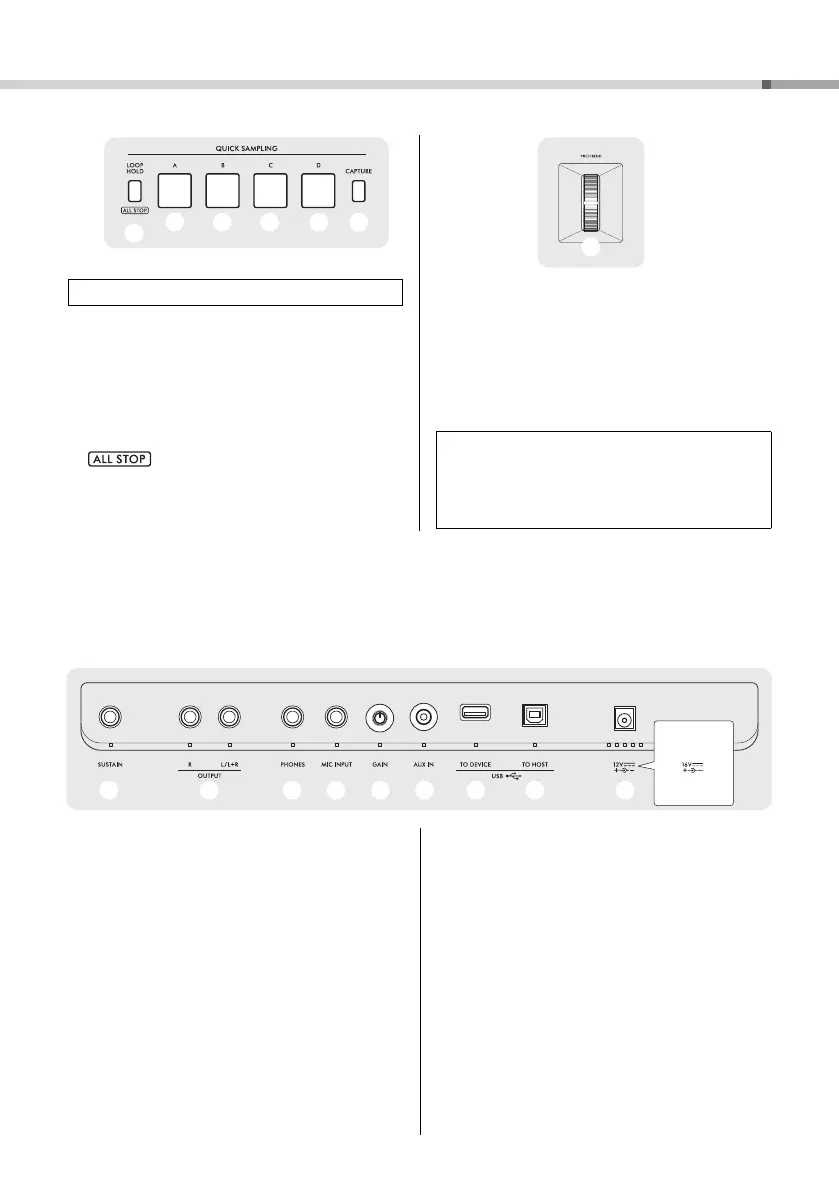
$3 − $6 [A] − [D] pads....................................... page 42
Plays back the sample assigned to each pad.
$7 [LOOP HOLD] button .................................. page 42
While holding down this button, pressing one of the
[A] − [D] pads plays the selected sample repeatedly
in a loop.
: Stops playback of all samples.
$8 [CAPTURE] button ...................................... page 43
Enters the Quick Sampling mode.
H
$9 [PITCH BEND] wheel
Bends the pitch of the keyboard-played sound up or
down by moving this upward or downward.
Rear Panel
%0 [SUSTAIN] jack............................................. page 53
For connecting a separately sold footswitch.
%1 OUTPUT [L/L+R], [R] jacks ....................... page 53
For connecting powered speakers.
%2 [PHONES] jack ............................................. page 53
For connecting headphones.
%3 [MIC INPUT] jack.......................................... page 38
For connecting a microphone.
%4 [GAIN] knob .................................................. page 38
For adjusting the input level of the connected micro-
phone.
%5 [AUX IN] jack ................................................ page 54
For connecting an audio player.
%6 [USB TO DEVICE] terminal ....................... page 56
For connecting a USB flash drive.
%7 [USB TO HOST] terminal ........................... page 54
For connecting a computer or a smart device.
%8 DC IN jack...................................................... page 16
For connecting the AC adaptor.
QUICK SAMPLING
Panel Settings
By using the controls on the panel, you can make various
settings as described here. These settings of the instru-
ment are together referred to as “panel settings” in this
manual.
%0 %2 %3 %7 %8 %8%6%5%4%1
PSR-EW425



 To Next Page