En 28
■ Changing the combination of video/audio input jacks
If the combination of video/audio input jacks prepared on this unit does not match your
video device, change its combination according to the output jacks of your device. It
enables you to connect a video device that has the following video/audio output jacks.
Necessary setting
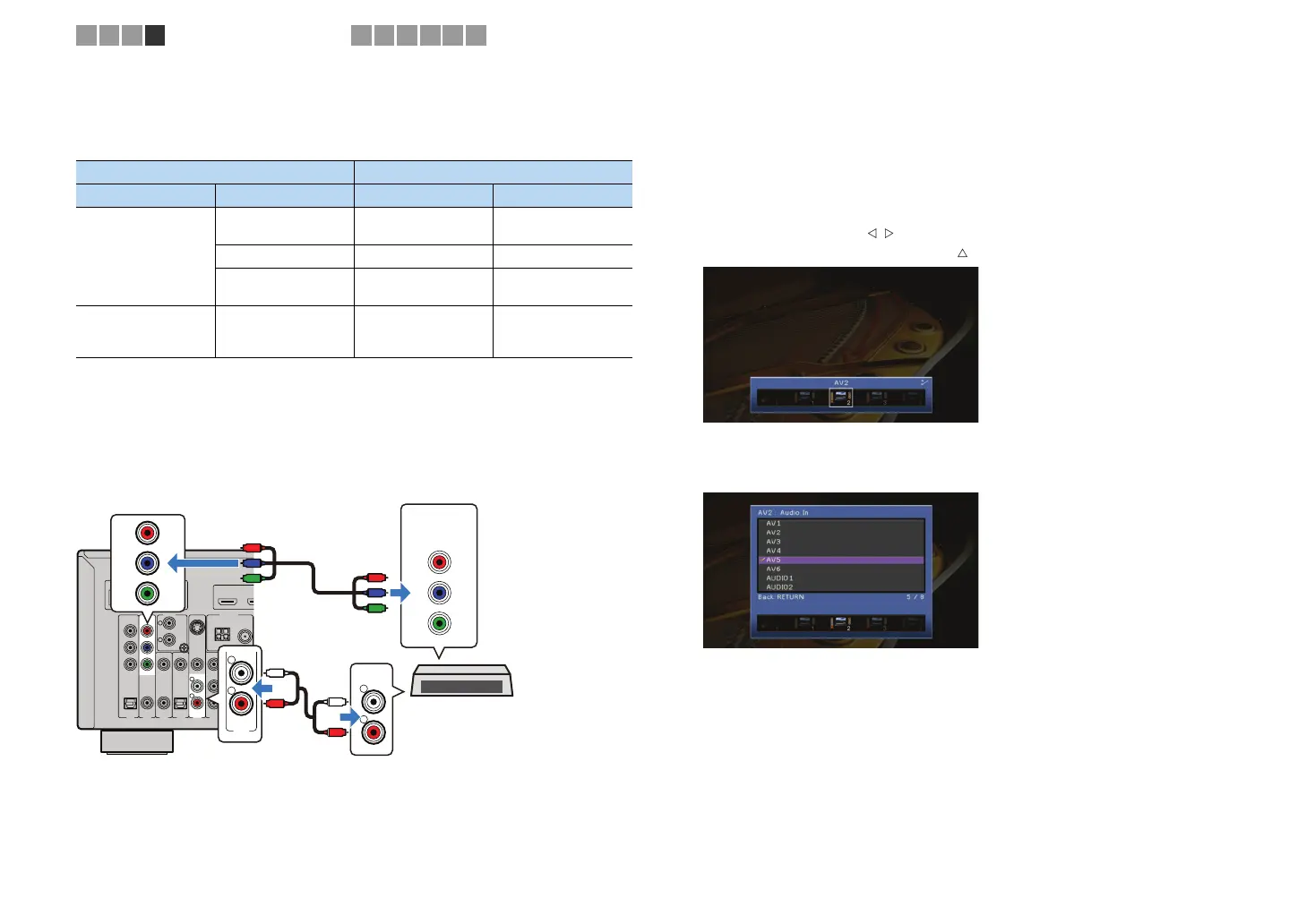
For example, if you have connected a video device to AV2 (COMPONENT VIDEO) and
AV5 (AUDIO) jacks of this unit, change the combination setting as follows.
1
After connecting external devices (TV, playback devices, etc.) and
power cable of this unit, turn on this unit and TV.
2
Switch the TV input to display the video from this unit.
3
Press ON SCREEN.
4
Use the cursor keys to select “Input” and press ENTER.
5
Use the cursor keys ( / ) to select “AV2” (video input jack to be
used) and press the cursor key ( ).
6
Use the cursor keys to select “Audio In” and press ENTER.
7
Use the cursor keys to select “AV5” (audio input jack to be used).
8
Press ON SCREEN.
Now the necessary setting is complete.
If you select “AV2” as the input source by pressing AV2, the video/audio played
back on the video device will be output from this unit.
Output jacks on video device Input jacks on this unit
Video Audio Video Audio
HDMI
Digital optical HDMI1~7
AV1 (OPTICAL)
AV4 (OPTICAL)
Digital coaxial HDMI1~7 AV2~3 (COAXIAL)
Analog stereo HDMI1~7
AV5~6 (AUDIO)
AUDIO 1~2
Component video Analog stereo
AV1~2
(COMPONENT
VIDEO)
AV5~6 (AUDIO)
AUDIO1~2
DOCK NETWORK
PHONO
GND
S VIDEO
FMAM
75Ω
ANTENNA
P
R
P
B
Y
AUDIO 1
AV 6AV 5AV 4AV 3
(
CD
)(
TV
)
VIDEO
AV 2
AV 1
COAXIAL OPTICALCOAXIAL
OPTICAL
AV
OUT
COMPONENT
VIDEO
R
L
R
L
HDMI OUT
ARC
12
AV 5
R
L
R
L
AUDIO
L
R
L
R
P
R
P
B
Y
COMPONENT
VIDEO
P
R
P
B
Y
P
R
P
B
Y
AV2 (COMPONENT VIDEO) jacks
Video output
(component video)
AV5 (AUDIO) jacks
Video device
Audio output
(analog stereo)
This unit (rear)
1 2 3 4
Playback device connections
5 6 7 8 9 10


 To Next Page